The Oracle 10g Scheduler

Posted by Sagar Patil

Oracle 10g’s DBMS_SCHEDULER provides significant improvements over DBMS_JOB for scheduling jobs and tasks. Let’s take an overview of new functionalities that the Oracle Scheduler provides for DBAs.

There are three basic components to DBMS scheduler: Programs,Schedules & Jobs

Programs : A program defines what Scheduler will execute. A program’s attributes include its name, its type (e.g. a PL/SQL procedure or anonymous block), and the action it is expected to perform.
Schedules : A schedule defines when and at what frequency the Scheduler will execute a particular set of tasks.
Jobs : A job assigns a specific task to a specific schedule. A job therefore tells the schedule which tasks – either one-time tasks created “on the fly,” or predefined programs – are to be run.

Job Classes: The Scheduler provides the capability to group together jobs that have similar resource demands into job classes.

Windows : Most businesses have periods of peak and off-peak. The scheduler provides concept of windows to assign resources to job classes.

Window Groups : The Scheduler also allows windows with similar scheduling properties – for example, normal business weekday off-peak time, weekends and holidays – to be collected within window groups for easier management of jobs and scheduled tasks.

Window Overlaps: It is possible to have windows overlap each other, and it does provide a simple conflict-resolution method to insure that the appropriate jobs do get the appropriate resources.

DBMS_JOB DBMS_SCHEDULER

— Schedule an Analyze job at 10PM
BEGIN
DBMS_JOB.SUBMIT (
job => :jobno
,what => ‘BEGIN DBMS_STATS.GATHER_SCHEMA_STATS(”ORACLEDBA”);END;’
,next_date => ’29/01/2009 22:00:00′
,interval => ‘TRUNC(SYSDATE) + 1 + 22/24’);
END;

BEGIN
DBMS_SCHEDULER.CREATE_JOB (
job_name => ‘REFRESH_STATS_ORACLEDBA_SCHEMA’
,job_type => ‘PLSQL_BLOCK’
,job_action => ‘BEGIN DBMS_STATS.GATHER_SCHEMA_STATS(”ORACLEDBA”);END;’
,start_date => ”29/01/2009 10:00 PM’
,repeat_interval => ‘FREQ=DAILY’
,enabled => TRUE
,comments => ‘Refreshes the ORACLEDBA Schema every night at 10 PM’);
END;

Let’s put the theory into practise. One of the common task as a DBA is setting up ANALYZE job for number of Oracle Database users.Let’s try and achieve it using the new DBMS_SCHEDULER API

————– Above task could be scheuled in a single API as below
BEGIN
DBMS_SCHEDULER.DROP_JOB ( job_name => ‘ANALYZE_USERS’ ,force => TRUE);
DBMS_SCHEDULER.CREATE_JOB (
job_name => ‘ANALYZE_USERS’
,job_type => ‘PLSQL_BLOCK’
,job_action => ‘BEGIN DBMS_STATS.GATHER_SCHEMA_STATS(”SALES”);DBMS_STATS.GATHER_SCHEMA_STATS(”Marketing”);DBMS_STATS.GATHER_SCHEMA_STATS(”HR”);END;’
,start_date => ’09/10/2009 22:00:00.000000′
,repeat_interval => ‘FREQ=DAILY’
,enabled => FALSE
,comments => ‘Refreshes the Schemas every night at 10 PM’
);
END;

Let’s try and use new feaures and strengths of 10g Scheduler

We need to create
1. A schedule object that controls when the various schema refreshes should run
2. A program object that handles calling appropriate procedure for Analyze refresh
3..A job object that invoke the program at the scheduled time

1. Creating Schedule Object: I want to schdule schema refresh on Sundays after 22:00 hours (off-peak time).

————– SQL for Creating a Schedule Object
BEGIN
DBMS_SCHEDULER.DROP_SCHEDULE( schedule_name => ‘RefreshSchemas’ ,force => TRUE );
DBMS_SCHEDULER.CREATE_SCHEDULE (
schedule_name => ‘RefreshSchemas’
,start_date => ’25/10/2009 22:00:00′
,repeat_interval => ‘FREQ=WEEKLY’
,comments => ‘Weekly schema statistics refresh’ );
END;

2. Creating Program Objects : I will create a program object named REFRESHHRSCHEMA without any arguments that will handle refreshes of just the one HR schema. I have multiple schmas so I could use following SQL for each one of them.

————– SQL for Creating a Simple Program Object
BEGIN
DBMS_SCHEDULER.CREATE_PROGRAM (program_name => ‘ReFreshSchema’
,program_type => ‘PLSQL_BLOCK’
,program_action => ‘BEGIN DBMS_STATS.GATHER_SCHEMA_STATS(”HR”);END;’
,number_of_arguments => 0
,enabled => TRUE
,comments => ‘Freshens statistics for all objects in HR schema only’
);
END;

3. Creating Job Objects: Finally, I will add a job object that assigns specific task within a specific schedule. I will need to create one job object for each schema for which statistics need to be refreshed.

————– SQL for Creating Job Using Existing Schedule and Program Objects
BEGIN
DBMS_SCHEDULER.DROP_JOB (
job_name => ‘HR_REFRESHSCHEMA’
,force => TRUE);

DBMS_SCHEDULER.CREATE_JOB (
job_name => ‘HR_REFRESHSCHEMA’
,program_name => ‘REFRESHSCHEMA’
,schedule_name => ‘REFRESHSCHEMAS’
,enabled => FALSE
,comments => ‘Refreshes the HR Schema every week’
);
END;

Now we have new scheduler and added a Analyze job but how would we locate Success /Failure of Scheduler jobs?

————– Show Scheduler database objects
TTITLE ‘Scheduler Objects:’
COL owner FORMAT A08 HEADING ‘Owner’
COL object_type FORMAT A12 HEADING ‘Object|Type’
COL object_name FORMAT A20 HEADING ‘Name’
COL created FORMAT A20 HEADING ‘Created On’
COL status FORMAT A12 HEADING ‘Status’

SELECT
owner ,object_type ,object_name ,created ,status
FROM dba_objects
WHERE object_type IN (‘PROGRAM’, ‘JOB’, ‘JOB CLASS’, ‘SCHEDULE’, ‘WINDOW’)
ORDER BY object_type, OBJECT_name;

————– Show Schedule objects
TTITLE ‘Schedules:’
COL owner FORMAT A08 HEADING ‘Owner’
COL schedule_name FORMAT A20 HEADING ‘Schedule’
COL start_date FORMAT A20 HEADING ‘Starts|On’
COL end_date FORMAT A20 HEADING ‘Ends|On’
COL repeat_interval FORMAT A45 HEADING ‘Interval’

SELECT
owner ,schedule_name ,to_char(start_date, ‘mm/dd/yyyy hh24:mi:ss’) start_date ,to_char(end_date, ‘mm/dd/yyyy hh24:mi:ss’) end_date ,repeat_interval
FROM dba_scheduler_schedules;

————– Show Program objects : What program objects are available?
TTITLE ‘Programs:’
COL owner FORMAT A08 HEADING ‘Owner’
COL program_name FORMAT A20 HEADING ‘Program’
COL program_type FORMAT A16 HEADING ‘Type’
COL program_action FORMAT A32 HEADING ‘Action’

SELECT
owner
,program_name
,program_type
,program_action
FROM dba_scheduler_programs;

— What program’s arguments are attached?
TTITLE ‘Program Arguments:’
COL owner FORMAT A08 HEADING ‘Owner’
COL program_name FORMAT A20 HEADING ‘Program’
C
OL argument_name FORMAT A12 HEADING ‘Arg Name’
COL argument_position FORMAT 999 HEADING ‘Arg|Pos’
COL argument_type FORMAT A12 HEADING ‘Arg Type’
COL default_value FORMAT A12 HEADING ‘Default|Value’
COL out_argument FORMAT A06 HEADING ‘Out|Arg?’

SELECT owner ,program_name ,argument_name ,argument_position ,argument_type ,default_value ,out_argument
FROM dba_scheduler_program_args;

————– Show Job objects
COL owner FORMAT A08 HEADING ‘Owner’
COL job_name FORMAT A20 HEADING ‘Job’
COL program_name FORMAT A20 HEADING ‘Program|Name’
COL job_class FORMAT A24 HEADING ‘Job Class’
COL job_type FORMAT A12 HEADING ‘Job|Type’
COL job_action FORMAT A12 HEADING ‘Job|Action’

TTITLE ‘Jobs:’
SELECT
owner ,job_name ,state ,job_class ,job_type ,job_action
FROM dba_scheduler_jobs;

COL owner FORMAT A08 HEADING ‘Owner’
COL job_name FORMAT A20 HEADING ‘Job’
COL program_name FORMAT A20 HEADING ‘Program|Name’
COL schedule_name FORMAT A20 HEADING ‘Schedule|Name’
COL enabled FORMAT A08 HEADING ‘Enabled?’
COL state FORMAT A08 HEADING ‘State’
COL restartable FORMAT A08 HEADING ‘Restart|-able?’
COL start_date FORMAT A32 HEADING ‘Start|Date’

TTITLE ‘Job Components:’
SELECT
owner ,job_name ,program_name ,schedule_name ,enabled ,state ,restartable ,start_date
FROM dba_scheduler_jobs;

————– What are a Job’s arguments?
COL job_name FORMAT A20 HEADING ‘Job’
COL argument_name FORMAT A12 HEADING ‘Arg Name’
COL argument_position FORMAT 999 HEADING ‘Arg|Pos’
COL value FORMAT A32 HEADING ‘Argument Value’

TTITLE ‘Job Arguments:’
SELECT job_name ,argument_name ,argument_position ,value
FROM dba_scheduler_job_args;

————– Show Scheduled Tasks History: Show a high-level view of scheduled task execution history
COL log_id FORMAT 9999 HEADING ‘Log#’
COL log_date FORMAT A32 HEADING ‘Log Date’
COL owner FORMAT A06 HEADING ‘Owner’
COL job_name FORMAT A20 HEADING ‘Job’
COL status FORMAT A10 HEADING ‘Status’

TTITLE ‘Scheduled Tasks History:’
SELECT
log_id ,log_date ,owner ,job_name ,status
FROM dba_scheduler_job_log;

————– What scheduled tasks failed during execution, and Error details
COL log_id FORMAT 9999 HEADING ‘Log#’
COL log_date FORMAT A32 HEADING ‘Log Date’
COL owner FORMAT A06 HEADING ‘Owner’
COL job_name FORMAT A20 HEADING ‘Job’
COL status FORMAT A10 HEADING ‘Status’
COL actual_start_date FORMAT A32 HEADING ‘Actual|Start|Date’
COL error# FORMAT 999999 HEADING ‘Error|Nbr’

TTITLE ‘Scheduled Tasks That Failed:’
SELECT
log_id ,log_date ,owner ,job_name ,status ,actual_start_date ,error#
FROM dba_scheduler_job_run_details
WHERE status <> ‘SUCCEEDED’
ORDER BY actual_start_date;

————– Which jobs are running right now ?
COL owner FORMAT A06 HEADING ‘Owner’
COL job_name FORMAT A20 HEADING ‘Job’
COL session_id FORMAT 999999 HEADING ‘Session’
COL running_instance FORMAT A10 HEADING ‘Running|Instance’
COL elapsed_time FORMAT A12 HEADING ‘Elapsed|Time’

TTITLE ‘Scheduled Tasks Running Right Now:’
SELECT
owner ,job_name ,session_id ,running_instance ,elapsed_time
FROM dba_scheduler_running_jobs;
How to Convert Physical Machines to Virtual Machines with VMware Converter

Posted by Sagar Patil

The VMware Converter is amazing piece of software which will:
1) Import a Virtual Machine from a physical machine
2) Configure newly created Virtual Machine to make an existing image bootable

In this case, I am going to demonstrate how you can import a physical running machine (while that machine is running).

Server /IP EBS /192.168.2.114 (PhySical) ESXi/ 192.168.2.110 (Virtual)
Hard Disk Space 274 GB of Local SCSI space 274 GB on Openfiler Storage
Applications Running Oracle EBS Suite Release 12
Make/Model Dell PowerEdge 2650 Dell PowerEdge 2650
Memory 6 GB 8 GB allocated 3.4 GB

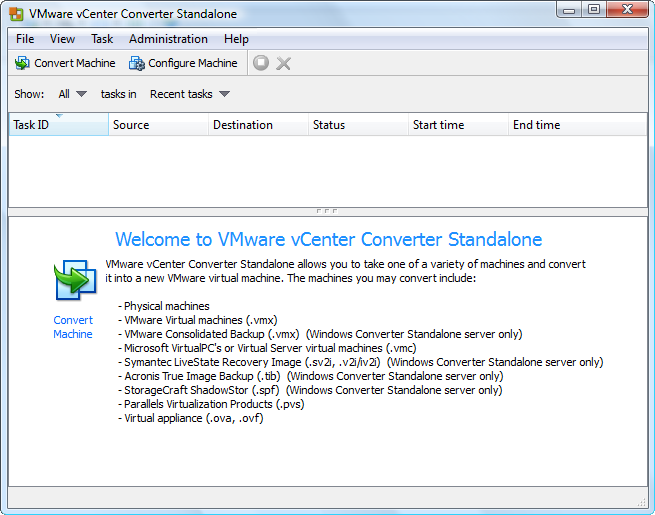
First download a VMware converter, here standalone in my case. Install it and click on a “Convert Machine” icon.

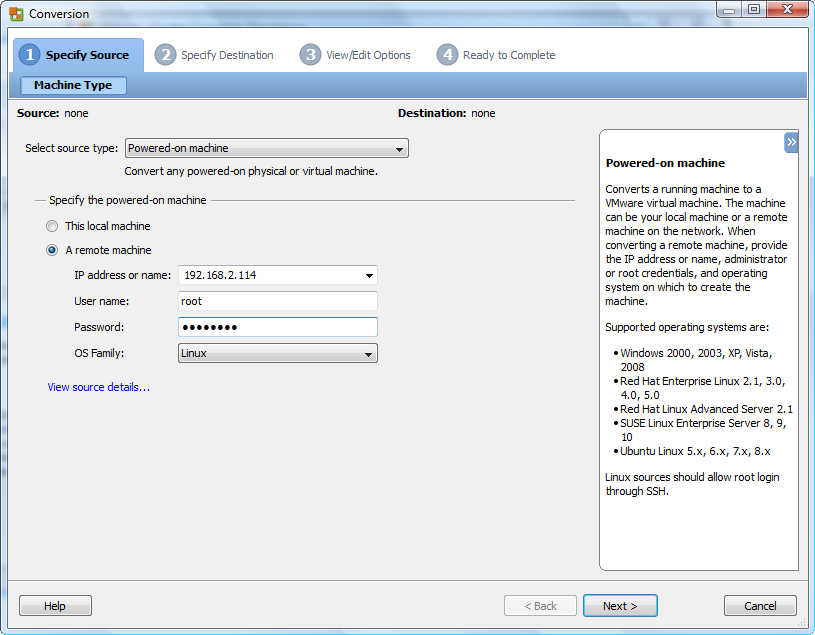
Enter the machine IP address/ Root username and password to be virtualized

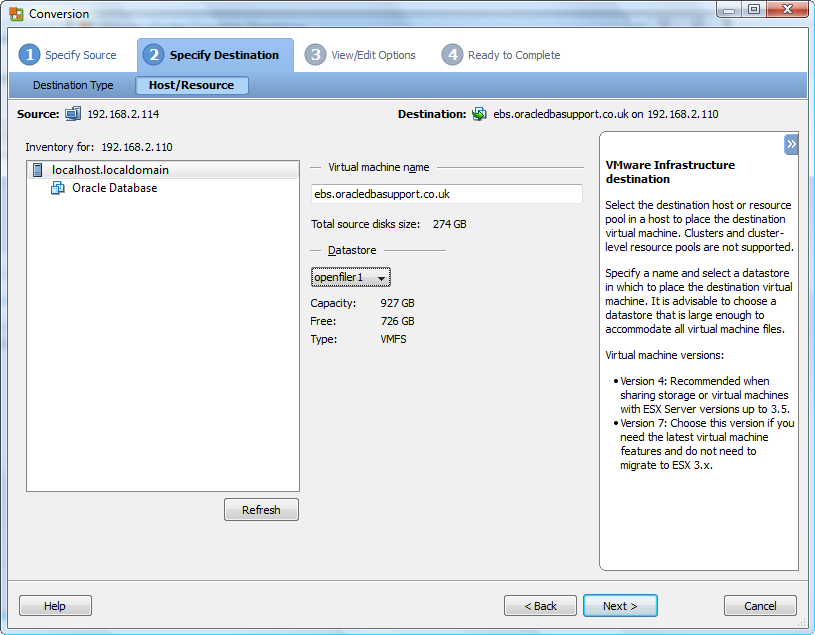
Now enter ESXi host details. I have mounted a terabyte HDD space on my ESXi using openfiler and I wish to push this machine to my SAN storage.

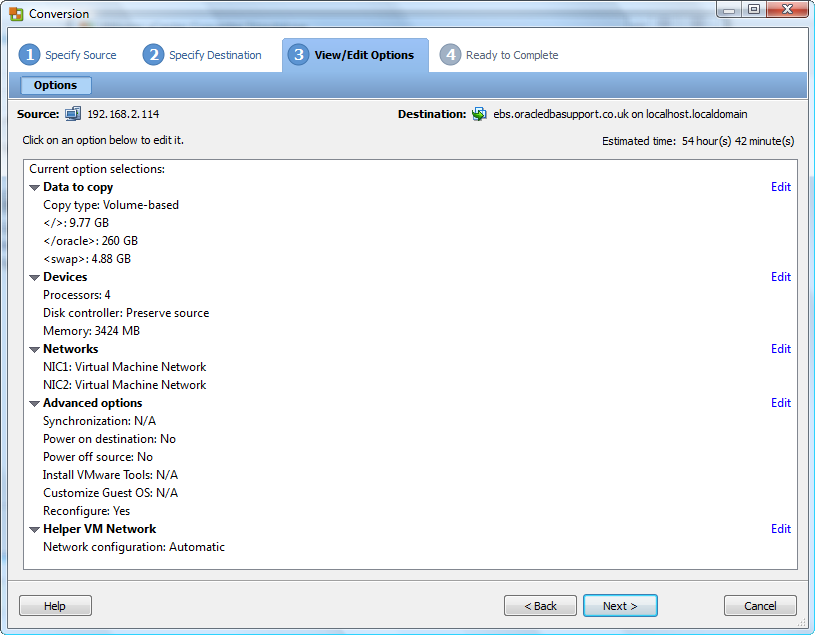
Adjust settings you want altered at destination for example Memory size, CPU numbers, HDD volumes

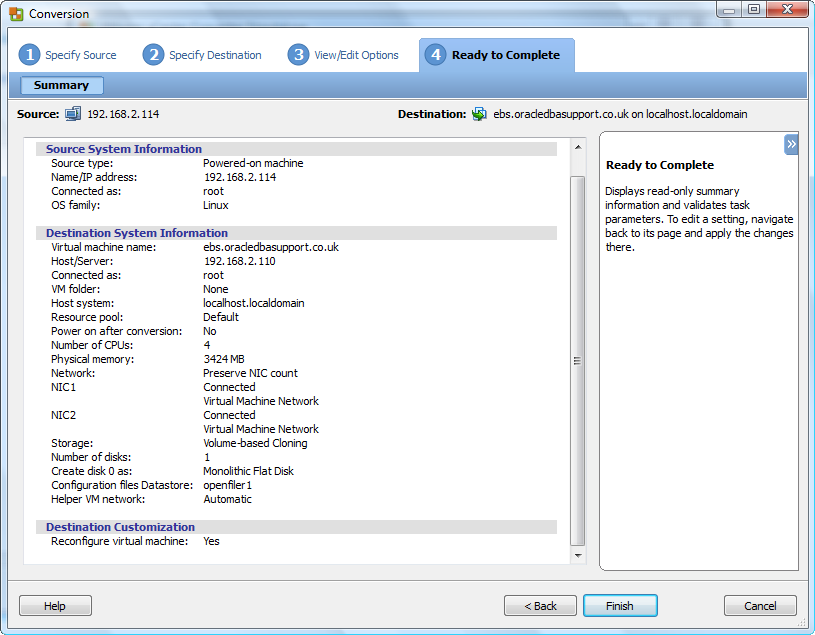
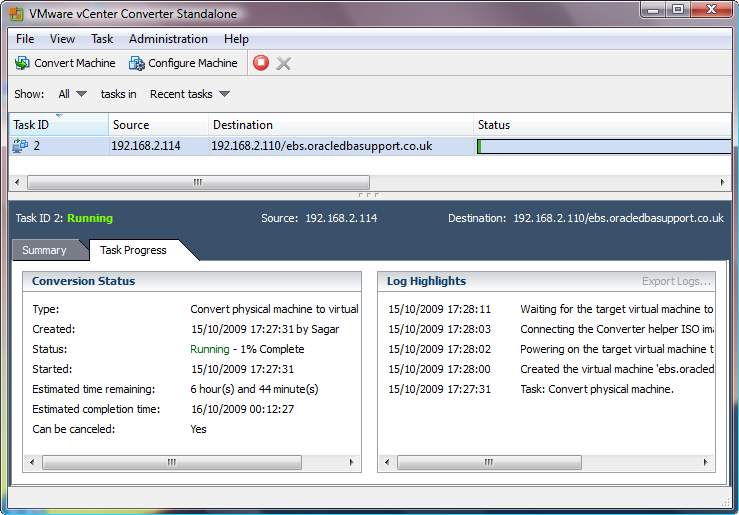
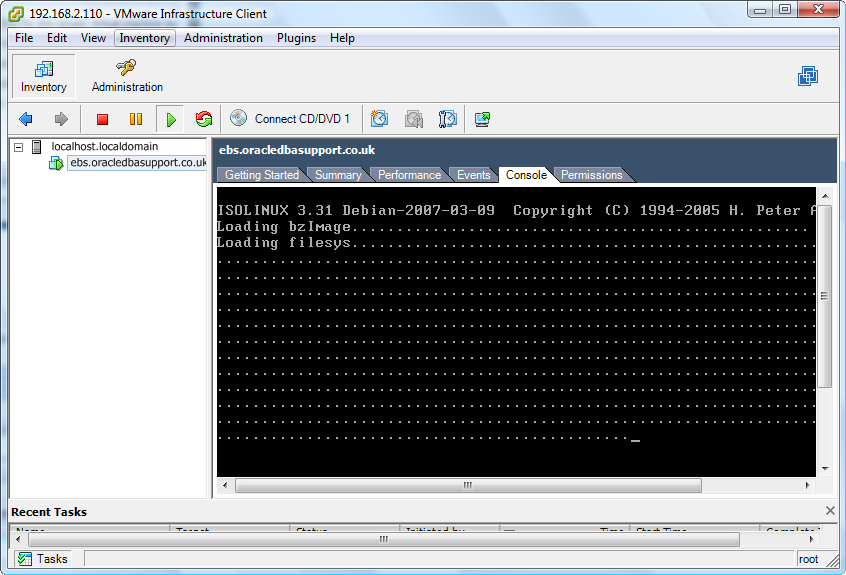
Click on finish and you will be presented a monitoring console as below. Now wait until it’s all done. For me it’s about 7 hours. The speed of copying is fairly slow despite having a network bandwidth of 1GBPS between all nodes.

If you look at vmware console , you will see progress details as below

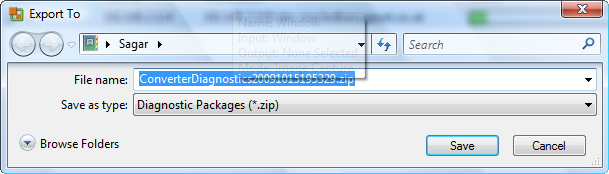
One can also monior the progress by looking at File -> Export Logs -> vmware-converter-agent-XXX.log file

Maintain RMAN Catalog

Posted by Sagar Patil

Below is a windows BATCH script used to Maintain RMAN catalogue. The script accepts 3 parameters Target SID, Target password and catalogue password.

@echo off
REM
REM NT RMAN catalogue maintenance
REM
REM 3 parameters SID, target password and catalogue password
REM

set ORACLE_SID=%1
set LOG=C:\rmanscripts\maintain_%1.log

REM
REM First generate the rman script using the two supplied parameters
REM

echo connect target rmantarget/%2@%1 >C:\rmanscripts\maintain_catalog.rman
echo connect catalog rman/%3@recovery_catalog >>C:\rmanscripts\maintain_catalog.rman
echo allocate channel for maintenance type “sbt_tape” >>C:\rmanscripts\maintain_catalog.rman
echo crosscheck backup of database; >>C:\rmanscripts\maintain_catalog.rman
echo release channel; >>C:\rmanscripts\maintain_catalog.rman
echo allocate channel for maintenance type “sbt_tape” >>C:\rmanscripts\maintain_catalog.rman
echo crosscheck backup of archivelog all; >>C:\rmanscripts\maintain_catalog.rman
echo release channel; >>C:\rmanscripts\maintain_catalog.rman
echo allocate channel for delete type “sbt_tape”; >>C:\rmanscripts\maintain_catalog.rman
echo delete noprompt expired backup; >>C:\rmanscripts\maintain_catalog.rman
echo release channel; >>C:\rmanscripts\maintain_catalog.rman
echo exit >>C:\rmanscripts\maintain_catalog.rman

REM
REM Second generate the email call script
REM

echo connect rman/%3@recovery_catalog >C:\rmanscripts\send_email.sql
echo define subject=^&1 >>C:\rmanscripts\send_email.sql
echo define sender=^&2 >>C:\rmanscripts\send_email.sql
echo execute send_email_header(‘^&subject’,’^&sender’); >>C:\rmanscripts\send_email.sql
echo exit >>C:\rmanscripts\send_email.sql

date /t> %LOG%
time /t >> %LOG%
For /F “tokens=1,2,3,4* delims=/, ” %%i in (‘date/T’) Do SET DDMMYYYY=%%i-%%j-%%k

rman msglog=%LOG% cmdfile=C:\rmanscripts\maintain_catalog.rman

if not errorlevel 1 (
sqlplus -s /nolog @C:\rmanscripts\send_email.sql \”‘RMAN catalog maintenance complete on %DDMMYYYY%’\” %COMPUTERNAME%
) else (
sqlplus -s /nolog @C:\rmanscripts\send_email.sql \”‘RMAN catalog maintenance failure on %DDMMYYYY%’\” %COMPUTERNAME%
)
exit

Please compile send_email_header pl/sql procedure as rman user.

CREATE OR REPLACE PROCEDURE send_email_header(
msg_subject varchar2 ,
msg_sendner varchar2 )
IS
c utl_tcp.connection;
rc integer;
BEGIN
c := utl_tcp.open_connection(‘127.0.0.1’, 25); — open the SMTP port 25 on local machine
dbms_output.put_line(utl_tcp.get_line(c, TRUE));
rc := utl_tcp.write_line(c, ‘HELO localhost’);
dbms_output.put_line(utl_tcp.get_line(c, TRUE));
rc := utl_tcp.write_line(c, ‘MAIL FROM: ‘||msg_sender);
dbms_output.put_line(utl_tcp.get_line(c, TRUE));
rc := utl_tcp.write_line(c, ‘RCPT TO: ‘||’dba@oracledbasupport.co.uk’);
dbms_output.put_line(utl_tcp.get_line(c, TRUE));
rc := utl_tcp.write_line(c, ‘QUIT’);
dbms_output.put_line(utl_tcp.get_line(c, TRUE));
utl_tcp.close_connection(c); — Close the connection
EXCEPTION
when others then
raise_application_error(
-20000, ‘Unable to send e-mail message from pl/sql because of: ‘||
sqlerrm);
END;
/
show errors

Rman Script to Create Standby/Duplicate database using RMAN

Posted by Sagar Patil

Duplicate Database using rman

connect target rman/%password%@primary_server
connect auxiliary sys/%password%@standby_server
connect rcvcat rman/%password%@recovery_catalog
run {
set until time ’27-JUL-2009 10:59:00′;
allocate auxiliary channel tp1 type “sbt_tape”;
allocate auxiliary channel tp2 type “sbt_tape”;

duplicate target database to %target_instance_name%;
release channel tp1;
release channel tp2;
}

Restore rman database for Standby

connect target rman/%password%@primary_server
connect auxiliary sys/%password%@standby_server
connect rcvcat rman/%password%@recovery_catalog
Run {
set until time ’20-SEP-2009 06:03:00′;
allocate auxiliary channel tp1 type “sbt_tape”;
allocate auxiliary channel tp2 type “sbt_tape”;

duplicate target database for standby dorecover nofilenamecheck;
release channel tp1;
release channel tp2;
}

Remove Failed Clusterware

Posted by Sagar Patil

If you have already uninstalled Oracle Clusterware using the Oracle Universal Installer – Please download attached file cleanup.zip that contains a copy of the logpartformat.exe and the guioracleobjmanage.exe (plus necessary dll).

In case you have Clusterware installed – (You need to carry these steps only from one node)

Remove the partitions that have been initialized for ocrcfg and votedsk

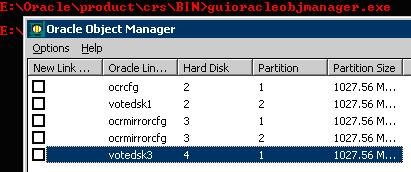
1. You can view these using the Oracle provided tool: guioracleobjmanager.exe
Invoke the Oracle tool GuiOracleObjManager.exe to see the link names that have been assigned to your partitions:

clip_image002

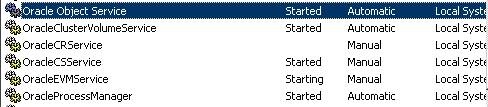
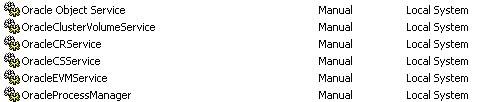
2. Use Services on Windows to stop the following services on each cluster node and set them to Manual. Please stop all oracle services.

clip_image004

clip_image006

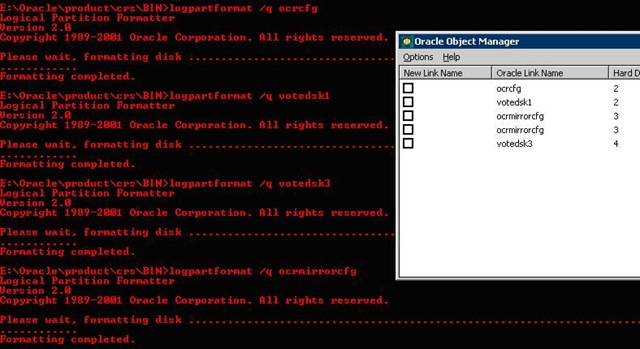
3. Remove the formatting on these partitions using the Oracle provided tool: logpartformat.exe. Invoke the Oracle tool logpatformat to reinitialize the headers of the disks you have specified for use as votedsk1 and ocrcfg

For RAW partitions:

run logpartformat /q <link name as shown to you in guioracleobjmanager tool
For example “logpartformat /q ocrcfg” repeat this step for all link names listed in guioracleobjmanager

clip_image008

For OCFS:

run logpartformat /q <DRIVELETTER>
For example, if the drive letter for your OCFS partition is ‘ P ‘

logpartformat /q P:

Certain times Logpartformat can fail. For example:

$CRS_HOME/BIN>logpartformat /q \\.\votedsk1
Logical Partition Formatter
Version 2.0
Copyright 1989-2001 Oracle Corporation. All rights reserved.
Unable to validate logical partition for symbolic link votedsk1

This is typically an access problem but cleaning up the disks can be problematic in such a case. Physically removing the disks and creating new ones with different sizes has been known to help in some cases.

4. Remove the assigned link names using the GUIOracleobjmanager.exe
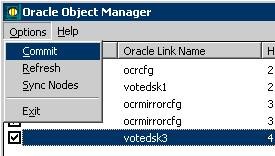
– Go back to the guioracleobjmanager tool and remove all link names:
– place a check mark in the box preceding each link name / physical partition listed
– then go to the Options menu and click ‘commit
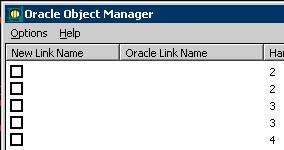
– the link names should now be removed

clip_image010 clip_image012

5. If possible remove and recreate your logical drives on top of extended partitions at this time from Windows Disk Management.

6. Use the Oracle Universal Installer to remove the empty CRS home (cleans up the inventory file)

7. Remove Oracle binaries using Windows explorer, both the CRS home and the files located in:

8. Using Windows explorer, remove the following driver files from: %systemroot%\windows\system32\drivers:
* ocfs.sys
* orafencedrv.sys
* orafenceservice.sys

9. Reboot all servers in your RAC configuration

You can also look at metalink note 341214.1

Top of Page

Top menu