My Statspack has following details.
Enqueue activity DB/Inst: Snaps: 1791-1808
-> only enqueues with waits are shown
-> Enqueue stats gathered prior to 10g should not be compared with 10g data
-> ordered by Wait Time desc, Waits desc

Above list indicates oracle was waiting about 4 secs to acquire a lock. Let’s look at row contention and enqueues closely.
I was looking on google and stumbled across exceptional article “Diagnose performance problems, using the wait interface in Oracle 10g.”
John, the DBA at Acme Bank, is on the phone with an irate user, Bill, who complains that his database session is hanging, a complaint not unfamiliar to most DBAs. What can John do to address Bill’s complaint?
Acme Bank’s database is Oracle Database 10g, so John has many options. Automatic Database Diagnostic Manager (ADDM), new in Oracle Database 10g, can tell John about the current overall status and performance of the database, so John starts with ADDM to determine whether what Bill’s session is experiencing is the result of a databasewide issue. The ADDM report identifies no databasewide issues that could have this impact on Bill’s session, so John moves on to the next option.
One way to diagnose session-level events such as Bill’s is to determine whether the session is waiting for anything, such as the reading of a block of a file, a lock on a table row, or a latch. Oracle has provided mechanisms to display the waits happening inside the database since Oracle7, and during the last several years, the model has been steadily perfected, with more and more diagnostic information added to it. In Oracle Database 10g, which makes significantly improved wait event information available, diagnosing a session slowdown has become even easier. This article shows you how to use the wait events in Oracle Database 10g to identify bottlenecks.
Session Waits : How can John the DBA determine what’s causing Bill’s session to hang? Actually, the session is not hanging; it’s waiting for an event to happen, and that’s exactly what John checks for.
To continue his investigation, John could use Oracle Enterprise Manager or he could directly access V$ views from the command line. John has a set of scripts he uses to diagnose these types of problems, so he uses the command line.
John queries the V$SESSION view to see what Bill’s session is waiting for. (Note that John filters out all idle events.)
select sid, username, event, blocking_session,
seconds_in_wait, wait_time
from v$session where state in (‘WAITING’)
and wait_class != ‘Idle’;
The output follows, in vertical format.
SID : 270
USERNAME : BILL
EVENT : enq: TX – row lock
contention
BLOCKING_SESSION : 254
SECONDS_IN_WAIT : 83
WAIT_TIME : 0
Looking at this information, John immediately concludes that Bill’s session with SID 270 is waiting for a lock on a table and that that lock is held by session 254 (BLOCKING_SESSION).
But John wants to know which SQL statement is causing this lock. He can find out easily, by issuing the following query joining the V$SESSION and V$SQL views:
select sid, sql_text
from v$session s, v$sql q
where sid in (254,270)
and (
q.sql_id = s.sql_id or
q.sql_id = s.prev_sql_id);

Listing 1 shows the result of the query. And there (in Listing 1) John sees it?both sessions are trying to update the same row. Unless session 254 commits or rolls back, session 270 will continue to wait for the lock. He explains this to Bill, who, considerably less irate now, decides that something in the application has gone awry and asks John to kill session 254 and release the locks.
Wait Classes After John kills the blocking session, Bill’s session continues but is very slow. John decides to check for other problems in the session. Again, he checks for any other wait events, but this time he specifically checks Bill’s session.
In Oracle Database 10g, wait events are divided into various wait classes, based on their type. The grouping of events lets you focus on specific classes and exclude nonessential ones such as idle events. John issues the following against the V$SESSION_WAIT_CLASS view:
select wait_class_id, wait_class,
total_waits, time_waited
from v$session_wait_class
where sid = 270;
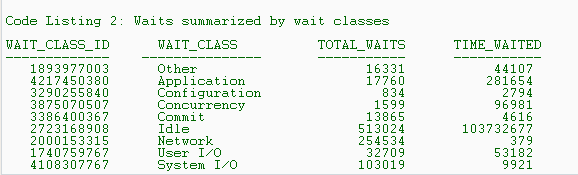
The output, shown in Listing 2, shows the wait classes and how many times the session has waited for events in each class. It tells John that application-related waits such as those due to row locks have occurred 17,760 times, for a total of 281,654 centiseconds (cs)?hundredths of a second?since the instance started. John thinks that this TIME_WAITED value is high for this session. He decides to explore the cause of these waits in the application wait class. The times for individual waits are available in the V$SYSTEM_EVENT view. He issues the following query to identify individual waits in the application wait class (class id 4217450380):
select event, total_waits, time_waited
from v$system_event e, v$event_name n
where n.event_id = e.event_id
and wait_class_id = 4217450380;

Listing 3 shows the output of this query. It shows that lock contentions (indicated by the event enq: TX – row lock contention) constitute the major part of the waiting time in the application wait class. This concerns John. Is it possible that a badly written application made its way through to the production database, causing these lock contention problems?
Being the experienced DBA that he is, however, John does not immediately draw that conclusion. The data in Listing 3 merely indicates that the users have experienced lock-contention-related waits a total of 2,275 times, for 280,856 cs. It is possible that mostly 1- or 2-cs waits and only one large wait account for the total wait time, and in that case, the application isn’t faulty. A single large wait may be some freak occurrence skewing the data and not representative of the workload on the system. How can John determine whether a single wait is skewing the data?
Oracle 10g provides a new view, V$EVENT_HISTOGRAM, that shows the wait time periods and how often sessions have waited for a specific time period. He issues the following against V$EVENT_HISTOGRAM:
select wait_time_milli bucket, wait_count
from v$event_histogram
where event =
‘enq: TX – row lock contention’;
The output looks like this:
BUCKET WAIT_COUNT
———– ———-
1 252
2 0
4 0
8 0
16 1
32 0
64 4
128 52
256 706
512 392
1024 18
2048 7
4096 843
The V$EVENT_HISTOGRAM view shows the buckets of wait times and how many times the sessions waited for a particular event?in this case, a row lock contention?for that duration. For example, sessions waited 252 times for less than 1 millisecond (ms), once less than 16
ms but more than 1 ms, and so on. The sum of the values of the WAIT_COUNT column is 2,275, the same as the value shown in the event enq: TX – row lock contention, shown in Listing 3. The V$EVENT_HISTOGRAM view shows that the most waits occurred in the ranges of 256 ms, 512 ms, and 4,096 ms, which is sufficient evidence that the applications are experiencing locking issues and that this locking is the cause of the slowness in Bill’s session. Had the view showed numerous waits in the 1-ms range, John wouldn’t have been as concerned, because the waits would have seemed normal.
Time Models : Just after John explains his preliminary findings to Bill, Lora walks in with a similar complaint: Her session SID 355 is very slow. Once again, John looks for the events the session is waiting for, by issuing the following query against the V$SESSION_WAIT view:
select event, seconds_in_wait,
wait_time
from v$session_wait
where sid = 355;
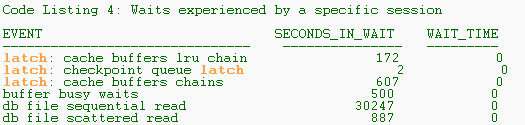
The output, shown in Listing 4, shows a variety of wait events in Lora’s session, including latch contention, which may be indicative of an application design problem. But before he sends Lora off with a prescription for an application change, John must support his theory that bad application design is the cause of the poor performance in Lora’s session. To test this theory, he decides to determine whether the resource utilization of Lora’s session is extraordinarily high and whether it slows not only itself but other sessions too.
In the Time Model interface of Oracle Database 10g, John can easily view details of time spent by a session in various activities. He issues the following against the V$SESS_TIME_MODEL view:
select stat_name, value
from v$sess_time_model
where sid = 355;
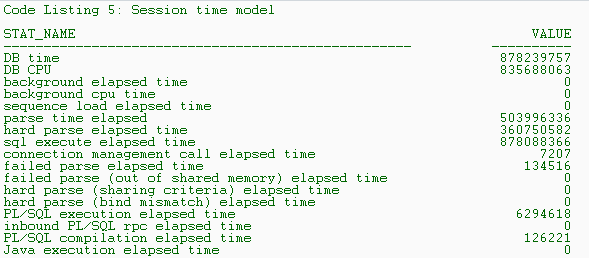
The output, shown in Listing 5, displays the time (in microseconds) spent by the session in various places. From this output, John sees that the session spent 503,996,336 microseconds parsing (parse time elapsed), out of a total of 878,088,366 microseconds on all SQL execution (sql execute elapsed time), or 57 percent of the SQL execution time, which indicates that a cause of this slowness is high parsing. John gives Lora this information, and she follows up with the application design team.
OS Statistics :While going over users’ performance problems, John also wants to rule out the possibility of the host system’s being a bottleneck. Before Oracle 10g, he could use operating system (OS) utilities such as sar and vmstat and extrapolate the metrics to determine contention. In Oracle 10g, the metrics at the OS level are collected automatically in the database. To see potential host contention, John issues the following query against the V$OSSTAT view:
select * from v$osstat;
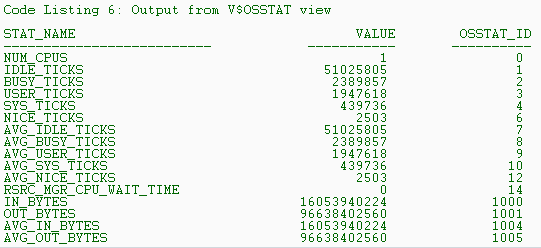
The output in Listing 6 shows the various elements of the OS-level metrics collected. All time elements are in cs. From the results in Listing 6, John sees that the single CPU of the system has been idle for 51,025,805 cs (IDLE_TICKS) and busy for 2,389,857 cs (BUSY_TICKS), indicating a CPU that is about 4 percent busy. From this he concludes that the CPU is not a bottleneck on this host. Note that if the host system had more than one CPU, the columns whose headings had the prefix AVG_, such as AVG_IDLE_TICKS, would show the average of these metrics over all the CPUs.
Active Session History: So far the users have consulted John exactly when each problem occurred, enabling him to peek into the performance views in real time. This good fortune doesn’t last long?Janice comes to John complaining about a recent performance problem. When John queries the V$SESSION view, the session is idle, with no events being waited for. How can John check which events Janice’s session was waiting for when the problem occurred?
Oracle 10g collects the information on active sessions in a memory buffer every second. This buffer, called Active Session History (ASH), which can be viewed in the V$ACTIVE_SESSION_HISTORY dynamic performance view, holds data for about 30 minutes before being overwritten with new data in a circular fashion. John gets the SID and SERIAL# of Janice’s session and issues this query against the V$ACTIVE_SESSION_HISTORY view to find out the wait events for which this session waited in the past.
select sample_time, event, wait_time
from v$active_session_history
where session_id = 271
and session_serial# = 5;
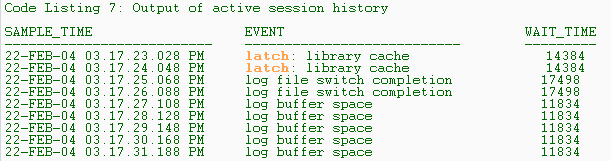
The output, excerpted in Listing 7, shows several important pieces of information. First it shows SAMPLE_TIME?the time stamp showing when the statistics were collected?which lets John tie the occurrence of the performance problems to the wait events. Using the data in the V$ACTIVE_SESSION_HISTORY view, John sees that at around 3:17 p.m., the session waited several times for the log buffer space event, indicating that there was some problem with redo log buffers. To further aid the diagnosis, John identifies the exact SQL statement executed by the session at that time, using the following query of the V$SQL view:
select sql_text, application_wait_time
from v$sql
where sql_id in (
select sql_id
from v$active_session_history
where sample_time =
’22-FEB-04 03.17.31.188 PM’
and session_id = 271
and session_serial# = 5
);
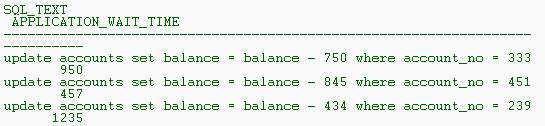
The output is shown in Listing 8.
The column APPLICATION_WAIT_TIME shows how long the sessions executing that SQL waited for the application wait class. In addition to the SQL_ID, the V$ACTIVE_SESSION_HISTORY view also lets John see specific rows being waited for (in case of lock contentions), client identifiers, and much more.
What if a user comes to John a little late, after the data is overwritten in this view? When purged from this dynamic performance view, the data is flushed to the Active Workload Repository (AWR), a disk-based repository. The purged ASH data can be seen in the DBA_HIST_ACTIVE_SESSION_HIST view, enabling John to see the wait events of a past session. The data in the AWR is purged by default after seven days.
Conclusion : Oracle Database 10g introduces a number of enhancements designed to automate and simplify the performance diagnostic process. Wait event information is more elaborate in Oracle Database 10g and provides deeper insight into the cause of problems, making the diagnosis of performance problems a breeze in most cases, especially in proactive performance tuning.

 Tweet
Tweet
