Monitoring Application Performance using Websphere Request Metrics

Posted by Sagar Patil

Version 6.x of WebSphere introduced Request Metrics (PMRM), which unlike Performance Monitoring Infrastructure (PMI) metrics, are transaction based.

PMRM can be a useful first step in performance analysis of your application. The PMRM records show the elapsed time for each request.
The PMRM records are written to the SystemOut log file for the JVM in which the request is processed. In a Network Deployment configuration, the WebSphere Http Plugin running inside the web server also writes PMRM records to its http-plugin.log file giving a composite view of application performance across all JVM’s.

The log records contains information about the flow of the transaction through the WebSphere JVMs. The last fields are of particular interest during performance monitoring.

The SystemOut file contains

1. Name of servlet

2. Response time

In addition, the web server http-plugin.log file contains

3. Size of the request

4. Size of the response

How to Activate Request Metrics ?

Select “Request Metrics” & you will a see screen below.

We can also set filters on modules to be logged

Let’s say we want to trace JDBC connections & transaction time.

Choose Custom -> JDBC & click “Standard logs” option to log information at SystemOut.log & http-plugin.log.

Once activated you will see details as below at Systemout.log

[16/08/11 15:23:58:529 BST] 000000e0 PmiRmArmWrapp I   PMRM0003I:  parent:ver=1,ip=172.30.9.24,time=1313495871159,pid=11183,reqid=16634,event=1 – current:ver=1,ip=172.30.9.24,time=1313495871159,pid=11183,reqid=16641,event=1 type=JDBC detail=java.sql.PreparedStatement.executeQuery() elapsed=0

[16/08/11 15:25:08:956 BST] 000000df PmiRmArmWrapp I   PMRM0003I:  parent:ver=1,ip=172.30.9.24,time=1313495871159,pid=11183,reqid=469,event=1 – current:ver=1,ip=172.30.9.24,time=1313495871159,pid=11183,reqid=522,event=1 type=JDBC detail=java.sql.PreparedStatement.executeQuery() elapsed=1

You should see similar records in http-plugin.log

Monitor SSL Certificate Expiration/Replace Expired SSL Certificates Automatically

Posted by Sagar Patil

Problem : I have websphere systems which are roll forwarded in future and then rolled back to current date. Certain times I get SSL errors in my log despite setting option to replace expired certificates at deployment manager.

The certificate expiration monitor task runs under the deployment manager process.

The certificate expiration monitor administrative task cycles through all the keystores that are configured in the security.xml file and reports on any certificates that expire within a specified threshold, which is typically within 30 days.

The default self-signed certificate on each node expires 365 days after creation. You can modify the certificate validity period by changing the default value for the com.ibm.ssl.defaultCertReqDays=365 property in the ssl.client.props global property area for clients. You can also specify this property as a security custom property on the administrative console. Click Security > Secure administration, applications, and infrastructure > Custom properties.

The expiration monitor automatically replaces only self-signed certificates that meet the expiration threshold criteria.

<wsSchedules xmi:id=”WSSchedule_2″ name=”ExpirationMonitorSchedule” frequency=”28″ dayOfWeek=”1″ hour=”21″ minute=”30″ nextStartDate=”1312144223207″/>
<wsNotifications xmi:id=”WSNotification_1″ name=”MessageLog” logToSystemOut=”true” emailList=””/>
<wsCertificateExpirationMonitor xmi:id=”WSCertificateExpirationMonitor_1″ name=”Certificate Expiration Monitor” autoReplace=”true” daysBeforeNotification=”60″ isEnabled=”true” wsNotification=”WSNotification_1″ wsSchedule=”WSSchedule_2″/>

To replace all of the signers from the old certificate with the signer that belongs to the new certificate in all the keystores in the configuration for that cell, set the autoReplace attribute to true.

When the deleteOld attribute is true, the old personal certificate and old signers also are deleted from the keystores.

The isEnabled attribute determines whether the expiration monitor task runs based upon the nextStartDate attribute that is derived from the schedule. The nextStartDate attribute is derived from the schedule in milliseconds since 1970, and is identical to the System.currentTimeMillis(). If the nextStartDate has already passed when an expiration monitor process begins, and the expiration monitor is enabled, the task is started, but a new nextStartDate value is established based on the schedule.

<wsNotifications xmi:id=”WSNotification_1″ name=”MessageLog” logToSystemOut=”true” emailList=””/>

For expiration monitor notifications, you can select message log, e-mail using SMTP server, or both methods of notification. When you configure the e-mail option, use the format user@domain@smtpserver.

To specify multiple e-mail addresses using scripting, you must add a pipe (|) character between entries. When you specify the logToSystemOut attribute, the expiration monitor results are sent to the message log for the environment, which is typically the SystemOut.log file.

How to Locate Connection Leak in Websphere

Posted by Sagar Patil

Websphere connection manager generally will timeout orphaned connections and send it back to connection pool for reuse. If threads do timeout waiting for connection, connection manager will raise Connectionwaittimeoutexception at websphere logs.

Common reason for connection leak is , application not using connection.close() call at finally{} code block. When trace is enabled, Websphere connection pool manager will print stack traces detailing how long connection been in use.

It only prints trace information if connection was in use for more than 10 seconds. This interval is unchangeable without IBM support assistance.

Let’s gather connection leak trace …
Navigate to Logging and Tracing > %Application_Server_Name%> Diagnostic Trace Service > Change Log Detail Level

Alter the logging level as *=info: ConnLeakLogic=finest

If you want to see all options availble click on “ConnLeakLogic” which will give you options like screenshot below, select finest.

You may have to restart Application server to see log being created $WAS_HOME/Profiles/node/logs/%Server_Name%/trace.log
Search Trace.log for keyword “Connection Leak Logic Information”. If present you know there are connections being used for more than 10 sec.

In an example above doGet method is using connection for 20 sec i.e 10 sec ping time +11 sec in use time.


Websphere Dmgr- Node Synchronization : WSX509TrustMa E CWPKI0311E

Posted by Sagar Patil

Environment :   Websphere 6.1 Vertical Cluster, 2 JVMS

I have websphere servers which time travel in the future. Normally we don’t go forward over an year which is what SSL is valid for but when we cross that date we have problems. The application state changes to “unknown” as nodeagent fails to communicate with dmgr.

Please also read GSK_ERROR_BAD_CERT error configuring SSL between Plug-in and Application Server V6.1

When I tried synchronizing Node Agent with JVMs it returned following error message

When I tried synchronizing Node Agent with JVMs it returned following error message The nodeagent log flashed following messages : tail -f  /opt/IBM/WebSphere/AppServer/profiles/Profile01/Node/logs/nodeagent/SystemOut.log

[12/04/11 06:58:23:313 BST] 00000017 WSX509TrustMa E CWPKI0311E: The certificate with subject DN CN=172.30.9.24, O=IBM, C=US has a start date Fri Aug 12 01:35:46 BST 2011 which is valid after the current date/time.  This will can happen if the client’s clock is set earlier than the server’s clock.   Please verify the clocks are in sync between this client and server and retry the request. Forwarded IOR failed with: CAUGHT_EXCEPTION_WHILE_CONFIGURING_SSL_CLIENT_SOCKET: JSSL0080E: javax.net.ssl.SSLHandshakeException – The client and server could not negotiate the desired level of security.  Reason: com.ibm.jsse2.util.h: Certificate not valid yet

Easy Solution :

Create new set of SSL certificate else change sysdate to SSL valid date and restart websphere services

If you can’t pickup easiest solution then long  process to correct this issue is below:

I have this issue today again when system was moved to date in the future. Since I have some time in hand , lets find out where things are going wrong.

DMGR LOG ERROR : /opt/IBM/WebSphere/AppServer/profiles/Profile01/dmgr/logs/dmgr/SystemOut.log
[10/23/11 6:42:06:982 BST] 0000001f ORBRas        E com.ibm.ws.security.orbssl.WSSSLClientSocketFactoryImpl createSSLSocket ProcessDiscovery : 0 JSSL0080E: javax.net.ssl.SSLHandshakeException – The client and server could not negotiate the desired level of security.  Reason: com.ibm.jsse2.util.h: No trusted certificate found javax.net.ssl.SSLHandshakeException: com.ibm.jsse2.util.h: No trusted certificate found

NODE LOG Error : /opt/IBM/WebSphere/AppServer/profiles/Profile01/Node/logs/nodeagent/SystemOut.log
[10/23/11 6:42:07:228 BST] 0000001c SystemOut     O CWPKI0022E: SSL HANDSHAKE FAILURE:  A signer with SubjectDN “CN=Server1.domain.com, O=IBM, C=US” was sent from target host:port “172.30.9.63:8879”.  The signer may need to be added to local trust store “/opt/IBM/WebSphere/AppServer/profiles/Profile01/Node/config/cells/Server1_Cell/trust.p12” located in SSL configuration alias “NodeDefaultSSLSettings” loaded from SSL configuration file “security.xml”.  The extended error message from the SSL handshake exception is: “No trusted certificate found”.
[10/23/11 6:42:07:228 BST] 0000001c SystemOut     O
[10/23/11 6:42:07:238 BST] 0000001c ServiceLogger I com.ibm.ws.ffdc.IncidentStreamImpl initialize FFDC0009I: FFDC opened incident stream file /opt/IBM/WebSphere/AppServer/profiles/Profile01/Node/logs/ffdc/nodeagent_0000001c_11.10.23_06.42.07_0.txt

We need to locate how many keystore (key.p12 or similar)  are there under WAS profile.

$ find /opt/IBM/WebSphere/AppServer/profiles/Profile01  -name “key.p12” -type f -ls
738613    4 -rw-rw-r–   1 was61    was61        1554 Jul 13  2010 ./dmgr/etc/key.p12
738621    4 -rw-rw-r–   1 was61    was61        2810 Oct 23 02:02 ./dmgr/config/cells/Server1Cell/key.p12
738624    4 -rw-rw-r–   1 was61    was61        2802 Jul 13  2010 ./dmgr/config/cells/Server1Cell/nodes/Server1Node01/key.p12
1098641    4 -rw-rw-r–   1 was61    was61        1554 Jul 13  2010 ./Node/etc/key.p12
1098643    4 -rw-rw-r–   1 was61    was61        2802 Oct  7  2010 ./Node/config/cells/Server1Cell/key.p12
1098646    4 -rw-rw-r–   1 was61    was61        2802 Jul 13  2010 ./Node/config/cells/Server1Cell/nodes/Server1Node01/key.p12

From the list above it’s clear there is a diff between files at DMGR & Cell level. You can open those keystores using ikeyman to look at SSL certificates in them.
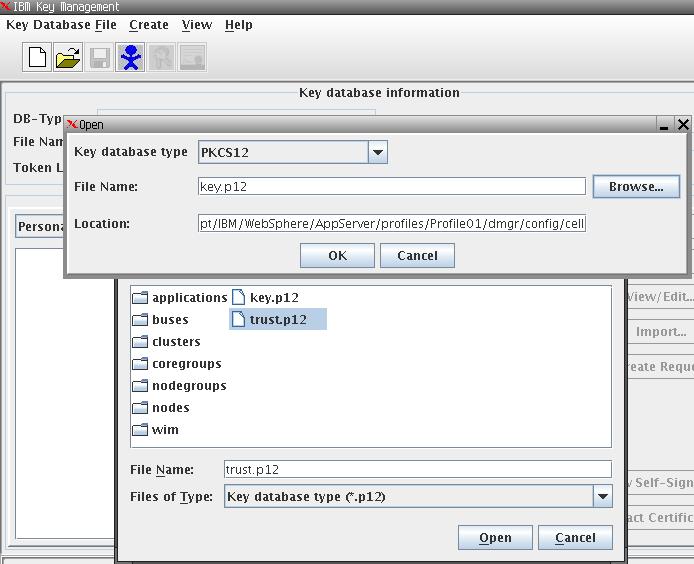
The master key file here is   ./dmgr/config/cells/Server1Cell/key.p12 so I need to manually copy it at other dmgr locations  but not NODEAGENT directories.

[was61@ Profile01]$ cp ./dmgr/config/cells/Server1Cell/key.p12 ./dmgr/config/cells/Server1Cell/nodes/Server1Node01/key.p12
[was61@ Profile01]$ cp ./dmgr/config/cells/Server1Cell/key.p12 ./dmgr/etc/key.p12

[was61@ Profile01]$ find .  -name “key.p12” -type f -ls
212994    4 -rw-rw-r–   1 was61    was61        2810 Oct 24 00:07 ./dmgr/etc/key.p12
738621    4 -rw-rw-r–   1 was61    was61        2810 Oct 23 02:02 ./dmgr/config/cells/Server1Cell/key.p12
738624    4 -rw-rw-r–   1 was61    was61        2810 Oct 24 00:06 ./dmgr/config/cells/Server1Cell/nodes/Server1Node01/key.p12

1098641    4 -rw-rw-r–   1 was61    was61        1554 Jul 13  2010 ./Node/etc/key.p12
1098643    4 -rw-rw-r–   1 was61    was61        2802 Oct  7  2010 ./Node/config/cells/Server1Cell/key.p12
1098646    4 -rw-rw-r–   1 was61    was61        2802 Jul 13  2010 ./Node/config/cells/Server1Cell/nodes/Server1Node01/key.p12

[was61@Server1 Profile01]$ alias dmgrlog
alias dmgrlog=’tail -f /opt/IBM/WebSphere/AppServer/profiles/Profile01/dmgr/logs/dmgr/SystemOut.log’
[was61@Server1 Profile01]$ alias nodelog
alias nodelog=’tail -f /opt/IBM/WebSphere/AppServer/profiles/Profile01/Node/logs/nodeagent/SystemOut.log’
[was61@Server1 Profile01]$ rm /opt/IBM/WebSphere/AppServer/profiles/Profile01/Node/logs/nodeagent/SystemOut.log

[was61@Server1 Profile01]$ /opt/IBM/WebSphere/AppServer/profiles/Profile01/dmgr/bin/startManager.sh
ADMU0116I: Tool information is being logged in file
/opt/IBM/WebSphere/AppServer/profiles/Profile01/dmgr/logs/dmgr/startServer.log
ADMU0128I: Starting tool with the dmgr profile
ADMU3100I: Reading configuration for server: dmgr
ADMU3200I: Server launched. Waiting for initialization status.
ADMU3000I: Server dmgr open for e-business; process id is 17088

[was61@Server1 Profile01]$ cd /opt/IBM/WebSphere/AppServer/profiles/Profile01/Node/bin/
[was61@Server1 bin]$ ./syncNode.sh Server1 8879
ADMU0116I: Tool information is being logged in file
/opt/IBM/WebSphere/AppServer/profiles/Profile01/Node/logs/syncNode.log
ADMU0128I: Starting tool with the Node profile

*** SSL SIGNER EXCHANGE PROMPT ***
SSL signer from target host 172.30.9.63 is not found in trust store /opt/IBM/WebSphere/AppServer/profiles/Profile01/Node/etc/trust.p12.

Here is the signer information (verify the digest value matches what is displayed at the server):
Subject DN:    CN=Server1.domain.com, O=IBM, C=US
Issuer DN:     CN=Server1.domain.com, O=IBM, C=US
Serial number: 1319331734885809000
Expires:       Sun Oct 21 02:02:14 BST 2012
SHA-1 Digest:  F2:BD:CB:E8:28:0B:66:2E:EA:1C:71:BE:0F:D7:24:BB:16:98:54:FF
MD5 Digest:    72:94:EC:FC:9B:10:1A:1E:B6:DF:AA:21:F5:FF:3A:23

Add signer to the trust store now? (y/n) y
A retry of the request may need to occur if the socket times out while waiting for a prompt response.  If the retry is required, note that the prompt will not be redisplayed if (y) is entered, which indicates the signer has already been added to the trust store.
ADMU0401I: Begin syncNode operation for node Server1_Node01 with
Deployment Manager Server1: 8879
ADMU0016I: Synchronizing configuration between node and cell.
ADMU0402I: The configuration for node Server1_Node01 has been synchronized
with Deployment Manager Server1: 8879

Start NodeAgent now and look at nodeagent log for any SSL errors

[was61@Server1 bin]$ /opt/IBM/WebSphere/AppServer/profiles/Profile01/Node/bin/startNode.sh
ADMU0116I: Tool information is being logged in file
/opt/IBM/WebSphere/AppServer/profiles/Profile01/Node/logs/nodeagent/startServer.log
ADMU0128I: Starting tool with the Node profile
ADMU3100I: Reading configuration for server: nodeagent
ADMU3200I: Server launched. Waiting for initialization status.
ADMU3000I: Server nodeagent open for e-business; process id is 17660

Let’s compare again   key SSL files at different directoriesunder dmgr & nodeagent

[was61@Server1 Profile01]$ find .  -name “key.p12” -type f -ls
212994    4 -rw-rw-r–   1 was61    was61        2810 Oct 24 00:07 ./dmgr/etc/key.p12
738621    4 -rw-rw-r–   1 was61    was61        2810 Oct 23 02:02 ./dmgr/config/cells/Server1_Cell/key.p12
738624    4 -rw-rw-r–   1 was61    was61        2810 Oct 24 00:06 ./dmgr/config/cells/Server1_Cell/nodes/Server1_Node01/key.p12
1098641    4 -rw-rw-r–   1 was61    was61        1554 Jul 13  2010 ./Node/etc/key.p12
1098643    4 -rw-rw-r–   1 was61    was61        2810 Oct 23 02:02 ./Node/config/cells/Server1_Cell/key.p12
1098646    4 -rw-rw-r–   1 was61    was61        2810 Oct 24 00:06 ./Node/config/cells/Server1_Cell/nodes/Server1_Node01/key.p12

Serverstatus returned following SUCCESSFUL status:

ADMU0116I: Tool information is being logged in file
/opt/IBM/WebSphere/AppServer/profiles/Profile01/Node/logs/serverStatus.log
ADMU0128I: Starting tool with the Node profile
ADMU0503I: Retrieving server status for all servers
ADMU0505I: Servers found in configuration:
ADMU0506I: Server name: server_member2
ADMU0506I: Server name: server_member1
ADMU0506I: Server name: ihs-prpc
ADMU0506I: Server name: nodeagent
ADMU0508I: The Application Server “server_member2” is STARTED
ADMU0508I: The Application Server “server_member1” is STARTED
ADMU0508I: The Web server “ihs-prpc” is RUNNING
ADMU0508I: The Node Agent “nodeagent” is STARTED

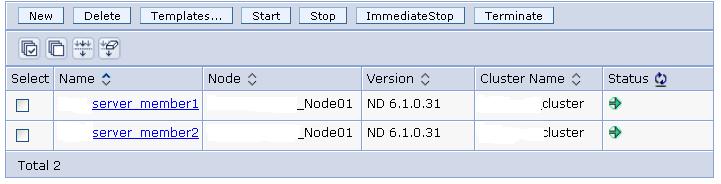
Individual JVMs are working OK. Status is Green than “unknown” listed previously.
DMGR LOG ERROR :
[10/23/11 6:42:06:982 BST] 0000001f ORBRas        E com.ibm.ws.security.orbssl.WSSSLClientSocketFactoryImpl createSSLSocket ProcessDiscovery : 0 JSSL0080E: javax.net.ssl.SSLHandshakeException – The client and server could not negotiate the desired level of security.  Reason: com.ibm.jsse2.util.h: No trusted certificate found javax.net.ssl.SSLHandshakeException: com.ibm.jsse2.util.h: No trusted certificate foundNODE LOG Error
[10/23/11 6:42:07:228 BST] 0000001c SystemOut     O CWPKI0022E: SSL HANDSHAKE FAILURE:  A signer with SubjectDN “CN=eugbbopg11lt.appsdmz.pinnacle.net, O=IBM, C=US” was sent from target host:port “172.30.9.63:8879”.  The signer may need to be added to local trust store “/opt/IBM/WebSphere/AppServer/profiles/Profile01/Node/config/cells/eugbbopg11lt_Cell/trust.p12” located in SSL configuration alias “NodeDefaultSSLSettings” loaded from SSL configuration file “security.xml”.  The extended error message from the SSL handshake exception is: “No trusted certificate found”.
[10/23/11 6:42:07:228 BST] 0000001c SystemOut     O
[10/23/11 6:42:07:238 BST] 0000001c ServiceLogger I com.ibm.ws.ffdc.IncidentStreamImpl initialize FFDC0009I: FFDC opened incident stream file /opt/IBM/WebSphere/AppServer/profiles/Profile01/Node/logs/ffdc/nodeagent_0000001c_11.10.23_06.42.07_0.txt

Oracle FlashBack Error : ORA-16014: log 3 sequence not archived, no available destinations

Posted by Sagar Patil

Number of my systems are on Oracle 10g with flashback Area allocated. The Archive logs , redo logs & backups are destined at this area. This morning users complained about system being down and when I looked at alrtlog I could see archive error.

SQL> show parameter  recovery

NAME                                 TYPE        VALUE

———————————— ———– ——————————

db_recovery_file_dest                string      /u07/backup/oat/flash_recovery_area

db_recovery_file_dest_size     big integer 50G

recovery_parallelism                 integer     0

Let’s have a look at Alrtlog file

SQL> show parameter background

NAME                                 TYPE        VALUE

———————————— ———– ——————————

background_core_dump                 string      partial

background_dump_dest                 string      /u01/app/oracle/product/10.2.0/admin/oat/bdump

Tail alrtlog

ORA-19815: WARNING: db_recovery_file_dest_size of 53687091200 bytes is 99.97% used, and has 14042624 remaining bytes available.

Tue Jun 15 09:52:12 2010

Errors in file /u01/app/oracle/product/10.2.0/admin/at/bdump/oat_arc4_7353.trc:

ORA-16038: log 1 sequence# 7603 cannot be archived

ORA-19815: WARNING: db_recovery_file_dest_size of 53687091200 bytes is 99.97% used, and has 14042624 remaining bytes available.

Tue Jun 15 08:03:57 2010

************************************************************************

You have following choices to free up space from flash recovery area:

1. Consider changing RMAN RETENTION POLICY. If you are using Data Guard,

then consider changing RMAN ARCHIVELOG DELETION POLICY.

2. Back up files to tertiary device such as tape using RMAN

BACKUP RECOVERY AREA command.

3. Add disk space and increase db_recovery_file_dest_size parameter to

reflect the new space.

4. Delete unnecessary files using RMAN DELETE command. If an operating

system command was used to delete files, then use RMAN CROSSCHECK and

DELETE EXPIRED commands.

************************************************************************

SQL> select space_used/(1024*1024),space_limit/(1024*1024) from v$recovery_file_dest;

SPACE_USED/(1024*1024) SPACE_LIMIT/(1024*1024)

———————- ———————–

51200                  51200

Quick Fix :

$ du /u07/backup/oat/flash_recovery_area/OAT/archivelog/  — To locate space used

$ cd /u07/backup/oat/flash_recovery_area/OAT/archivelog/

$ find -name ‘*.arc’ -mtime +2 -exec rm {} \; — Delete archive files older than 2 days

Just deleting archives is no good and we  need to update catalog with deleted file details

$ rman target / nocatalog

RMAN> crosscheck archivelog all;

RMAN> delete noprompt expired archivelog all;

SQL> select space_used/(1024*1024),space_limit/(1024*1024) from v$recovery_file_dest;

SPACE_USED/(1024*1024) SPACE_LIMIT/(1024*1024)

———————- ———————–

2932.44385                   51200

OR Add more space

SQL> select space_used/(1024*1024),space_limit/(1024*1024) from v$recovery_file_dest;

SPACE_USED/(1024*1024) SPACE_LIMIT/(1024*1024)

———————- ———————–

3227.13867                    4032

SQL> ALTER SYSTEM SET DB_RECOVERY_FILE_DEST_SIZE =20G scope=Both sid=’*’;

System altered.

SQL> select space_used/(1024*1024),space_limit/(1024*1024) from v$recovery_file_dest;

SPACE_USED/(1024*1024) SPACE_LIMIT/(1024*1024)

———————- ———————–

3941.9248                   20480


Configuring Websphere Plugin with NAGIOS Monitoring System

Posted by Sagar Patil

1. Download WAS plugin for Nagios from here.

2. Place check_was, check_was-<version>.jar and check_was.profiles in the same directory (e.g. /opt/plugins/custom). Make sure check_was is executable by your Nagios user

For my example here, I have following parameters:

Check_was.sh

#!/bin/sh
PLUGIN_HOME=/home/was61/check_was-0.3
JAVA_HOME=/opt/IBM/WebSphere/AppServer/java
WAS_HOME=/opt/IBM/WebSphere/AppServer

$JAVA_HOME/bin/java -Dplugin.home=”$PLUGIN_HOME” -cp $PLUGIN_HOME/check_was-0.3.jar:$WAS_HOME/runtimes/com.ibm.ws.admin.client_6.1.0.jar:$WAS_HOME/runtimes/com.ibm.ws.webservices.thinclient_6.1.0.jar:$WAS_HOME/plugins/com.ibm.ws.security.crypto_6.1.0.jar com.googlecode.nagioswas.Run $*  2> /dev/null

See relevant Jar files above are at respective directories.

“Server_member1″ is name of Application Server (JVM) so add parameters for each JVM suffixed with name of JVM

# I am running websphere with no ADMIN security enabled
server_member1.hostname=Server1
server_member1.port=8882 (Locate SOAP port number from  (DMGR->Servers -> Relevant Application Server -> Communications -> Ports)
server_member1.username=user1
server_member1.password=abcd
server_member1.securityenabled=false

3. Update check_was by setting the environment variables at the start of the script to the appropriate values for your server.

JAVA_HOME : must point to an IBM JRE/JDK.
WAS_HOME  : needs to point to a directory that contains a directory named “runtimes” containing the following WAS libraries: com.ibm.ws.admin.client_<version>.jar and com.ibm.ws.webservices.thinclient_<version>.jar. If you run the plugin on the same server as WAS, WAS_HOME should point to the WAS install directory.

Edit check_was.servers. This file should contain the configuration to connect to your WAS server.

For each server, the following properties should be provided:
<server alias>.hostname=<the hostname or IP of the WAS server>
<server alias>.port=<the port of the SOAP connector on the server, e.g. 8880>
<server alias>.username=<the admin user name>
<server alias>.password=<the admin password>
<server alias>.securityenabled=<true if security is enabled, false otherwise>
<server alias>.truststore=<the path to the keystore containing the certificated to be used for SSL. If you are running the plugin on your WAS server and use the default WAS keystores, this should point to etc/trust.p12 in your profile>
<server alias>.truststorepassword=<the password for the trust store>
<server alias>.keystore=<the path to the keystore containing the private key to be used for SSL. If you are running the plugin on your WAS server and use the default WAS keystores, this should point to etc/key.p12 in your profile>
<server alias>.keystorepassword=<the password for the key store>

-w sets the threshold percent used for issuing warnings
-c sets the threshold percent used for issuing critical issues
-p sets the server name in check_was.servers to be used
<server name>  : JVM used with scripts stopServer.sh/startServer.sh here server_member1

Monitor JVM heapSize :
JVM heapsize is provided for the entire server. It is measured as: percent used/maximum configured
To Monitor, check_was -s heapsize -w 80 -c 90 -p <server name>

[was61@Server1 check_was-0.3]$ ./check_was -s heapsize -w 80 -c 90 -p server_member1
OK – heapsize: 1048576/2097152 (50.0%)|heapsize=50.0%;80;90;

MonitorLiveSessions :
Live session usage can be monitored for the entire server (all hosts) or with a named host. It is measured as: Number of live sessions

To monitor,
[was61@Server1 check_was-0.3]$ ./check_was -s sessions -w 200 -c 400 -p server_member1
OK – live sessions: total 0, default_hostCTI 0, default_hostprsysmgmt 0, default_hostprweb 0, default_hostprdbutil 0|total=0.0;200;400; default_hostcti=0.0;200;400; default_hostprsysmgmt=0.0;200;400; default_hostprweb=0.0;200;400; default_hostprdbutil=0.0;200;400;

MonitorJdbcConnectionPools:
JDBC connection pool usage can be monitored for the entire server (all connection pools) or with a named connection pool. It is measured as: percent used/maximum configured

To monitor :
[was61@Server1 check_was-0.3]$ ./check_was -s connectionpool -w 80 -c 90 -p server_member
OK – connection pool size: Oracle JDBC Driver 5/100 (5.0%)|oraclejdbcdriver=5.0%;80;90;

MonitorThreadPools :
Thread pool usage can be monitored for the entire server (all thread pools) or with a named thread pool. It is measured as: percent used/maximum configured

To monitor :
[was61@Server1 check_was-0.3]$ ./check_was -s threadpool -w 80 -c 90 -p server_member1
CRITICAL – thread pool size: WebContainer 4/100 (4.0%), SoapConnectorThreadPool 3/5 (60.0%), SIBFAPInboundThreadPool 0/50 (0.0%), HAManager.thread.pool 2/2 (100.0%), MessageListenerThreadPool 0/50 (0.0%), ORB.thread.pool 0/50 (0.0%), SIBFAPThreadPool 2/50 (4.0%), ProcessDiscovery 1/2 (50.0%), TCPChannel.DCS 3/20 (15.0%)|webcontainer=4.0%;80;90; soapconnectorthreadpool=60.0%;80;90; sibfapinboundthreadpool=0.0%;80;90; hamanager_thread_pool=100.0%;80;90; messagelistenerthreadpool=0.0%;80;90; orb_thread_pool=0.0%;80;90; sibfapthreadpool=4.0%;80;90; processdiscovery=50.0%;80;90; tcpchannel_dcs=15.0%;80;90;

Websphere Administrative Security ON/OFF

Posted by Sagar Patil

Instead of

Following setting will be changed at Security.xml :

How to Create and Install websphere Self Signed Certificates

Posted by Sagar Patil

How to create a Singed SSL certificate Requests for RapidSSL,Verisign

Start ikeyman thru HTTPserver/bin

How to use Log Analyzer at IBM Support Assistant Workbench

Posted by Sagar Patil

Now click on Add  to add selected LOG files and then Finish.

You may see dialogue like

Websphere : Node Synchronise problem

Posted by Sagar Patil

I had a strange problem this morning. The clustered JVMs were up but Nodeagent was failing to synchronise with DMGR leaving applications in partial start state.

My attempts to Sync NodeAgent from DMGR were unsuccessful
Dmgr > System administration -> Nodes Select NodeAgent and click on Synchronise else Full Synchronise.

How to Debug this error message?I decided to sync the nodeAgent manually

1. Stop all node-agents that seem broken (that would probably be all of them!).

2. Go to the node agents bin directory on the node (usually something like $WAS_HOME/profiles//bin/).
# Manually sync the node with syncNode.sh, point to the SOAP connector (default is 8879) on the DMGR server.
See example
./syncNode.sh dmgrhost 8879 -username websphere -password webfear
3. Start the node agent and verify that the logs are happy. Kick off a cell sync from dmgr.

Now this came back with some strange error.

I was looking at DMGR logs & Individual JVM logs for an error message but there were 1 line of message dumped at nodelogs (/opt/IBM/WebSphere/AppServer/profiles/Profile01/Node/logs/nodeagent//SystemOut.log ) as below  :

“Global security in the local process is Disabled. Global security in the sending process is Enabled”

What it meant was security at DMGR was enabled but somehow same settings were not there at nodeagent file “security.xml“

./dmgr/config/cells/server1_Cell/security.xml :
useLocalSecurityServer=”true” useDomainQualifiedUserNames=”false” enabled=”true” cacheTimeout=”600″ issuePermissionWarning=”false” activeProtocol=”BOTH” enforceJava2Security=”false” enforceFineGrainedJCASecurity=”false” appEnabled=”false” dynamicallyUpdateSSLConfig=”true” activeAuthMechanism=”LTPA_1″ activeUserRegistry=”WIMUserRegistry_1″ defaultSSLSettings=”SSLConfig_1″>

./Node/config/cells/server1_Cell/security.xml
useLocalSecurityServer=”true” useDomainQualifiedUserNames=”false” enabled=”false” cacheTimeout=”600″ issuePermissionWarning=”true” activeProtocol=”BOTH” enforceJava2Security=”false” enforceFineGrainedJCASecurity=”false” appEnabled=”false” dynamicallyUpdateSSLConfig=”true” activeAuthMechanism=”LTPA_1″ activeUserRegistry=”WIMUserRegistry_1″ defaultSSLSettings=”SSLConfig_1″>

I changed above settings at Node to true and bounced nodeagent and dmgr. The Nodes are now getting sync.

/opt/IBM/WebSphere/AppServer/profiles/Profile01/Node/logs/nodeagent/systemout.log now does say

0000003f NodeSyncTask  A   ADMS0003I: The configuration synchronization completed successfully.

Where to download Websphere Fix Pack

Posted by Sagar Patil

Navigate to http://www-01.ibm.com/support/docview.wss?rs=180&uid=swg24026350

You can click on relevant platform to download packages

For example if you click on Linux it will show following available packages :

If you are unsure, select “Maintenance Download Wizard

Websphere Diagnostic & Tuning Tools : IBM Support Assistant Workbench

Posted by Sagar Patil

Click on relevant Tools to see working example

Read more…

Websphere Garbage Collection : How it's done

Posted by Sagar Patil

This morning I noticed one of my JVM (managed Node) log file native_stderr.log was over grown to 4GB. “tail -f native_stderr.log” was scrolling pages continuously indicating some issue with JVM garbage collection.

In Web applications, memory utilization can impact system performance significantly. One of the most common memory problems is memory leak, which causes severe performance degradation. In theory, memory leaks should not happen in Java™ because it has Garbage Collection (GC). However, GC only cleans up unused objects that are not referenced anymore. Therefore, if an object is not used, but is still referenced, GC does not remove it, which leads to memory leaks. Beside memory leaks, other memory problems that you might encounter are memory fragmentation, large objects, and tuning problems. In many cases, these memory problems can cause the application server to crash. Many users first notice that application server performance gradually declines, and eventually crashes with OutOfMemory exceptions.

<af type=”nursery” id=”5465″ timestamp=”Aug 12 12:42:37 2010″ intervalms=”190.797″>
* type:
* id: The id represents how many times the gc was executed
* intervalms: The time in ms since last time gc was executed
* timestamp: time of gc

<minimum requested_bytes=”168″ />
The minimum represents the number of bytes that were requested and JVM couldnot allocate them so it had to trigger garbage collection cycle.

<time exclusiveaccessms=”0.116″ />
<nursery freebytes=”0″ totalbytes=”57302016″ percent=”0″ />
<tenured freebytes=”1327455816″ totalbytes=”1814672384″ percent=”73″ >
<soa freebytes=”1262687592″ totalbytes=”1742086144″ percent=”72″ />
<loa freebytes=”64768224″ totalbytes=”72586240″ percent=”89″ />
</tenured>
<gc type=”scavenger” id=”5465″ totalid=”5472″ intervalms=”192.634″>
<flipped objectcount=”50598″ bytes=”7341136″ />
<tenured objectcount=”109″ bytes=”12368″ />
<refs_cleared soft=”0″ weak=”0″ phantom=”0″ />
<finalization objectsqueued=”0″ />
<scavenger tiltratio=”85″ />
<nursery freebytes=”49737176″ totalbytes=”57366528″ percent=”86″ tenureage=”14″ />
<tenured freebytes=”1327434760″ totalbytes=”1814672384″ percent=”73″ >
<soa freebytes=”1262666536″ totalbytes=”1742086144″ percent=”72″ />
<loa freebytes=”64768224″ totalbytes=”72586240″ percent=”89″ />
</tenured>
<time totalms=”46.316″ />
</gc>
<nursery freebytes=”49735128″ totalbytes=”57366528″ percent=”86″ />
<tenured freebytes=”1327434760″ totalbytes=”1814672384″ percent=”73″ >
<soa freebytes=”1262666536″ totalbytes=”1742086144″ percent=”72″ /
<loa freebytes=”64768224″ totalbytes=”72586240″ percent=”89″ />
</tenured>
<time totalms=”48.323″ />
</af>

The af element has 3 main child elements first tenured element has data about the tenured memory position before gc then gc element represents data about what happened during gc, such as time spent in mark, sweep and compact phases, The second tenured element represents the position of tenured memory after gc.
The IBM Support assistance has IBM Pattern modeling and Analysis tool for Java Garbage collection tool that can be used to analyze the garbage collection.

WebSphere Security: Switch off username/password prompt while shutting down services

Posted by Sagar Patil

In previous releases of WebSphere Application Server, when global security was enabled, both administrative and application security were enabled. In WebSphere Application Server V6.1, the concept of global security is split into administrative security and application security, of which each component can be enabled separately. Application security provides application isolation and requirements for authenticating users for the applications in your environment.

When global security is enabled, the application has to provide the right user name and password to be able to run the scripts. It could be achived by 2 ways , using 1)Remote Method Invocation (RMI) connector , or 2) a SOAP connector:

The sas.client.props (RMI) and the soap.client.props (SOAP) files are located in $PROFILE_ROOT/properties directory for each WebSphere Application Server profile:

1) Using RMI method with wsadmin

Amend following properties in sas.client.props file :

com.ibm.CORBA.loginSource=properties  — change from Prompt (Default)
com.ibm.CORBA.loginUserid=wsadmin
com.ibm.CORBA.loginPassword=wsadmin1234

wsadmin -conntype RMI -port 2809

2) Using SOAP Connector method

was61@properties]$ /opt/IBM/WebSphere/AppServer/profiles/Profile01/Node/bin/stopServer.sh  server_member1
ADMU0116I: Tool information is being logged in file
/opt/IBM/WebSphere/AppServer/profiles/Profile01/Node/logs/server_member1/stopServer.log
ADMU0128I: Starting tool with the Node profile
ADMU3100I: Reading configuration for server: server_member1
Realm/Cell Name: <default>
Username: wsadmin
Password:

To switch off username /password prompt while shutting down WAS services , edit $WAS_HOME/node/properties/soap.client.props

vi soap.client.props
com.ibm.SOAP.loginUserid=wsadmin
com.ibm.SOAP.loginPassword=wsadmin1234

Here is the result

[was61@properties]$ /opt/IBM/WebSphere/AppServer/profiles/Profile01/Node/bin/stopServer.sh server_member1
ADMU0116I: Tool information is being logged in file
/opt/IBM/WebSphere/AppServer/profiles/Profile01/Node/logs/server_member1/stopServer.log
ADMU0128I: Starting tool with the Node profile
ADMU3100I: Reading configuration for server: server_member1
ADMU3201I: Server stop request issued. Waiting for stop status.
ADMU4000I: Server server_member1 stop completed.

To switch off password prompt while shutting down dmgr you will need soap.client.props modified at $WAS_HOME/Dmgr/properties/

Top of Page

Top menu
