SQL server SQLDIAG Utility

Posted by Sagar Patil

SQLDIAG.exe executable can be found in the SQL Server installation directory under the BINN folder. SQLDIAG records the SQL Server configuration, contents of the error logs (current, as well as archived logs), and Windows configuration including registry keys. If SQL Server is running when SQLDIAG is executed, it will record the output of the following routines:

  1. sp_configure
  2. sp_who
  3. sp_lock
  4. sp_helpdb
  5. xp_msver
  6. sp_helpextendedproc
  7. SELECT * FROM sysprocesses
  8. DBCC INPUTBUFFER for all active sessions
  9. SQLDIAG will also find the roots of any blocking issues
  10. Last 100 queries and exceptions

If SQL Server isn’t running, then SQLDIAG won’t collect SQL Server connection information and INPUTBUFFERs.SQLDIAG output will include the following information about Windows:

  1. Operating system report
  2. Hard drive report
  3. Memory report
  4. Processor report
  5. Services report
  6. Program groups report
  7. Startup programs report
  8. Environment variables report
  9. Software environment report
  10. Network connections report
  11. IRQ’s report
  12. Problem devices report

Generating the output of SQLDIAG can be helpful during disaster recovery since it contains the report of Windows / SQL Server configuration. Notethat you must run the SQLDIAG utility directly on the server; you cannot run it on a remote client.The full syntax of SQLDIAG is as follows:

>──sqldiag─┬───────────────────┬─┬───────────────────────────────────┬──>
           ├─ -? ──────────────┤ └─┬──────────────┬─┬──────────────┬─┘
           └─ -I instance_name─┘   └─ -U login_id─┘ ├─ -P password─┤
                                                    └─ -E ─────────┘

>─┬─────────────────┬─┬──────┬─┬──────┬─┬──────┬────────────────────────>
  └─ -O output_file─┘ └─ -X ─┘ └─ -M ─┘ └─ -C ─┘

Parameters are summarized in the following table:


Parameter Explanation
-? Returns SQLDIAG syntax
-I Instance name. If not specified SQLDIAG will attempt connecting to the default instance
-U SQL Server login or Windows login used for connecting
-P Password of the login specified with –U
-E This option advises SQLDIAG to use trusted connections, the password will not be provided. –E is mutually exclusive with –P
-O The name of the output file. Default name is SQLDIAG.txt. The file is stored in the SQL Server installation directory in LOG folder
-X Advises SQLDIAG to exclude error logs from the output. This is useful if the error logs are too large to be included. You can read error logs directly from ERRORLOG files.
-M Advises SQLDIAG to include DBCC STACKDUMP in its output
-C Advises SQLDIAG to include cluster information in the output

For example, the following command generates the SQLDIAG report on the default instance of SQL Server:

sqldiag

The output generated at the command line looks similar to the following:

Connecting to server SERVERNAME
Getting file E:\Program Files\Microsoft SQL Server\MSSQL\log\ERRORLOG
Getting file E:\Program Files\Microsoft SQL Server\MSSQL\log\ERRORLOG.1
Getting file E:\Program Files\Microsoft SQL Server\MSSQL\log\ERRORLOG.2
Getting file E:\Program Files\Microsoft SQL Server\MSSQL\log\ERRORLOG.3
Getting file E:\Program Files\Microsoft SQL Server\MSSQL\log\ERRORLOG.4
Getting file E:\Program Files\Microsoft SQL Server\MSSQL\log\ERRORLOG.5
Getting file E:\Program Files\Microsoft SQL Server\MSSQL\log\ERRORLOG.6
Getting registry information
Getting library version information
Getting configuration information
Getting current user information
Getting lock information
Getting database information
Getting product information
Getting extended procedures information
Getting process information
Getting input buffers
Getting head blockers
Getting machine information. Please wait, this may take a few minutes
Data Stored in E:\Program Files\Microsoft SQL Server\MSSQL\log\SQLdiag.txt

SQL Server Maintenance Scripts : YourSqlDba & SQL Server Maintenance Solution

Posted by Sagar Patil

If you are looking for a good TSQL packaged scripts which will do usual database maintenance activities then you are on right page. I have detailed 2 such projects which will help you to setup maintenance job in less than an hour.

Please use it at your own risk. I would highly recommend running it on test setups  before adding at prod/useful boxes.

1. YourSqlDba  : T-Sql Database script that automate database maintenance using SQL Agent an DB Mail. Performs optimizations (index, statistics), integritry check, databases backups (complete and tx logs).

What it does…

  • Automate full backups and recurrent log backups.
  • Perform update statistics (spread all of them over a specified period of time, by default a week)
  • Selectively reorganize or rebuild index that show a fragmentation thresold
  • Check database integrity
  • Keep an up-to-date backup of MSDB which record all backup history (at the end of each full or log backup cycle)
  • Clean-up history log (backup, Sql Agent, Sql maintenance)
  • Recycle SQL Server error log every day (keep up to 30 archives)
  • Provides simplified sp utilities to do manual backup, duplicate database, and restore database.
  • Schedule agent task for maintenance
  • Configure database mail for maintenance reporting
  • Send e-mail that regular notify maintenance activity
  • Send exceptional e-mail for notifying problematic maintenance issues
  • Disable immediately databases with integrity problem
  • Disable databases which failed to be backup more than 3 consecutives times (manual backup can reset the failure count)
  • Connect network drives visible to database engine for backup purposes, and make them auto-reconnect at startup.

How it does it ?

  • Everything is stored in a database named YourSQLDba
    • Stored procedures
    • Internal table (logs, and informational tracking info)
  • It uses SQL Server Agent to run maintenance job
  • Two job are created that use the same procedure with different parameters
    • One for daily maintenance (integrity test, update statistics, reorganize or rebuild, full backups)
    • One for log backups
  • Job backups reset log size that grow beyond a given threshold
  • It communicates to operator or Dba or whatever else is responsible (SQL Agent operator) through database mail

How to Install it?

Download script from here

Compile the script on database. You will notice 2 default jobs added as part of a install.

image

Default Maintenance

YourSQLDba automated part is expressed as two tasks in the SQL Server Agent:

  • YourSQLDba_FullBackups_And_Maintenance
  • YourSQLDba_LogBackups.

Each task contains a single step which call YourSQLDba_DoMaint, but with different parameters.

YourSQLDba_LogBackups is quicker to explain, as it deal exclusively with log backups.

  • They are performed continuouly all around the clock, at every 15 minutes (thanls to SQL Server Agent Scheduler). Some may wonder how it avoid problems like running into a concurrent attempt to do log backup at the same time there is an ongoing database backup on the same database. YourSQLDba use a feature introduced in SQL2000 to avoid, this. This is called application locks (See sp_getapplock). A log backup for a given database give up immediately, if it can’t obtain the application lock. YourSQLDba defines for both log and complete maintenance for a given database. However complete maintenance wait at least 5 minutes before giving up waiting for a lock. We suppose that 5 minutes is a reasonable time to wait for a log backup, since log backup done at every 15 minutes doesn’t have too much time to become too large, and hence long to backup.
  • At log backup time, after the log is emptied by the log backup, log file that have grown beyond a certain size are shrunk. This target size is calculated this way (sum of size of primary data file + sum of size of files in default file group + 1/10 sum of the size of files outside default file group). If log size that is greater than 40% of this computation, we assumed that shrunk time has come. Why compute on 1/10 of the file outside of default file group ? Usually special filegroup are used to stored blob, or historical data, or to do table and index partionning. We have a big volume in these filegroups for which only a fraction of the content is usually changed. Log ratio size relatively to these big file need to be smaller, contrary to primary data file of default filegroup.

YourSQLDba_FullBackups_And_Maintenance needs more explanations as it performs more tasks.

  • Log cleanup are performed
    • Sql Server current is recycled (it means archived) and a new log is generated.
    • Logs like SQL Agent backup history are limited to 30 days.
    • YourSQLDba log history is limited to 30 days.
    • Mail items log is limited to 30 days
    • Agent job history is limited to 30 days.
  • By default the procedure YourSQLDba_DoMaint is called with the option to do the following tasks.
    • Check database integrity. If a database is found with any integrity problem, it is put immediately in emergency mode
    • Update distribution statistics. Updates are done using full scan, but process is spread by default (parameter) on seven days.
    • Reorganize or Rebuild index depending on their real level of fragmentation, base on a threshold specified internally into the procedure
    • Perform full database backup
      • Full database backup files older that one day (parameter) are suppressed from disk backup directory
      • Log backup files older that seven day (parameter) are suppressed from disk backup directory
      • A full backup file of the database is created and named this way dbname_[yyyy-mm-dd_hhhmimsss_dw].bak where dbname is the name of the database, yyyy-mm-dd HHhMImSSs_dw a timestamp plus the day name of the week and .Bak extension is the regular extension used for full database backup.
      • A log backup file is created and named about the same as a full backup file except the extension which is .Trn for transaction log backups.
      • Every backup cycle, whether it is full backup or transaction log backup cycle, is followed by a complete backup of MSDB. Msdb keeps tracks of all backups done and makes it easier to do other restores once it is restored since all the backup history become accurate and up-to-date.
      • Backup file name and locations are retained into a table into YourSQLDba. It allows YourSQLDba to reuse the backup log file for a given database, to continue to append other log backups to the same file. It greatly reduce the number of files produced by the backup procedure, by using the same log backup file for all the day.

2.  SQL Server Maintenance Solution by  ola.hallengren.com

The SQL Server Maintenance Solution comprises scripts for running backups, integrity checks, and index and statistics maintenance on all editions of Microsoft SQL Server 2005, SQL Server 2008, SQL Server 2008 R2, and SQL Server 2012. The solution is based on stored procedures, functions, the sqlcmd utility, and SQL Server Agent jobs.

Download MaintenanceSolution.sql. This script creates all the objects and jobs that you need.

Learn more about using the SQL Server Maintenance Solution:

Helpful SQL Scripts

SQL Server Maintenance Solution logs the command executed in table dbo.CommandLog

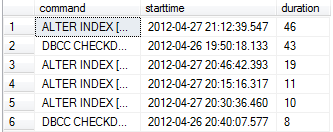
1. Find the most expensive “SQL server maintenance” job for last one month

SELECT command,starttime, DATEDIFF(MINUTE,starttime,endtime) as duration FROM dbo.CommandLog
WHERE starttime BETWEEN GETDATE()-30 AND GETDATE()
ORDER BY 3 DESC
image

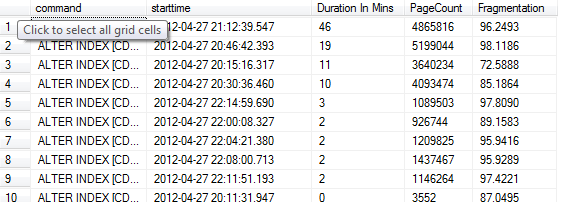
2. Find list of reorg/rebuilt indexes & their fragmentation details

select command,starttime, DATEDIFF(MINUTE,starttime,endtime) as "Duration In Mins", ExtendedInfo.value('(/ExtendedInfo/PageCount)[1]', 'int') as PageCount,
          ExtendedInfo.value('(/ExtendedInfo/Fragmentation)[1]', 'decimal(10,4)') as Fragmentation
from commandlog
where command is not null 
and ExtendedInfo.value('(/ExtendedInfo/PageCount)[1]', 'int') is not null
and ExtendedInfo.value('(/ExtendedInfo/Fragmentation)[1]', 'decimal(10,4)') is not null
ORDER BY 3 DESC
image

3.  Script to shrink all user SQL databases.

DECLARE @db VARCHAR(255)
DECLARE c CURSOR FOR
SELECT name FROM sys.databases WHERE is_read_only=0 AND STATE=0
  AND name NOT IN ('master','model','tempdb','msdb')
OPEN c
FETCH c INTO @db
WHILE @@FETCH_STATUS=0
BEGIN
  EXEC SP_dboption @db,'trunc. log on chkpt.','true' 
  DBCC shrinkdatabase (@db)
  FETCH NEXT FROM c INTO @db
END
CLOSE c
DEALLOCATE c
image

4. Shrink log files for all databases

declare @ssql nvarchar(4000)
set @ssql= '
        if ''?'' not in (''tempdb'',''master'',''model'',''msdb'') begin
        use [?]
        declare @tsql nvarchar(4000) set @tsql = ''''
        declare @iLogFile int
        declare LogFiles cursor for
        select fileid from sysfiles where  status & 0x40 = 0x40
        open LogFiles
        fetch next from LogFiles into @iLogFile
        while @@fetch_status = 0
        begin
          set @tsql = @tsql + ''DBCC SHRINKFILE(''+cast(@iLogFile as varchar(5))+'', 1) ''
          fetch next from LogFiles into @iLogFile
        end
        set @tsql = @tsql + '' BACKUP LOG [?] WITH TRUNCATE_ONLY '' + @tsql
        --print @tsql
        exec(@tsql)
        close LogFiles
        DEALLOCATE LogFiles
        end'

exec sp_msforeachdb @ssql

Streams | ORA-24082 while disabling a propagation job

Posted by Sagar Patil

The reason for the ORA-24082 error is that a message has been enqueued  onto the AQ$_PROP_NOTIFY_<N> queue to notify the job_queue_process associated with  the propagation schedule to stop propagating messages and the
job_queue_process has failed to acknowledge that message within a  reasonable amount of time.

dbms_aqadm.disable_propagation_schedule(
queue_name => ‘STRMADMIN. SCOTT_PROPAGATION_Q’, destination => ‘${DEST_DB}’, destination_queue => ‘STRMADMIN. SCOTT_PROPAGATION_Q’);

stopping SCOTT_PROPAGATION
BEGIN
*
ERROR at line 1:
ORA-24082: propagation may still be happening for the schedule for QUEUE
STRMADMIN.SCOTT_C_Q and DESTINATION STREAMS
ORA-06512: at line 11

Use stop_propagation with Force option

select PROPAGATION_NAME,status from dba_propagation where propagation_name=’SCOTT’;

PROPAGATION_NAME                   STATUS
————————————————————————————
SCOTT_P                            ENABLED

SQL> execute dbms_propagation_adm.stop_propagation(propagation_name=>’SCOTT_P’,force=>TRUE);
PL/SQL procedure successfully completed.

select PROPAGATION_NAME,status from dba_propagation where propagation_name=’SCOTT’;

PROPAGATION_NAME                   STATUS
———————————————————————————–
SCOTT_P                            ABORTED

If you have number of propagation processes within database to stop then try bash script below

#!/bin/bash
# This script will connect to each Database defined at array “SIDs”
# Disable Capture process
# Disable Propogation process
#
# If you want to run SQL commands at ALL instances active on the Box please use line below
# typeset -a SIDS=($(ps -ef | grep pmon | grep -v grep | awk -F_ ‘{print $NF}’))
#
# Connect to specific database defined at SIDS=(test1 test2 test3)
typeset -a SIDS=(ORCL)

for x in $(seq 0 $((${#SIDS[*]}-1)))
do
export ORACLE_SID=${SIDS[x]}
export ORACLE_HOME=$(awk -F: ‘/’^$ORACLE_SID’/ {print $2}’ /etc/oratab)
typeset -a UIDS=($(
$ORACLE_HOME/bin/sqlplus -s strmadmin/strmadmin <<EOF | grep -v “SQL>” | grep “M_A_R_K” |awk ‘{print $1}’
set feedback off
set pages 0
set hea off
select capture_name, ‘M_A_R_K’  from sys.streams$_capture_process where status= 1;
order by 1;
quit
EOF
))
for ID in ${UIDS[*]}
do
#
# DEST_DB — Set this variable to Target Database
# If your destination_queue name is different then please change value accordingly
#
$ORACLE_HOME/bin/sqlplus  -s strmadmin/strmadmin <<EOF
set pages 0;
set feedback off;
set linesize 200;
Begin
dbms_aqadm.disable_propagation_schedule(
queue_name => ‘STRMADMIN.${ID}_Q’,
destination => ‘${DEST_DB}’,
destination_queue => ‘STRMADMIN.${ID}_Q’);
EXCEPTION
WHEN OTHERS THEN
IF sqlcode = -24082 THEN
execute dbms_propagation_adm.stop_propagation(propagation_name=>’${ID}’,force=>TRUE);
END IF;
IF sqlcode = -24064  THEN NULL;
ELSE RAISE;
END IF;
END;
exit;
EOF
echo “Proceed/Cancel (P/C)?”
read A
[[ $A != “p” && $A != “P” ]] && exit
#    “break” will skip the remaining users for this SID and continue with the next SID
#    To skip everything (the remaining users for this SID as well as the remaining SIDs)replace “break” with “exit”.
done
done

Streams/RAC and Database Link Problem

Posted by Sagar Patil

While working with streams 10g RAC,  setup went well but source database  propagation process won’t work with target database “strmrepl1” and returned TNS “12514” error.

Propagation Schedule for (STRMADMIN.SCOTT_C_Q, “STRMADMIN”.”SCOTT_A_Q”@strmrepl) encountered following error:
ORA-12514: TNS:listener does not currently know of service requested in connect descriptor

Strangely I could see db links working fine from source(streams) to destination(strmrepl) and vice versa. Manually DB links were working under TOAD, SQLPLUS but thru streams propagate process they won’t.

Finally I hit a solution when I carried “lsnrctl staus LISTENER”
I could see there were 2 services registered for same servicename

[Streams]$ lsnrctl status LISTENER | grep str
Service “replication” has 2 instance(s).
Instance “streams1”, status READY, has 2 handler(s) for this service…
Instance “strmrepl1”, status READY, has 2 handler(s) for this service…

Show parameter service_names at database did flash both instance details which seem wrongly updated.

Solution : Set right value for service name at database instance

[oracle@]$ srvctl config service -d streams      –Source DB
strmtesting PREF: streams1 AVAIL:

[oracle@]$ srvctl config service -d strmrepl    –Target DB
replication PREF: strmrepl1 AVAIL:

SQL> alter system set service_names=’replication’
$lsnrctl reload LISTENER

[Streams]$ lsnrctl status LISTENER | grep str
Service “replication” has 1 instance(s).
Instance “strmrepl1”, status READY, has 2 handler(s) for this service…

Setting up Bidirectional Streams SCHEMA Replication

Posted by Sagar Patil

Details below are for configuring a schema level replication using API DBMS_STREAMS_ADM.MAINTAIN_SCHEMAS.

1. Verify Source & Target System for Streams Configuration

CONNECT system/manager@ {STREAMS/STRMREPL}
SET SQLPROMPT "STREAMS> "
set pages 0;
set linesize 2000;
SELECT * FROM global_name; 
SHOW PARAMETER service_names
SHOW PARAMETER global_names

-- Verify database parameters
col name HEADING 'Parameter|Name' format a30
col value HEADING 'Parameter|Value' format a15
col description HEADING 'Description' format a60 word
select name,value,description from v$parameter where name in
 ('aq_tm_processes', 'archive_lag_target', 'job_queue_processes','_job_queue_interval',
 'shared_pool_size', 'sga_max_size', 'sga_target','streams_pool_size',
 'global_names', 'compatible','log_parallelism', 'logmnr_max_persistent_sessions',
 'parallel_max_servers', 'processes', 'sessions'
 );

-- Verify ARCHIVELOG mode and archive log settings
ARCHIVE LOG LIST
SHOW PARAMETER log_archive_format
SHOW PARAMETER log_archive_dest_1
SHOW PARAMETER log_archive_dest_state_1

-- Verify Streams administrator
SELECT username, account_status, default_tablespace
 FROM DBA_USERS
 WHERE username = 'STRMADMIN';
SELECT *
 FROM DBA_STREAMS_ADMINISTRATOR;

-- Verify database link as Streams administrator
CONNECT strmadmin/strmadmin@STREAMS
SELECT db_link
 FROM DBA_DB_LINKS;

-- Verify directory objects
SELECT directory_name, directory_path
 FROM   dba_directories;

2. Setting Up SCOTT Schema Replication

STREAMS>>conn scott/tiger
Connected.
STREAMS>>select * from tab;
TNAME                          TABTYPE  CLUSTERID
------------------------------ ------- ----------
DEPT                           TABLE
EMP                            TABLE
BONUS                          TABLE
SALGRADE                       TABLE
SALES                          TABLE
COSTS                          TABLE
TIMES                          TABLE
CHANNELS                       TABLE
PROMOTIONS                     TABLE
COUNTRIES                      TABLE
PRODUCTS                       TABLE
CATEGORIES_TAB                 TABLE
PRODUCT_REF_LIST_NESTEDTAB     TABLE
SUBCATEGORY_REF_LIST_NESTEDTAB TABLE
CUSTOMERS                      TABLE
EMP_REPL                       TABLE
16 rows selected.

STRMREPL>>conn scott/tiger
Connected.
STRMREPL>>select * from tab;
no rows selected

There are no tables existing at destination schema : SCOTT@STRMREPL

set serveroutput on;
set term on;
set lines 200;
BEGIN
 DBMS_STREAMS_ADM.MAINTAIN_SCHEMAS(
 schema_names => 'SCOTT',
 source_directory_object => 'STREAMS_DIR',
 destination_directory_object => 'STRMREPL_DIR',
 source_database => 'STREAMS',
 destination_database => 'STRMREPL',
 perform_actions => TRUE,
 dump_file_name => 'scott_exp.dmp',
 capture_name => 'SCOTT_CAP',
 capture_queue_table => 'SCOTT_SCHEMA_CAPTURE_QT',
 capture_queue_name => 'SCOTT_SCHEMA_CAPTURE_Q',
 propagation_name => 'SCOTT_SCHEMA_PROPAGATION',
 apply_name => 'SCOTT_SCHEMA_APPLY',
 apply_queue_table => 'strmadmin.SCOTT_SCHEMA_APPLY_QT',
 apply_queue_name => 'strmadmin.SCOTT_SCHEMA_APPLY_Q',
 bi_directional=> TRUE,
 include_ddl => FALSE,
 instantiation=>DBMS_STREAMS_ADM.INSTANTIATION_SCHEMA);
 END;
 /
job finished
PL/SQL procedure successfully completed.

This can take a long time depending on schema to be replciated.
To monitor progress have alook at filesizes of expdp operation "scott_exp.dmp" at STREAMS_DIR & STRMREPL_DIR

select from dba_recoverable_script_errors to see there were no errors
STREAMS>> select error_message,block_num from dba_recoverable_script_errors

STRMREPL>>conn scott/tiger
Connected.
STRMREPL>>select * from tab;
TNAME                          TABTYPE  CLUSTERID
------------------------------ ------- ----------
DEPT                           TABLE
EMP                            TABLE
BONUS                          TABLE
SALGRADE                       TABLE
SALES                          TABLE
COSTS                          TABLE
TIMES                          TABLE
CHANNELS                       TABLE
PROMOTIONS                     TABLE
COUNTRIES                      TABLE
PRODUCTS                       TABLE
CATEGORIES_TAB                 TABLE
PRODUCT_REF_LIST_NESTEDTAB     TABLE
SUBCATEGORY_REF_LIST_NESTEDTAB TABLE
CUSTOMERS                      TABLE
EMP_REPL                       TABLE
16 rows selected.


3) Let’s verify DML changes executed in STREAMS are propagated to STRMREPL database

STREAMS>>delete from scott.promotions;
2 rows deleted.
STREAMS>>commit;
Commit complete.
STREAMS>>select count(*) from scott.promotions;
 COUNT(*)
----------
 0

At replicated Site 
STRMREPL>>select count(*) from scott.promotions;
 COUNT(*)
----------
 0

Note the DDL changes are not replicated as I set "include_ddl => FALSE" at "MAINTAIN_SCHEMAS"

STREAMS>>drop table scott.emp;
Table dropped.
STREAMS>>desc scott.emp;
ERROR:
ORA-04043: object scott.emp does not exist

STRMREPL>>desc scott.emp;
 Name                                                                                                    Null?    Type
 ----------------------------------------------------------------------------------------------------------------- -------- ----------------------------------------------------------------------------
 EMPNO                                                                                                   NOT NULL NUMBER(4)
 ENAME                                                                                                    VARCHAR2(10)
 JOB                                                                                                      VARCHAR2(9)
 MGR                                                                                                      NUMBER(4)
 HIREDATE                                                                                                 DATE
 SAL                                                                                                      NUMBER(7,2)
 COMM                                                                                                     NUMBER(7,2)
 DEPTNO                                                                                                   NUMBER(2)

Issues Noticed

STREAMS>>select error_message,block_num from dba_recoverable_script_errors;

ERROR_MESSAGE
--------------------------------------------------------------------------------------------------------------------------------------------------------------------------------------------------------
 BLOCK_NUM
----------
ORA-24035: AQ agent  is not a subscriber for queue STRMADMIN.SCOTT_SCHEMA_CAPTURE_Q

I fixed it by deleting rows from following 2 tables.

SQL> conn / as sysdba
Connected.
STREAMS>> delete from dba_recoverable_script_errors;
STREAMS>> delete from dba_recoverable_script;
STREAMS>> commit;

If needed you can delete all streams config details except db_links and parameters using API below

A) Disable propagation schedule
STREAMS>> exec dbms_aqadm.disable_propagation_schedule(queue_name => 'SCOTT_SCHEMA_CAPTURE_Q',destination => 'STRMREPL',destination_queue => 'strmadmin.SCOTT_SCHEMA_APPLY_Q');

B) Drop propagation
STREAMS>> exec dbms_propagation_adm.drop_propagation(propagation_name => 'SCOTT_SCHEMA_PROPAGATION',drop_unused_rule_sets => true);
PL/SQL procedure successfully completed.

C) Remove Streams
STREAMS>> exec  dbms_streams_adm.remove_streams_configuration;
PL/SQL procedure successfully completed.

D) Drop Queues for capture and apply
– drop capture queue
STREAMS>>exec  DBMS_STREAMS_ADM.REMOVE_QUEUE('SCOTT_SCHEMA_CAPTURE_Q',TRUE);
PL/SQL procedure successfully completed.

– drop apply queue
STREAMS>>Exec DBMS_STREAMS_ADM.REMOVE_QUEUE('strmadmin.SCOTT_SCHEMA_APPLY_Q',TRUE);
PL/SQL procedure successfully completed.

Finally delete any STREAMs errors reported
STREAMS>> delete from dba_recoverable_script_errors;
STREAMS>> delete from dba_recoverable_script;
STREAMS>> commit;

Streams Replication| Monitoring Streams Capture Processes

Posted by Sagar Patil

Capture process is an optional Streams client that is an Oracle background process that scans a database redo log to capture DML and DDL changes made to database objects.

1)  Displaying the Queue, Rule Sets, and Status of Each Capture Process
2)  Displaying Change Capture Information About Each Capture Process
3)  Displaying State Change and Message Creation Time for Each Capture Process
4)  Displaying Elapsed Time Performing Capture Operations for Each Capture Process
5)  Displaying Information About Each Downstream Capture Process
6)  Displaying the Registered Redo Log Files for Each Capture Process
7)  Displaying the Redo Log Files that Are Required by Each Capture Process
8)  Displaying SCN Values for Each Redo Log File Used by Each Capture Process
9)  Displaying the Last Archived Redo Entry Available to Each Capture Process
10) Listing the Parameter Settings for Each Capture Process
11) Viewing the Extra Attributes Captured by Each Capture Process
12) Determining the Applied SCN for All Capture Processes in a Database
13) Determining Redo Log Scanning Latency for Each Capture Process
14) Determining Message Enqueuing Latency for Each Capture Process
15) Displaying Information About Rule Evaluations for Each Capture Process

1)    Displaying the Queue, Rule Sets, and Status of Each Capture Process
To display this general information about each capture process in a database, run the following query:

COLUMN CAPTURE_NAME HEADING 'Capture|Process|Name' FORMAT A15
COLUMN QUEUE_NAME HEADING 'Capture|Process|Queue' FORMAT A15
COLUMN RULE_SET_NAME HEADING 'Positive|Rule Set' FORMAT A15
COLUMN NEGATIVE_RULE_SET_NAME HEADING 'Negative|Rule Set' FORMAT A15
COLUMN STATUS HEADING 'Capture|Process|Status' FORMAT A15

SELECT CAPTURE_NAME, QUEUE_NAME, RULE_SET_NAME, NEGATIVE_RULE_SET_NAME, STATUS
FROM DBA_CAPTURE;

Capture         Capture                                         Capture
Process         Process         Positive        Negative        Process
Name            Queue           Rule Set        Rule Set        Status
--------------- --------------- --------------- --------------- ---------------
STREAMS_DATA_C STREAMS_DATA_C RULESET$_54                     ENABLED
 _Q
If the status of a capture process is ABORTED, then you can query the ERROR_NUMBER and ERROR_MESSAGE columns in the DBA_CAPTURE data dictionary view to determine the error.

2)    Displaying Change Capture Information About Each Capture Process
The query in this section displays the following information about each capture process in a database:
The current state of the capture process: INITIALIZING,WAITING FOR DICTONARY REDO, DICTIONARY INITIALIZATION, MINING, LOADING, CAPTURING CHANGES, WAITING FOR REDO, EVALUATING RULE, CREATING LCR, ENQUEUING MESSAGE, PAUSED FOR FLOW CONTROL, SHUTTING DOWN
The total number of redo entries passed by LogMiner to the capture process for detailed rule evaluation. A capture process converts a redo entry into a message and performs detailed rule evaluation on the message when capture process prefiltering cannot discard the change.
COLUMN CAPTURE_NAME HEADING 'Capture|Name' FORMAT A15
COLUMN PROCESS_NAME HEADING 'Capture|Process|Number' FORMAT A7
COLUMN SID HEADING 'Session|ID' FORMAT 9999
COLUMN SERIAL# HEADING 'Session|Serial|Number' FORMAT 9999
COLUMN STATE HEADING 'State' FORMAT A27
COLUMN TOTAL_MESSAGES_CAPTURED HEADING 'Redo|Entries|Evaluated|In Detail' FORMAT 9999999
COLUMN TOTAL_MESSAGES_ENQUEUED HEADING 'Total|LCRs|Enqueued' FORMAT 999999

SELECT c.CAPTURE_NAME,
 SUBSTR(s.PROGRAM,INSTR(s.PROGRAM,'(')+1,4) PROCESS_NAME,
 c.SID,
 c.SERIAL#,
 c.STATE,
 c.TOTAL_MESSAGES_CAPTURED,
 c.TOTAL_MESSAGES_ENQUEUED
 FROM V$STREAMS_CAPTURE c, V$SESSION s
 WHERE c.SID = s.SID AND
 c.SERIAL# = s.SERIAL#;
Redo
 Capture         Session                               Entries
Capture         Process Session  Serial                             Evaluated
Name            Number       ID  Number State                       In Detail
--------------- ------- ------- ------- --------------------------- ---------
 Total
 LCRs
Enqueued
--------
STREAMS_DATA_C CP01        217    2119 WAITING FOR TRANSACTION      ########
 #######

3)    Displaying State Change and Message Creation Time for Each Capture Process

COLUMN CAPTURE_NAME HEADING 'Capture|Name' FORMAT A15
COLUMN STATE HEADING 'State' FORMAT A27
COLUMN STATE_CHANGED HEADING 'State|Change Time'
COLUMN CREATE_MESSAGE HEADING 'Last Message|Create Time'

SELECT CAPTURE_NAME,
 STATE,
 TO_CHAR(STATE_CHANGED_TIME, 'HH24:MI:SS MM/DD/YY') STATE_CHANGED,
 TO_CHAR(CAPTURE_MESSAGE_CREATE_TIME, 'HH24:MI:SS MM/DD/YY') CREATE_MESSAGE
 FROM V$STREAMS_CAPTURE;

Capture                                     State             Last Message
Name            State                       Change Time       Create Time
--------------- --------------------------- ----------------- -----------------
STREAMS_DATA_C WAITING FOR TRANSACTION     13:03:11 01/26/10 13:03:13 01/26/10

4)    Displaying Elapsed Time Performing Capture Operations for Each Capture Process
To display this information for each capture process in a database, run the following query:

COLUMN CAPTURE_NAME HEADING 'Capture|Name' FORMAT A15
COLUMN ELAPSED_CAPTURE_TIME HEADING 'Elapsed|Capture|Time' FORMAT 99999999.99
COLUMN ELAPSED_RULE_TIME HEADING 'Elapsed|Rule|Evaluation|Time' FORMAT 99999999.99
COLUMN ELAPSED_ENQUEUE_TIME HEADING 'Elapsed|Enqueue|Time' FORMAT 99999999.99
COLUMN ELAPSED_LCR_TIME HEADING 'Elapsed|LCR|Creation|Time' FORMAT 99999999.99
COLUMN ELAPSED_PAUSE_TIME HEADING 'Elapsed|Pause|Time' FORMAT 99999999.99

SELECT CAPTURE_NAME,
 (ELAPSED_CAPTURE_TIME/100) ELAPSED_CAPTURE_TIME,
 (ELAPSED_RULE_TIME/100) ELAPSED_RULE_TIME,
 (ELAPSED_ENQUEUE_TIME/100) ELAPSED_ENQUEUE_TIME,
 (ELAPSED_LCR_TIME/100) ELAPSED_LCR_TIME,
 (ELAPSED_PAUSE_TIME/100) ELAPSED_PAUSE_TIME
 FROM V$STREAMS_CAPTURE;

Elapsed                   Elapsed
 Elapsed         Rule      Elapsed          LCR      Elapsed
Capture              Capture   Evaluation      Enqueue     Creation        Pause
Name                    Time         Time         Time         Time         Time
--------------- ------------ ------------ ------------ ------------ ------------
STREAMS_DATA_C       279.21          .26          .43          .26          .00

5)    Displaying Information About Each Downstream Capture Process
A downstream capture is a capture process runs on a database other than the source database.
You can display the following information about each downstream capture process in a database by running the query in this section:

COLUMN CAPTURE_NAME HEADING 'Capture|Process|Name' FORMAT A15
COLUMN SOURCE_DATABASE HEADING 'Source|Database' FORMAT A15
COLUMN QUEUE_NAME HEADING 'Capture|Process|Queue' FORMAT A15
COLUMN STATUS HEADING 'Capture|Process|Status' FORMAT A15
COLUMN USE_DATABASE_LINK HEADING 'Uses|Database|Link?' FORMAT A8

SELECT CAPTURE_NAME,
 SOURCE_DATABASE,
 QUEUE_NAME,
 STATUS,
 USE_DATABASE_LINK
 FROM DBA_CAPTURE
 WHERE CAPTURE_TYPE = 'DOWNSTREAM';

6)    Displaying the Registered Redo Log Files for Each Capture Process
This query displays information about these files for both local capture processes and downstream capture processes.

COLUMN CONSUMER_NAME HEADING 'Capture|Process|Name' FORMAT A15
COLUMN SOURCE_DATABASE HEADING 'Source|Database' FORMAT A10
COLUMN SEQUENCE# HEADING 'Sequence|Number' FORMAT 99999
COLUMN NAME HEADING 'Archived Redo Log|File Name' FORMAT A20
COLUMN DICTIONARY_BEGIN HEADING 'Dictionary|Build|Begin' FORMAT A10
COLUMN DICTIONARY_END HEADING 'Dictionary|Build|End' FORMAT A10

SELECT r.CONSUMER_NAME,
 r.SOURCE_DATABASE,
 r.SEQUENCE#,
 r.NAME,
 r.DICTIONARY_BEGIN,
 r.DICTIONARY_END
 FROM DBA_REGISTERED_ARCHIVED_LOG r, DBA_CAPTURE c
 WHERE r.CONSUMER_NAME = c.CAPTURE_NAME;

Capture                                                  Dictionary Dictionary
Process         Source     Sequence Archived Redo Log    Build      Build
Name            Database     Number File Name            Begin      End
--------------- ---------- -------- -------------------- ---------- ----------
STREAMS_DATA_C   PROD         7175 /mnt/logs/oradata/   NO         NO
 PROD/arch/1_7175_732278995.arc

STREAMS_DATA_C   PROD         7176 /mnt/logs/oradata/   NO         NO
 PROD/arch/1_7176_732278995.arc

STREAMS_DATA_C   PROD         7177 /mnt/logs/oradata/   NO         NO
 PROD/arch/1_7177_732278995.arc

7)    Displaying the Redo Log Files that Are Required by Each Capture Process
A capture process needs the redo log file that includes the required checkpoint SCN, and all subsequent redo log files.
You can query the REQUIRED_CHECKPOINT_SCN column in the DBA_CAPTURE data dictionary view to determine the required checkpoint SCN for a capture process. Redo log files prior to the redo log file that contains the required checkpoint SCN are no longer needed by the capture process. These redo log files can be stored offline if they are no longer needed for any other purpose. If you reset the start SCN for a capture process to a lower value in the future, then these redo log files might be needed.
To display this information about each required archive redo log file in a database, run the following query:

COLUMN CONSUMER_NAME HEADING 'Capture|Process|Name' FORMAT A15
COLUMN SOURCE_DATABASE HEADING 'Source|Database' FORMAT A10
COLUMN SEQUENCE# HEADING 'Sequence|Number' FORMAT 99999
COLUMN NAME HEADING 'Required|Archived Redo Log|File Name' FORMAT A40

SELECT r.CONSUMER_NAME,
 r.SOURCE_DATABASE,
 r.SEQUENCE#,
 r.NAME
 FROM DBA_REGISTERED_ARCHIVED_LOG r, DBA_CAPTURE c
 WHERE r.CONSUMER_NAME =  c.CAPTURE_NAME AND
 r.NEXT_SCN      >= c.REQUIRED_CHECKPOINT_SCN;

Capture                             Required
Process         Source     Sequence Archived Redo Log
Name            Database     Number File Name
--------------- ---------- -------- ----------------------------------------
STREAMS_DATA_C PROD        13418 /mnt/logs/oradata/PROD/arch/2_13418_732278995.arc
STREAMS_DATA_C PROD        10762 /mnt/logs/oradata/PROD/arch/1_10762_732278995.arc

8)    Displaying SCN Values for Each Redo Log File Used by Each Capture Process:

You can display information about the SCN values for archived redo log files that are registered for each capture process in a database by running the query in this section.
This query displays information the SCN values for these files for both local capture processes and downstream capture processes. This query also identifies redo log files that are no longer needed by any capture process at the local database.
To display this information about each registered archive redo log file in a database, run the following query:

COLUMN CONSUMER_NAME HEADING 'Capture|Process|Name' FORMAT A15
COLUMN NAME HEADING 'Archived Redo Log|File Name' FORMAT A25
COLUMN FIRST_SCN HEADING 'First SCN' FORMAT 99999999999
COLUMN NEXT_SCN HEADING 'Next SCN' FORMAT 99999999999
COLUMN PURGEABLE HEADING 'Purgeable?' FORMAT A10

SELECT r.CONSUMER_NAME,
 r.NAME,
 r.FIRST_SCN,
 r.NEXT_SCN,
 r.PURGEABLE
 FROM DBA_REGISTERED_ARCHIVED_LOG r, DBA_CAPTURE c
 WHERE r.CONSUMER_NAME = c.CAPTURE_NAME;

Capture
Process         Archived Redo Log
Name            File Name                    First SCN     Next SCN Purgeable?
--------------- ------------------------- ------------ ------------ ----------
STREAMS_DATA_C /mnt/logs/oradata/PROD/           7499664298   7499908128 NO
 arch/1_7175_732278995.arc

STREAMS_DATA_C /mnt/logs/oradata/PROD/           7499908128   7500009109 NO
 arch/1_7176_732278995.arc

9) Displaying the Last Archived Redo Entry Available to Each Capture Process
For a local capture process, the last archived redo entry available is the last entry from the online redo log flushed to an archived log file.
For a downstream capture process, the last archived redo entry available is the redo entry with the most recent SCN in the last archived log file added to the LogMiner session used by the capture process.

COLUMN CAPTURE_NAME HEADING 'Capture|Name' FORMAT A20
COLUMN LOGMINER_ID HEADING 'LogMiner ID' FORMAT 9999
COLUMN AVAILABLE_MESSAGE_NUMBER HEADING 'Last Redo SCN' FORMAT 9999999999
COLUMN AVAILABLE_MESSAGE_CREATE_TIME HEADING 'Time of|Last Redo SCN'

SELECT CAPTURE_NAME,
 LOGMINER_ID,
 AVAILABLE_MESSAGE_NUMBER,
 TO_CHAR(AVAILABLE_MESSAGE_CREATE_TIME, 'HH24:MI:SS MM/DD/YY')
 AVAILABLE_MESSAGE_CREATE_TIME
 FROM V$STREAMS_CAPTURE;

Capture                                        Time of
Name                 LogMiner ID Last Redo SCN Last Redo SCN
-------------------- ----------- ------------- -----------------
STREAMS_DATA_C                9    8087814747 23:13:18 10/26/10

10)    Listing the Parameter Settings for Each Capture Process
Following query displays the current setting for each capture process parameter for each capture process in a database:

COLUMN CAPTURE_NAME HEADING 'Capture|Process|Name' FORMAT A25
COLUMN PARAMETER HEADING 'Parameter' FORMAT A25
COLUMN VALUE HEADING 'Value' FORMAT A10
COLUMN SET_BY_USER HEADING 'Set by User?' FORMAT A15

SELECT CAPTURE_NAME,
 PARAMETER,
 VALUE,
 SET_BY_USER 
 FROM DBA_CAPTURE_PARAMETERS;

Capture
Process
Name                      Parameter                 Value      Set by User?
------------------------- ------------------------- ---------- ---------------
STREAMS_DATA_C           PARALLELISM               1          NO
STREAMS_DATA_C           STARTUP_SECONDS           0          NO
STREAMS_DATA_C           TRACE_LEVEL               0          NO
STREAMS_DATA_C           TIME_LIMIT                INFINITE   NO
STREAMS_DATA_C           MESSAGE_LIMIT             INFINITE   NO
STREAMS_DATA_C           MAXIMUM_SCN               INFINITE   NO
STREAMS_DATA_C           WRITE_ALERT_LOG           Y          NO
STREAMS_DATA_C           DISABLE_ON_LIMIT          N          NO
STREAMS_DATA_C           DOWNSTREAM_REAL_TIME_MINE Y          NO
STREAMS_DATA_C           IGNORE_TRANSACTION                   NO
STREAMS_DATA_C           MESSAGE_TRACKING_FREQUENC 2000000    NO
 Y

STREAMS_DATA_C           IGNORE_UNSUPPORTED_TABLE  *          NO
STREAMS_DATA_C           SKIP_AUTOFILTERED_TABLE_D Y          NO
 DL

STREAMS_DATA_C           SPLIT_THRESHOLD           1800       NO
STREAMS_DATA_C           MERGE_THRESHOLD           60         NO
STREAMS_DATA_C           CAPTURE_SEQUENCE_NEXTVAL  N          NO
STREAMS_DATA_C           XOUT_CLIENT_EXISTS        N          NO
STREAMS_DATA_C           EXCLUDEUSER                          NO
STREAMS_DATA_C           EXCLUDEUSERID                        NO
STREAMS_DATA_C           EXCLUDETRANS                         NO
STREAMS_DATA_C           GETREPLICATES             N          NO
STREAMS_DATA_C           GETAPPLOPS                Y          NO
STREAMS_DATA_C           CAPTURE_IDKEY_OBJECTS     N          NO
STREAMS_DATA_C           MAX_SGA_SIZE              INFINITE   NO

11)    Viewing the Extra Attributes Captured by Each Capture Process
You can use the INCLUDE_EXTRA_ATTRIBUTE procedure in the DBMS_CAPTURE_ADM package to instruct a capture process to capture one or more extra attributes from the redo log.
The following query displays the extra attributes included in the LCRs captured by each capture process in the local database:

COLUMN CAPTURE_NAME HEADING 'Capture Process' FORMAT A20
COLUMN ATTRIBUTE_NAME HEADING 'Attribute Name' FORMAT A15
COLUMN INCLUDE HEADING 'Include Attribute in LCRs?' FORMAT A30

SELECT CAPTURE_NAME, ATTRIBUTE_NAME, INCLUDE
 FROM DBA_CAPTURE_EXTRA_ATTRIBUTES
 ORDER BY CAPTURE_NAME;

Capture Process      Attribute Name  Include Attribute in LCRs?
-------------------- --------------- ------------------------------
STREAMS_DATA_C      THREAD#         NO
STREAMS_DATA_C      ROW_ID          NO
STREAMS_DATA_C      TX_NAME         NO
STREAMS_DATA_C      SERIAL#         NO
STREAMS_DATA_C      USERNAME        NO
STREAMS_DATA_C      SESSION#        NO

12) Determining the Applied SCN for All Capture Processes in a Database
The applied system change number (SCN) for a capture process is the SCN of the most recent message dequeued by the relevant apply processes. All changes below this applied SCN have been dequeued by all apply processes that apply changes captured by the capture process.

COLUMN CAPTURE_NAME HEADING 'Capture Process Name' FORMAT A30
COLUMN APPLIED_SCN HEADING 'Applied SCN' FORMAT 99999999999

SELECT   CAPTURE_NAME, APPLIED_SCN FROM DBA_CAPTURE;

Capture Process      APPLIED_SCN
-------------------- -----------
STREAMS_DATA_C       8087783293

13) Determining Redo Log Scanning Latency for Each Capture Process

COLUMN CAPTURE_NAME HEADING 'Capture|Process|Name' FORMAT A10
COLUMN LATENCY_SECONDS HEADING 'Latency|in|Seconds' FORMAT 999999
COLUMN LAST_STATUS HEADING 'Seconds Since|Last Status' FORMAT 999999
COLUMN CAPTURE_TIME HEADING 'Current|Process|Time'
COLUMN CREATE_TIME HEADING 'Message|Creation Time' FORMAT 999999

SELECT CAPTURE_NAME,
 ((SYSDATE - CAPTURE_MESSAGE_CREATE_TIME)*86400) LATENCY_SECONDS,
 ((SYSDATE - CAPTURE_TIME)*86400) LAST_STATUS,
 TO_CHAR(CAPTURE_TIME, 'HH24:MI:SS MM/DD/YY') CAPTURE_TIME,     
 TO_CHAR(CAPTURE_MESSAGE_CREATE_TIME, 'HH24:MI:SS MM/DD/YY') CREATE_TIME
 FROM V$STREAMS_CAPTURE;

Capture    Latency               Current
Process         in Seconds Since Process           Message
Name       Seconds   Last Status Time              Creation Time
---------- ------- ------------- ----------------- -----------------
INFO_CONTR       2             1 23:21:36 10/26/10 23:21:35 10/26/10
ACT_C

The “Latency in Seconds” returned by this query is the difference between the current time (SYSDATE) and the “Message Creation Time.” The “Seconds Since Last Status” returned by this query is the difference between the current time (SYSDATE) and the “Current Process Time.”

14)    Determining Message Enqueuing Latency for Each Capture Process
Run the following query to determine the message capturing latency for each capture process:

COLUMN CAPTURE_NAME HEADING 'Capture|Process|Name' FORMAT A10
COLUMN LATENCY_SECONDS HEADING 'Latency|in|Seconds' FORMAT 999999
COLUMN CREATE_TIME HEADING 'Message Creation|Time' FORMAT A20
COLUMN ENQUEUE_TIME HEADING 'Enqueue Time' FORMAT A20
COLUMN ENQUEUE_MESSAGE_NUMBER HEADING 'Message|Number' FORMAT 999999

SELECT CAPTURE_NAME,
 (ENQUEUE_TIME-ENQUEUE_MESSAGE_CREATE_TIME)*86400 LATENCY_SECONDS,
 TO_CHAR(ENQUEUE_MESSAGE_CREATE_TIME, 'HH24:MI:SS MM/DD/YY') CREATE_TIME,
 TO_CHAR(ENQUEUE_TIME, 'HH24:MI:SS MM/DD/YY') ENQUEUE_TIME,
 ENQUEUE_MESSAGE_NUMBER
 FROM V$STREAMS_CAPTURE;

Capture    Latency
Process         in Message Creation                          Message
Name       Seconds Time                 Enqueue Time          Number
---------- ------- -------------------- -------------------- -------
STREAMS_DATA   -3 23:22:25 10/26/10    23:22:22 10/26/10    #######

15)    Displaying Information About Rule Evaluations for Each Capture Process

COLUMN CAPTURE_NAME HEADING 'Capture|Name' FORMAT A15
COLUMN TOTAL_PREFILTER_DISCARDED HEADING 'Prefilter|Changes|Discarded'
 FORMAT 9999999999
COLUMN TOTAL_PREFILTER_KEPT HEADING 'Prefilter|Changes|Kept' FORMAT 9999999999
COLUMN TOTAL_PREFILTER_EVALUATIONS HEADING 'Prefilter|Evaluations'
 FORMAT 9999999999
COLUMN UNDECIDED HEADING 'Undecided|After|Prefilter' FORMAT 9999999999
COLUMN TOTAL_FULL_EVALUATIONS HEADING 'Full|Evaluations' FORMAT 9999999999

SELECT CAPTURE_NAME,
 TOTAL_PREFILTER_DISCARDED,
 TOTAL_PREFILTER_KEPT,
 TOTAL_PREFILTER_EVALUATIONS,
 (TOTAL_PREFILTER_EVALUATIONS -
 (TOTAL_PREFILTER_KEPT + TOTAL_PREFILTER_DISCARDED)) UNDECIDED,
 TOTAL_FULL_EVALUATIONS
 FROM V$STREAMS_CAPTURE;

Prefilter   Prefilter               Undecided
Capture            Changes     Changes   Prefilter       After        Full
Name             Discarded        Kept Evaluations   Prefilter Evaluations
--------------- ---------- ----------- ----------- ----------- -----------
STREAMS_DATA_C   53128265     1662026    54790291           0         801

The total number of prefilter evaluations equals the sum of the prefilter changes discarded, the prefilter changes kept, and the undecided changes.

Finding Backup details from 11g RMAN respository tables

Posted by Sagar Patil
  • List databases registered with rman repository

select NAME
     , DBID
  from RC_DATABASE;

  • List rman backup STATUS details with database name, Start time, End time , Processed MB/GB

SELECT db_name, row_type, start_time, end_time, operation, status, mbytes_processed
    FROM   rc_rman_status
    WHERE  db_name like  ‘PROD%’
      AND  start_time > SYSDATE – 1
    ORDER  BY END_TIME desc;

  • List backup details of all registered RMAN databases 

SELECT  db_name
      , start_time
      , row_type
      , end_time
      , operation
      , status
      , mbytes_processed
   FROM rc_rman_status
  WHERE start_time > SYSDATE – 1
  ORDER BY DB_NAME
  , start_time;

  • Show backups which are still RUNNING

SELECT  db_name
      , start_time
      , row_type
      , operation
      , status
  FROM rc_rman_status
  WHERE start_time > SYSDATE – 1
  AND STATUS = ‘RUNNING’
  ORDER BY DB_NAME
  , start_time;

  • List db name, tablespace & datafiles backed up with size

select DB_NAME
     , TABLESPACE_NAME
     , FILE#
     , BYTES/1000000000 SIZE_GB
     , NAME
  from RC_DATAFILE
 where DB_NAME = ‘PROD’;

  • List RMAN backup configuration Parameters

select
DB_UNIQUE_NAME
,NAME
,VALUE         
from RC_RMAN_CONFIGURATION
 where DB_UNIQUE_NAME =’PROD’
order by 1,2,3;

ARCHIVELOG BACKUP COPIES FOR DEVICE TYPE      DISK TO 1
ARCHIVELOG DELETION POLICY                    TO NONE
BACKUP OPTIMIZATION                           OFF
CHANNEL                                       DEVICE TYPE DISK FORMAT   '/mnt/backup/Rman/PROD1/%d_%s_%p_%U'
CONTROLFILE AUTOBACKUP                        ON
CONTROLFILE AUTOBACKUP FORMAT FOR DEVICE TYPE DISK TO '/mnt/backup/Rman/PROD1/%F'
DATAFILE BACKUP COPIES FOR DEVICE TYPE        DISK TO 1
DEVICE TYPE                                   DISK PARALLELISM 3 BACKUP TYPE TO COMPRESSED BACKUPSET
MAXSETSIZE TO                                 UNLIMITED
SNAPSHOT CONTROLFILE NAME                     TO '/opt/app/oracle/product/11.2/db_1/dbs/snapcf_RMANTST.f'  
  • List the most recent FULL Database backup with STATUS=’COMPLETED’

select   a.db_name
Database
       , db.dbid DBID
       , a.end_time Latest_Backup
       , round ( a.output_bytes / 1000000000 ) GBytes_Processed
       , round ( ( end_time – start_time ) * 60 * 24 ) Minutes
    from rc_rman_status a
       , rc_database db
   where object_type in ( ‘DB FULL’
   , ‘DB INCR’ )
     and status = ‘COMPLETED’
     and operation = ‘BACKUP’
     and a.db_name = ‘&&DB_NAME’
     and end_time in ( select end_time
           from rc_rman_status b
          where b.db_name = a.db_name
            and b.db_key = a.db_key
            and object_type in ( ‘DB FULL’
          , ‘DB INCR’ )
            and status = ‘COMPLETED’
            and operation = ‘BACKUP’ )
     and db.db_key = a.db_key
   order by a.db_name
   , end_time desc;

  • List Backups for a Specific Database Instance ‘&&DB_NAME’

select   a.db_name
Database
       , db.dbid DBID
       , a.end_time Latest_Backup
       , round ( a.output_bytes / 1000000000 ) GBytes_Processed
       , round ( ( end_time – start_time ) * 60 * 24 ) Minutes_Taken
    from rman.rc_rman_status a
       , rman.rc_database db
   where object_type in ( ‘DB FULL’
   , ‘DB INCR’ )
     and status = ‘COMPLETED’
     and operation = ‘BACKUP’
     and a.db_name = ‘&&DB_NAME’
     and end_time in ( select end_time
           from rman.rc_rman_status b
          where b.db_name = a.db_name
            and b.db_key = a.db_key
            and object_type in ( ‘DB FULL’
          , ‘DB INCR’ )
            and status = ‘COMPLETED’
            and operation = ‘BACKUP’ )
     and db.db_key = a.db_key
   order by a.db_name
   , end_time desc;

DATABASE       DBID LATEST_BA GBYTES_PROCESSED MINUTES_TAKEN
-------- ---------- --------- ---------------- -------------
PROD   4020163152 22-SEP-11                0            20
PROD   4020163152 21-SEP-11                0            19
PROD   4020163152 20-SEP-11                0            17
PROD   4020163152 19-SEP-11                0            16
PROD   4020163152 18-SEP-11                4            13
PROD   4020163152 17-SEP-11                0            15
  • List Archivelog backups

SELECT a.db_name “Database”
     , db.dbid “DBID”
     , a.end_time “Latest Backup”
     , ROUND ( a.output_bytes / 1000000 ) “MBytes Processed”
     , ROUND ( ( end_time – start_time ) * 60 * 24 ) “Minutes Taken”
  FROM rman.rc_rman_status a
     , rman.rc_database db
 WHERE object_type = ‘ARCHIVELOG’
   AND status = ‘COMPLETED’
   AND operation = ‘BACKUP’
   AND a.db_name = ‘&&DB_NAME’
   AND end_time IN ( SELECT end_time
         FROM rman.rc_rman_status b
        WHERE b.db_name = a.db_name
          AND b.db_key = a.db_key
          AND object_type = ‘ARCHIVELOG’
          AND status = ‘COMPLETED’
          AND operation = ‘BACKUP’ )
   AND db.db_key = a.db_key
 ORDER BY a.db_name
 , end_time desc;

  • List all Database FULL backups done in last 30 days

SELECT  SUBSTR ( TO_CHAR ( START_TIME
    , ‘DD-MON-YYYY HH24:MI’ )
        , 1
        , 20 )
      , SUBSTR ( OBJECT_TYPE
  , 1
  , 20 )
   FROM rman.rc_rman_status
  WHERE start_time > SYSDATE – 30
    AND object_type = ‘DB FULL’
  ORDER BY 1 DESC;

  • Is RMAN Backup Still Running?

SELECT TO_CHAR ( start_time
        , ‘DD-MON-YY HH24:MI’ ) “BACKUP STARTED”
     , sofar
     , totalwork
     , elapsed_seconds / 60 “ELAPSE (Min)”
     , ROUND ( sofar / totalwork * 100
       , 2 ) “Complete%”
  FROM sys.v_$session_longops
 WHERE opname = ‘dbms_backup_restore’;

DataGuard Monitorable (Read-Only) Database Properties

Posted by Sagar Patil
Configuration details below are for a 2 Node RAC as Primary (PROD1,PROD2) & 2 node RAC(STDBY1,STDBY2) as Physical Standby.
DGMGRL> show database 'PROD';
Database - PROD
  Role:            PRIMARY
  Intended State:  TRANSPORT-ON
  Instance(s):
    PROD1
    PROD2
Database Status:
SUCCESS

DGMGRL> show database 'STDBY';
Database - STDBY
  Role:            PHYSICAL STANDBY
  Intended State:  APPLY-ON
  Transport Lag:   0 seconds
  Apply Lag:       6 seconds
  Real Time Query: OFF
  Instance(s):
    STDBY1 (apply instance)
    STDBY2
Database Status:
SUCCESS
DGMGRL> show instance verbose "PROD1";
Instance 'PROD1' of database 'PROD'
  Host Name: Primary-Server
  PFILE:
  Properties:
    SidName                         = 'PROD1'
    StaticConnectIdentifier         = '(DESCRIPTION=(ADDRESS=(PROTOCOL=TCP)(HOST=Primary-Server)(PORT=1529))(CONNECT_DATA=(SERVICE_NAME=PROD_DGMGRL)(INSTANCE_NAME=PROD1)(SERVER=DEDICATED)))'
    StandbyArchiveLocation          = '/mnt/logs/oradata/PROD/arch'
    AlternateLocation               = ''
    LogArchiveTrace                 = '0'
    LogArchiveFormat                = '%t_%s_%r.arc'
    TopWaitEvents                   = '(monitor)'
Instance Status:
SUCCESS

DGMGRL> show instance verbose "STDBY2";
Instance 'STDBY2' of database 'STDBY'
  Host Name : Standby-Server
  PFILE:
  Properties:
    SidName                         = 'STDBY2'
    StaticConnectIdentifier         = '(DESCRIPTION=(ADDRESS=(PROTOCOL=TCP)(HOST=Standby-Server)(PORT=1529))(CONNECT_DATA=(SERVICE_NAME=STDBY_DGMGRL)(INSTANCE_NAME=STDBY2)(SERVER=DEDICATED)))'
    StandbyArchiveLocation          = '/mnt/logs/oradata/PROD/arch'
    AlternateLocation               = ''
    LogArchiveTrace                 = '0'
    LogArchiveFormat                = '%t_%s_%r.arc'
    TopWaitEvents                   = '(monitor)'
Instance Status:
SUCCESS
Properties for Physical Standby Database :
1.  InconsistentLogXptProps (Inconsistent Redo Transport Properties)
2.  InconsistentProperties (Inconsistent Database Properties)
3.  LogXptStatus (Redo Transport Status)
4.  RecvQEntries (Receive Queue Entries)
5.  SendQEntries (Send Queue Entries)
6.  StatusReport (Status Report)
7.  TopWaitEvents

Properties for Logical Standby Database
1.  LsbyFailedTxnInfo (Logical Standby Failed Transaction Information)
2.  LsbyParameters (Logical Standby Parameters)
3.  LsbySkipTable (Logical Standby Skip Table)
4.  LsbySkipTxnTable (SQL Apply Skip Transaction Table)

1.  InconsistentLogXptProps (Inconsistent Redo Transport Properties)
    The InconsistentLogXptProps monitorable database property returns a table that shows all properties related to redo transport services whose values are inconsistent between the broker configuration file and the runtime value in the database.
	DGMGRL> show instance "PROD1" 'InconsistentLogXptProps';
2.  InconsistentProperties (Inconsistent Database Properties)
DGMGRL> show instance "PROD1" 'InconsistentProperties';
INCONSISTENT PROPERTIES
   INSTANCE_NAME        PROPERTY_NAME         MEMORY_VALUE         SPFILE_VALUE         BROKER_VALUE
DGMGRL> show instance "STDBY1" 'InconsistentProperties';
INCONSISTENT PROPERTIES
   INSTANCE_NAME        PROPERTY_NAME         MEMORY_VALUE         SPFILE_VALUE         BROKER_VALUE
3.  LogXptStatus (Redo Transport Status)
    The LogXptStatus monitorable database property returns a table that contains the error status of redo transport services for each of the enabled standby databases. This property pertains to the primary database.
	DGMGRL> show instance "PROD1" 'LogXptStatus';
		LOG TRANSPORT STATUS
		PRIMARY_INSTANCE_NAME STANDBY_DATABASE_NAME               STATUS
             PROD1              STDBY
             PROD2              STDBY
4.  RecvQEntries (Receive Queue Entries)
    The RecvQEntries monitorable database property returns a table indicating all log files that were received by the standby database but have not yet been applied.
    If no rows are returned, it implies all log files received have been applied. This property pertains to a standby database.
	DGMGRL> show instance "STDBY1" 'RecvQEntries';
STANDBY_RECEIVE_QUEUE
              STATUS     RESETLOGS_ID           THREAD              LOG_SEQ       TIME_GENERATED       TIME_COMPLETED    FIRST_CHANGE#     NEXT_CHANGE#       SIZE (KBs)
         NOT_APPLIED        732278995                2                 7733  09/13/2011 17:35:56  09/13/2011 17:36:07       7611896792       7611961172            39968
         NOT_APPLIED        732278995                2                 7734  09/13/2011 17:36:07  09/13/2011 17:36:16       7611961172       7612024484            39969
5. SendQEntries (Send Queue Entries)
   The SendQEntries monitorable database property returns a table that shows all log files on the primary database that were not successfully archived to one or more standby databases.
   This property pertains to the primary database.
	DGMGRL> show instance "PROD1" 'SendQEntries';
   PRIMARY_SEND_QUEUE
        STANDBY_NAME       STATUS     RESETLOGS_ID           THREAD              LOG_SEQ       TIME_GENERATED       TIME_COMPLETED    FIRST_CHANGE#     NEXT_CHANGE#       SIZE (KBs)
             STDBY     ARCHIVED        732278995                1                 7796  09/13/2011 17:37:31  09/13/2011 17:38:01       7612501278       7612699830              177
             STDBY     ARCHIVED        732278995                2                 7744  09/13/2011 17:37:46  09/13/2011 17:37:55       7612594908       7612657357            39970
             STDBY     ARCHIVED        732278995                2                 7745  09/13/2011 17:37:55  09/13/2011 17:38:05       7612657357       7612719596            39968
                       CURRENT         732278995                1                 7797  09/13/2011 17:38:01                            7612699830                                56
                       CURRENT         732278995                2                 7746  09/13/2011 17:38:05                            7612719596                             10491
6. StatusReport (Status Report)
   DGMGRL> SHOW DATABASE 'PROD1' 'StatusReport' ;
7. TopWaitEvents
   The TopWaitEvents monitorable database property specifies the 5 events with the longest waiting time in the specified instance. The events and their waiting time are retrieved from V$SYSTEM_EVENT.
DGMGRL> show instance "PROD1" 'TopWaitEvents';
TOP SYSTEM WAIT EVENTS
               Event            Wait Time
SQL*Net message from client   202752791770
   rdbms ipc message          65593825038
EMON slave idle wait          12015781443
  gcs remote message          5594728345
      DIAG idle wait          5590025706

DGMGRL> show instance "STDBY1" 'TopWaitEvents';
TOP SYSTEM WAIT EVENTS
               Event            		Wait Time
   rdbms ipc message          			16335113847
parallel recovery slave next change     5446704641
SQL*Net message from client           	4758412882
        PX Idle Wait           			2533146430
  gcs remote message           			1361762939


How to Safely Remove a Data Guard Broker Configuration under RAC/NON-RAC setup

Posted by Sagar Patil

1) Remove the Data Guard Broker Configuration

Using the Commandline DGMGRL
SQL> show parameter dg_broker;
NAME                                 TYPE        VALUE
———————————— ———– ——————————
dg_broker_config_file1               string      /mnt/data/oradata/PROD/dr1PROD.dat
dg_broker_config_file2               string      /mnt/data/oradata/PROD/dr2PROD.dat
dg_broker_start                      boolean     TRUE

DGMGRL> connect sys/sysgsadm
Connected.
DGMGRL> show configuration;
Configuration – dataguard
Protection Mode: MaxPerformance
Databases:
PROD  – Primary database
PROD – Physical standby database
Fast-Start Failover: DISABLED
Configuration Status:
SUCCESS

DGMGRL> remove configuration;
Removed configuration
DGMGRL> show configuration;
ORA-16532: Data Guard broker configuration does not exist
Configuration details cannot be determined by DGMGRL

2) On the primary database set dg_broker_start=false:

SQL> show parameter dg_broker

NAME                                 TYPE        VALUE
———————————— ———– ——————————
dg_broker_config_file1               string      ?/dbs/dr1@.dat
dg_broker_config_file2               string      ?/dbs/dr2@.dat
dg_broker_start                      boolean     TRUE

SQL> alter system set dg_broker_start=false scope=both;

System altered.

SQL> show parameter dg_broker;
NAME                                 TYPE        VALUE
———————————— ———– ——————————
dg_broker_config_file1               string      /mnt/data/oradata/PROD/dr1PROD.dat
dg_broker_config_file2               string      /mnt/data/oradata/PROD/dr2PROD.dat
dg_broker_start                      boolean     TRUE

3) On the primary disable any archive destinations that are archiving to the standby:

SQL> column A format 999;
column B format a40;
column C format a10;
column C word_wrapped;
column D word_wrapped;
select dest_id A,destination B,status C
from v$archive_dest
where target=’STANDBY’;
A B                                        C
—- —————————————- ———-
2 dg_PROD                                VALID

Primary> show parameter log_archive_dest_state_2;
NAME                                 TYPE        VALUE
———————————— ———– ——————————
log_archive_dest_state_2             string      ENABLE

Primary> alter system set log_archive_dest_state_2=defer scope=both;
System altered.

Primary> show parameter log_archive_dest_state_2;
NAME                                 TYPE        VALUE
———————————— ———– ——————————
log_archive_dest_state_2             string      DEFER


4) on the standby set the dg_broker_start parameter to false:

SQL> show parameter dg_broker;
NAME                                 TYPE        VALUE
———————————— ———– ——————————
dg_broker_config_file1               string      /mnt/data/oradata/PROD/dr1PROD.dat
dg_broker_config_file2               string      /mnt/data/oradata/PROD/dr2PROD.dat
dg_broker_start                      boolean     TRUE

SQL> alter system set dg_broker_start=false scope=both;
System altered.

5) On both system remove metadata files

oracle@hasunclu1:/u03/oracle/9.2.0/dbs> rm /mnt/data/oradata/PROD/dr1PROD.dat
oracle@hasunclu1:/u03/oracle/9.2.0/dbs> rm /mnt/data/oradata/PROD/dr2PROD.dat

If required you can activate standby database as below :

Standby> Shutdown abort;

Standby> startup;
ORACLE instance started.
Total System Global Area 9152860160 bytes
Fixed Size                  2234056 bytes
Variable Size            6610225464 bytes
Database Buffers         2516582400 bytes
Redo Buffers               23818240 bytes
Database mounted.
ORA-10456: cannot open standby database; media recovery session may be in progress

SQL> alter database activate standby database;
Database altered.

SQL> startup force;
ORACLE instance started.
Total System Global Area 9152860160 bytes
Fixed Size                  2234056 bytes
Variable Size            6610225464 bytes
Database Buffers         2516582400 bytes
Redo Buffers               23818240 bytes
Database mounted.
Database opened.

[oracle@Node2 PROD]$ srvctl stop database -d PROD
[oracle@Node2 PROD]$ srvctl start database -d PROD

[oracle@Node2 PROD]$ srvctl status instance -d PROD -n Node1
Instance PROD1 is running on node Node1
[oracle@Node2 PROD]$ srvctl status instance -d PROD -n Node2
Instance PROD2 is running on node Node2

The database won’t be opened by srvctl commands as it’s configured for STANDBY mode under Datauard setup.
Please change service mode using srvctl from MOUNT TO OPEN.

Replicating RAC database using RMAN at Remote Server

Posted by Sagar Patil

Here I am duplicating 11g RAC database from one RHEL Server to Another by old 10g method.
I could have used 11g “DUPLICATE TARGET DATABASE TO TARGET_DB FROM ACTIVE DATABASE” which doesn’t need previous rman backup at source. But it may not be a good option for large databases or at places with narrow network bandwidth.

Assumptions Made:

– RAC Clusterware and Database binaries are installed at Destination Nodes
– Clusterware services “crsctl check crs” reported active

PRIMARY site Tasks (Ora01a1,Ora01a2):

  • Create FULL RMAN Backup
  • Copy backup files from PRIMARY server to New server
  • Create pfile from spfile at source RAC
  • Copy init.ora from $Primary_Server:ORACLE_HOME/dbs to $New_Server:ORACLE_HOME/dbs
  • Copy $Primary_Server:ORACLE_HOME/dbs/password file to $New_Server:ORACLE_HOME/dbs

[oracle@Ora01a1 RAC1]$ scp Ora01a1BKUP.tgz oracle@Node1:/mnt/data
Warning: Permanently added (RSA) to the list of known hosts.
Ora01a1BKUP.tgz                                                          100%  274MB  11.4MB/s   00:24

SQL> show parameter pfile
NAME                                 TYPE        VALUE
———————————— ———– ——————————
spfile                               string      /mnt/data/oradata/primary/spfileRAC.ora

SQL> show parameter spfile
NAME                                 TYPE        VALUE
———————————— ———– ——————————
spfile                               string      /mnt/data/oradata/primary/spfileRAC.ora

SQL> create pfile=’/mnt/data/oradata/primary/init.ora’ from spfile;
File created

[oracle@Ora01a1 RAC]$ scp init.ora oracle@Node1:/mnt/data/rman_backups/bkup/init.ora 100% 1612     1.6KB/s   00:00
[oracle@Ora01a1 dbs]$ scp /mnt/data/oradata/primary/orapwRAC oracle@Node1:/mnt/data/rman_backups/bkup   orapwRAC 100% 1536     1.5KB/s   00:00

Destination Site Tasks (Node1,Node2)
Create required directories for bdump,adump as well as database mount volumes.

[oracle@Node1]$ grep /mnt initRAC.ora
*.control_files=’/mnt/data/oradata/primary/control01.ctl’,’/mnt/data/oradata/primary/control02.ctl’
*.db_recovery_file_dest=’/mnt/logs/oradata/primary/fast_recovery_area’
*.log_archive_dest_1=’LOCATION=/mnt/logs/oradata/primary/arch’

[oracle@Node1]$ mkdir -p /mnt/data/oradata/primary/
[oracle@Node1]$ mkdir -p /mnt/logs/oradata/primary/fast_recovery_area
[oracle@Node1]$ mkdir -p /mnt/logs/oradata/primary/arch

“opt” is a local volume for each instance so create directories on both RAC nodes
[oracle@Node1]$ grep /opt initRAC.ora
*.audit_file_dest=’/opt/app/oracle/admin/primary/adump’
*.diagnostic_dest=’/opt/app/oracle’

[oracle@Node1]$ mkdir -p /opt/app/oracle/admin/primary/adump
[oracle@Node1]$ mkdir -p /opt/app/oracle

[oracle@Node2]$ mkdir -p /opt/app/oracle/admin/primary/adump
[oracle@Node3]$ mkdir -p /opt/app/oracle

Under 11g background trace will be maintained at “$ORACLE_BASE/diag/rdbms”, if required create necessary directories there.

Modify init.ora file ($ORACLE_HOME/dbs/init.ora) and amend/change parameters. I had to comment out “remote_listener” parameter as the serversnames at destination are different.

Copy init.ora at both nodes “Node1,Node2″@$ORACLE_HOME/dbs

[oracle@Node1 dbs]$ cp initRAC.ora initRAC1.ora

[oracle@Node1 dbs]$ echo $ORACLE_SID
RAC1
SQL> startup nomount;
ORACLE instance started.
Total System Global Area 9152860160 bytes
Fixed Size                  2234056 bytes
Variable Size            6945769784 bytes
Database Buffers         2181038080 bytes
Redo Buffers               23818240 bytes

[oracle@Node1 dbs]$ rman target / nocatalog
connected to target database: RAC (not mounted)
using target database control file instead of recovery catalog
RMAN> restore controlfile from ‘/mnt/data/rman_backups/bkup/c-4020163152-20110405-01’;
allocated channel: ORA_DISK_1
channel ORA_DISK_1: SID=588 instance=RAC1 device type=DISK
channel ORA_DISK_1: restoring control file
channel ORA_DISK_1: restore complete, elapsed time: 00:00:03
output file name=/mnt/data/oradata/primary/control01.ctl
output file name=/mnt/data/oradata/primary/control02.ctl
.

………
Finished restore at 05-APR-11

Verify controlfiles are copied at right location

[oracle@Node2 RAC]$ pwd
/mnt/data/oradata/RAC

[oracle@Node2 RAC]$ ls -lrt
-rw-r—–  1 oracle oinstall 22986752 Apr  5 16:35 control01.ctl
-rw-r—–  1 oracle oinstall 22986752 Apr  5 16:35 control02.ctl

RMAN> alter database mount;
database mounted
RMAN> RESTORE DATABASE;
Starting restore at 05-APR-11
Starting implicit crosscheck backup at 05-APR-11
allocated channel: ORA_DISK_1
allocated channel: ORA_DISK_2
******* This returned errors
RMAN-00571: ===========================================================
RMAN-00569: =============== ERROR MESSAGE STACK FOLLOWS ===============
RMAN-00571: ===========================================================
RMAN-03002: failure of restore command at 04/05/2011 16:36:54
RMAN-06026: some targets not found – aborting restore
RMAN-06023: no backup or copy of datafile 3 found to restore

RMAN was not able to locate backup since backupset was not registered with rman inventory & copied at different location. Let’s catalog backup pieces that were shipped from Primary database.

I have multiple copies of backup files so I used
RMAN> CATALOG START WITH ‘/mnt/data/rman_backups/bkup/’ NOPROMPT;
List of Cataloged Files
=======================
File Name: /mnt/data/rman_backups/bkup/c-4020163152-20110405-04
File Name: /mnt/data/rman_backups/bkup/c-4020163152-20110405-05
File Name: /mnt/data/rman_backups/bkup/db_bk_ub8m91cg7_s3432_p1_t747680263.bkp
File Name: /mnt/data/rman_backups/bkup/db_bk_ub9m91cg8_s3433_p1_t747680264.bkp
File Name: /mnt/data/rman_backups/bkup/db_bk_ubam91cg9_s3434_p1_t747680265.bkp
File Name: /mnt/data/rman_backups/bkup/db_bk_ubcm91cgi_s3436_p1_t747680274.bkp
File Name: /mnt/data/rman_backups/bkup/db_bk_ubdm91cgi_s3437_p1_t747680274.bkp
File Name: /mnt/data/rman_backups/bkup/db_bk_ubbm91cgi_s3435_p1_t747680274.bkp
File Name: /mnt/data/rman_backups/bkup/db_bk_ubem91ck0_s3438_p1_t747680384.bkp
File Name: /mnt/data/rman_backups/bkup/db_bk_ubfm91ck0_s3439_p1_t747680384.bkp
File Name: /mnt/data/rman_backups/bkup/ctl_bk_ubhm91ck3_s3441_p1_t747680387.bkp

RMAN> RESTORE DATABASE;
channel ORA_DISK_1: starting datafile backup set restore
channel ORA_DISK_1: specifying datafile(s) to restore from backup set
channel ORA_DISK_1: restoring datafile 00001 to /mnt/data/oradata/primary/system01.dbf
channel ORA_DISK_1: restoring datafile 00005 to /mnt/data/oradata/primary/undotbs02.dbf
channel ORA_DISK_1: reading from backup piece /mnt/data/rman_backups/bkup/db_bk_ubdm91cgi_s3437_p1_t747680274.bkp
.
..
channel ORA_DISK_1: piece handle=/mnt/data/rman_backups/bkup/db_bk_ubdm91cgi_s3437_p1_t747680274.bkp tag=TAG20110405T165753
channel ORA_DISK_1: restored backup piece 1
channel ORA_DISK_1: restore complete, elapsed time: 00:01:26
channel ORA_DISK_2: piece handle=/mnt/data/rman_backups/bkup/db_bk_ubcm91cgi_s3436_p1_t747680274.bkp tag=TAG20110405T165753
channel ORA_DISK_2: restored backup piece 1
channel ORA_DISK_2: restore complete, elapsed time: 00:01:26
channel ORA_DISK_3: piece handle=/mnt/data/rman_backups/bkup/db_bk_ubbm91cgi_s3435_p1_t747680274.bkp tag=TAG20110405T165753
channel ORA_DISK_3: restored backup piece 1
channel ORA_DISK_3: restore complete, elapsed time: 00:01:56
Finished restore at 05-APR-11

RMAN> recover database;
channel ORA_DISK_1: starting archived log restore to default destination
channel ORA_DISK_1: restoring archived log
archived log thread=1 sequence=3289
channel ORA_DISK_1: reading from backup piece /mnt/data/rman_backups/bkup/db_bk_ubem91ck0_s3438_p1_t747680384.bkp
channel ORA_DISK_2: starting archived log restore to default destination
channel ORA_DISK_2: restoring archived log
archived log thread=2 sequence=3484
RMAN-00571: ===========================================================
RMAN-00569: =============== ERROR MESSAGE STACK FOLLOWS ===============
RMAN-00571: ===========================================================
RMAN-03002: failure of recover command at 04/05/2011 17:17:46
RMAN-06054: media recovery requesting unknown archived log for thread 1 with sequence 3290 and starting SCN of 246447604

RMAN> ALTER DATABASE OPEN RESETLOGS;
database opened

Shutdown and restart database RAC1

SQL> shutdown abort;
ORACLE instance shut down.

set sqlprompt ‘&_CONNECT_IDENTIFIER > ‘
RAC1> startup;
ORACLE instance started.
Total System Global Area 9152860160 bytes
Fixed Size                  2234056 bytes
Variable Size            6945769784 bytes
Database Buffers         2181038080 bytes
Redo Buffers               23818240 bytes
Database mounted.
Database opened.

RAC1> set linesize 200;
RAC1> set pagesize 20;
RAC1> select inst_id,substr(member,1,35) from gv$logfile;
INST_ID SUBSTR(MEMBER,1,35)
———- ——————————————————————————————————————————————–
1 /mnt/data/oradata/primary/redo02.log
1 /mnt/data/oradata/primary/redo01.log
1 /mnt/data/oradata/primary/redo03.log
1 /mnt/data/oradata/primary/redo04.log

I can see , INSTANCE 2 REDO log files are not listed so startup RAC2 instance at Node2

[oracle@Node2 dbs]$ echo $ORACLE_SID
RAC2
SQL> set sqlprompt ‘&_CONNECT_IDENTIFIER > ‘
RAC2> startup;
ORACLE instance started.
Total System Global Area 9152860160 bytes
Fixed Size                  2234056 bytes
Variable Size            6610225464 bytes
Database Buffers         2516582400 bytes
Redo Buffers               23818240 bytes
Database mounted.
Database opened.

I can now locate REDO files for Instance 1 as well as 2

select inst_id,substr(member,1,35) from gv$logfile;
INST_ID SUBSTR(MEMBER,1,35)
———- ——————————————————————————————————————————————–
2 /mnt/data/oradata/primary/redo02.log
2 /mnt/data/oradata/primary/redo01.log
2 /mnt/data/oradata/primary/redo03.log
2 /mnt/data/oradata/primary/redo04.log
1 /mnt/data/oradata/primary/redo02.log
1 /mnt/data/oradata/primary/redo01.log
1 /mnt/data/oradata/primary/redo03.log
1 /mnt/data/oradata/primary/redo04.log
8 rows selected.

I will carry log switchs to see ARCHIVE files create at Archive Destination “/mnt/logs/oradata/primary/arch”

RAC1 > alter system switch logfile;
System altered.
RAC1 > /
System altered.
RAC2 > alter system switch logfile;
System altered.
RAC2 > /
System altered.
[oracle@Node2 arch]$ pwd
/mnt/logs/oradata/primary/arch
[oracle@Node2 arch]$ ls -lrt
total 5348
-rw-r—–  1 oracle oinstall  777216 Apr  6 10:00 1_10_747681489.arc
-rw-r—–  1 oracle oinstall    4096 Apr  6 10:00 1_11_747681489.arc
-rw-r—–  1 oracle oinstall 4667392 Apr  6 10:00 2_11_747681489.arc
-rw-r—–  1 oracle oinstall   56832 Apr  6 10:01 2_12_747681489.arc

We have some background jobs in this database. I will set them to sleep at both databases for some time

RAC1 > alter system set job_queue_processes=0;
System altered.

RAC2 > alter system set job_queue_processes=0;
System altered.

See if there are any alrtlog errors reported at nodes node1/node2 before Registering  database with CRS

RAC1> create spfile from pfile;
File created.

[oracle@Node1 dbs]$ pwd
/opt/app/oracle/product/11.2/db_1/dbs
-rw-r—–  1 oracle oinstall     3584 Apr  6 10:20 spfileRAC1.ora

Move spfile at a shared clustered location accessible to both Nodes/Instances RAC1/RAC2.

cp spfileRAC1.ora /mnt/data/oradata/primary/spfileRAC.ora

[oracle@(RAC1 or RAC2 ) ]$ df -k
/dev/mapper/System-Opt 20314748  14636172   4630208  76% /opt   — Local Storage
NETAPP_Server:/vol/prod_data 52428800  33919456  18509344  65% /mnt/data — Clustered Storage

[oracle@RAC1 PROD]$ ls -l /mnt/data/oradata/primary/spfile*
-rw-r—– 1 oracle oinstall 7680 May 10 15:18 spfileRAC.ora

Link individual init files on nodes RAC1/RAC2 to spfile

[oracle@RAC1]$ cd $ORACLE_HOME/dbs

[oracle@RAC1 dbs]$ cat initRAC1.ora
SPFILE=’/mnt/data/oradata/primary/spfileRAC.ora’

[oracle@RAC2 dbs]$ cat initRAC2.ora
SPFILE=’/mnt/data/oradata/primary/spfileRAC.ora’

Registering  database with CRS

[oracle@Node1 dbs]$ srvctl add database -d RAC -o /opt/app/oracle/product/11.2/db_1 -p  /mnt/data/oradata/primary/spfileRAC.ora
[oracle@Node1 dbs]$ srvctl add instance -d RAC -i RAC1 -n Node1
[oracle@Node1 dbs]$ srvctl add instance -d RAC -i RAC2 -n Node2
[oracle@Node2 arch]$ crsstat.sh  | grep RAC
ora.RAC.db                                 OFFLINE    OFFLINE

Before using services, we must check the cluster configuration is correct

[oracle@Node1 dbs]$ srvctl config database -d RAC
Database unique name: RAC
Database name:
Oracle home: /opt/app/oracle/product/11.2/db_1
Oracle user: oracle
Spfile: /mnt/data/oradata/primary/spfileRAC.ora
Domain:
Start options: open
Stop options: immediate
Database role: PRIMARY
Management policy: AUTOMATIC
Server pools: RAC
Database instances: RAC1,RAC2
Disk Groups:
Mount point paths:
Services:
Type: RAC
Database is administrator managed

[oracle@Node1 dbs]$ srvctl start database -d RAC
PRCR-1079 : Failed to start resource ora.RAC.db
CRS-5017: The resource action “ora.RAC.db start” encountered the following error:
ORA-29760: instance_number parameter not specified

Solution of the Problem
srvctl is case sensitive. So we need to ensure that instance and database definitions set in spfile/pfile are same case as those in the OCR and as are used in the srvctl commands. I made a mistake here and added “GDPROD1/2” in lowercase “RAC1/RAC2” while creating services.
Before going into solution be sure that ORACLE_SID reflects correct case so that instance can be accessed using SQL*Plus

I will have to remove services created earlier and add them with “UPPERCASE” instance name

[oracle@Node1 dbs]$ srvctl remove database -d RAC

Remove the database RAC? (y/[n]) y
[oracle@Node1 dbs]$ srvctl remove instance -d RAC -i RAC1
PRCD-1120 : The resource for database RAC could not be found.
PRCR-1001 : Resource ora.RAC.db does not exist
[oracle@Node1 dbs]$ srvctl remove instance -d RAC -i RAC2
PRCD-1120 : The resource for database RAC could not be found.

[oracle@Node1 dbs]$ srvctl add database -d RAC -o /opt/app/oracle/product/11.2/db_1 -p /mnt/data/oradata/primary/spfileRAC.ora
[oracle@Node1 dbs]$ srvctl add instance -d RAC -i RAC1 -n Node1
[oracle@Node1 dbs]$ srvctl add instance -d RAC -i RAC2 -n Node2
[oracle@Node2 arch]$ crsstat.sh  | grep RAC
ora.RAC.db                                 OFFLINE OFFLINE

Moment of TRUTH , start the Database

[oracle@Node1 dbs]$ srvctl start database -d RAC
[oracle@Node1 dbs]$ crsstat.sh  | grep RAC
ora.RAC.db                                 ONLINE ONLINE on Node1

[oracle@Node1 ~]$ export ORACLE_SID=RAC1
SQL> set sqlprompt ‘&_CONNECT_IDENTIFIER > ‘
RAC1 > archive log list;
Database log mode              Archive Mode
Automatic archival             Enabled
Archive destination            /mnt/logs/oradata/primary/arch
Oldest online log sequence     18
Next log sequence to archive   19
Current log sequence           19

SQL>  set sqlprompt ‘&_CONNECT_IDENTIFIER > ‘
RAC2 > archive log list;
Database log mode              Archive Mode
Automatic archival             Enabled
Archive destination            /mnt/logs/oradata/primary/arch
Oldest online log sequence     20
Next log sequence to archive   21
Current log sequence           21

Finally have a look at alrtlog for any issues reported

To test session failover , I will create SQLPLUS connection and see if  it gets migrated to other node when instance goes down.

SQL> select machine from v$session where rownum <5;
MACHINE
—————————————————————-
Node1
Node1
Node1
Node1

Node1 RAC1> shutdown abort;
ORACLE instance shut down.

SQL> select machine from v$session where rownum <5;
MACHINE
—————————————————————-
Node2
Node2
Node2
Node2

11g |Monitoring DataGuard using Broker Commands

Posted by Sagar Patil

DGMGRL> show database PROD;
Object “prod” was not found

** 11.2.0.2 – You may see errors at dgmgrl if you don’t include database name in quotes

Use : DGMGRL> show database ‘prod’;

1    Check the DG configuration status.
The status of the broker configuration is an aggregated status of all databases and instances in the broker configuration

DGMGRL> show configuration
Configuration – dataguard
Protection Mode: MaxPerformance
Databases:
stdby – Primary database
prod  – Physical standby database
Fast-Start Failover: DISABLED
Configuration Status:
SUCCESS

2   Check the database status  :

DGMGRL> show database  STDBY;
Database – prod
Role:            PHYSICAL STANDBY
Intended State:  APPLY-ON
Transport Lag:   0 seconds
Apply Lag:       1 hour(s) 3 minutes 6 seconds (Note Apply Lag of an hour)
Real Time Query: OFF
Instance(s):
PROD1 (apply instance)
PROD2
Database Status:
SUCCESS

We can also run an SQL to locate the lag between Primary and Standby

set linesize 200;
set pagesize 2000;
COLUMN NAME FORMAT A30;
COLUMN value FORMAT A20;
COLUMN UNIT FORMAT A20;
COLUMN time_computed FORMAT A20;
select name
 , value
 , unit
 , time_computed
 from v$dataguard_stats;
NAME                           VALUE                UNIT                 TIME_COMPUTED
------------------------------ -------------------- -------------------- --------------------
transport lag                  +00 00:22:37         day(2) to second(0)  06/09/2011 12:06:09
 interval
apply lag                      +00 00:22:40         day(2) to second(0)  06/09/2011 12:06:09
 interval
apply finish time              +00 00:00:00.035     day(2) to second(3)  06/09/2011 12:06:09
 interval
estimated startup time         18                   second               06/09/2011 12:06:09

3. Check the monitorable property StatusReport
To identify which database has the failure, you need to go through all of the databases in the configuration one by one.

DGMGRL> show database prod statusreport;
STATUS REPORT
INSTANCE_NAME   SEVERITY ERROR_TEXT

DGMGRL> show database stdby statusreport;
STATUS REPORT
INSTANCE_NAME   SEVERITY ERROR_TEXT

4   Check the monitorable property LogXptStatus
To identify exact log transport errors, we can use monitorable property LogXptStatus

DGMGRL> show database prod logxptstatus
LOG TRANSPORT STATUS
PRIMARY_INSTANCE_NAME STANDBY_DATABASE_NAME               STATUS

5.    Check the monitorable property InconsistentProperties
If you see warning ORA-16714 reported, to identify inconsistent values for property LogArchiveTrace we can use property InconsistentProperties

DGMGRL> SHOW DATABASE prod InconsistentProperties;
INCONSISTENT PROPERTIES
INSTANCE_NAME        PROPERTY_NAME         MEMORY_VALUE         SPFILE_VALUE         BROKER_VALUE

6.    Check the monitorable property InconsistentLogXptProps
To identify the inconsistent values for the redo transport property use monitorable property InconsistentLogXptProps:

DGMGRL> show database prod InconsistentLogXptProps
INCONSISTENT PROPERTIES
INSTANCE_NAME        PROPERTY_NAME         MEMORY_VALUE         SPFILE_VALUE         BROKER_VALUE

Dataguard: Recovering lost broker configuration files: Clear Old Configuration & Add New One

Posted by Sagar Patil

I had a working datagard configuration between 1 primary and 2 physical standby systems. Today I noticed my dataguard configuration files were missing from all servers (Primary/Standby).

DGMGRL> show configuration;
ORA-16532: Data Guard broker configuration does not exist
Configuration details cannot be determined by DGMGRL

Although my dataguard primary-standby were working with existing init values any switchover /failover thru Dataguard single command won’t be possible until broker configuration is in place.

At Both Primary and Secondary :  Set values for parameters fal_server, fal_client,  log_archive_config,
dg_broker_start, log_archive_dest_n

sys@ PRIMARY> show parameter fal
NAME                                 TYPE        VALUE
------------------------------------ ----------- ---------------------------
fal_client                           string      primary
fal_server                           string      secondary

sys@ SECONDARY> show parameter fal;
NAME                                 TYPE        VALUE
———————————— ———– ——————————
fal_client                           string      secondary
fal_server                           string      primary

sys@ PRIMARY/Secondary> alter system set fal_client=”;
System altered.

sys@ PRIMARY/Secondary> alter system set fal_server=”;
System altered.

sys@ PRIMARY/Secondary> alter system set log_archive_dest_2=”;
System altered.

sys@ PRIMARY/SECONDARY> show parameter log_archive_config;
NAME                                 TYPE        VALUE
———————————— ———– ——————————
log_archive_config                   string      dg_config=(secondary,primary)

sys@ PRIMARY/SECONDARY> alter system set log_archive_config=” scope=both;

System altered.
sys@ PRIMARY/SECONDARY> show parameter log_archive_config;
NAME                                 TYPE        VALUE
———————————— ———– ——————————
log_archive_config                   string

sys@ PRIMARY/SECONDARY> show parameter dg_broker_start
NAME                                 TYPE        VALUE
———————————— ———– ——————————
dg_broker_start                      boolean     FALSE

At this point I see there were no archives shipped/ applied at Standby Database

PRIMARY> archive log list;
Database log mode              Archive Mode
Automatic archival             Enabled
Archive destination            C:\app\patilsa\product\11.2.0\dbhome_1\oradata\primary
Oldest online log sequence     338
Next log sequence to archive   340
Current log sequence           340

Waited for 10 minutes .. No Archive files shipped from Primary to Standby

sys@ SECONDARY> archive log list;
Database log mode              Archive Mode
Automatic archival             Enabled
Archive destination            USE_DB_RECOVERY_FILE_DEST
Oldest online log sequence     323
Next log sequence to archive   0
Current log sequence           328

Create a Dataguard Config

Enable Dataguard broker at both systems

sys@ SECONDARY> select instance_name,status from v$instance;
INSTANCE_NAME    STATUS
—————- ————
secondary        MOUNTED

sys@ PRIMARY> select instance_name,status from v$instance;
INSTANCE_NAME    STATUS
—————- ————
primary          OPEN

sys@ PRIMARY> ALTER SYSTEM SET dg_broker_start=TRUE SCOPE=spfile ;
System altered.

sys@ PRIMARY>  show parameter dg_broker
NAME                                 TYPE        VALUE
———————————— ———– ——————————
dg_broker_config_file1               string      C:\APP\PATILSA\PRODUCT\11.2.0\DBHOME_1\DATABASE\DR1PRIMARY.DAT
dg_broker_config_file2               string      C:\APP\PATILSA\PRODUCT\11.2.0\DBHOME_1\DATABASE\DR2PRIMARY.DAT
dg_broker_start                      boolean     TRUE

sys@ SECONDARY> show parameter dg_broker
NAME                                 TYPE        VALUE
———————————— ———– ——————————
dg_broker_config_file1               string      C:\APP\PATILSA\PRODUCT\11.2.0\DBHOME_1\DATABASE\DR1SECONDARY.DAT
dg_broker_config_file2               string      C:\APP\PATILSA\PRODUCT\11.2.0\DBHOME_1\DATABASE\DR2SECONDARY.DAT
dg_broker_start                      boolean     TRUE

DGMGRL> show configuration;
ORA-16532: Data Guard broker configuration does not exist

Configuration details cannot be determined by DGMGRL

DGMGRL> CREATE CONFIGURATION ‘sample’ AS PRIMARY DATABASE IS ‘primary’ CONNECT I
DENTIFIER IS primary;
Configuration “sample” created with primary database “primary”

DGMGRL> show configuration;

Configuration – sample

Protection Mode: MaxPerformance
Databases:
primary – Primary database

Fast-Start Failover: DISABLED

Configuration Status:
DISABLED

DGMGRL> ADD DATABASE ‘secondary’ AS CONNECT IDENTIFIER IS secondary MAINTAINED AS PHYSICAL;
Database “secondary” added
DGMGRL> show configuration;
Configuration – sample
Protection Mode: MaxPerformance
Databases:
primary   – Primary database
secondary – Physical standby database
Fast-Start Failover: DISABLED
Configuration Status:
DISABLED

DGMGRL> enable configuration;
Enabled

DGMGRL> show configuration;
Configuration – sample
Protection Mode: MaxPerformance
Databases:
primary   – Primary database
secondary – Physical standby database
Fast-Start Failover: DISABLED
Configuration Status:
SUCCESS

DGMGRL> switchover to secondary;
Performing switchover NOW, please wait…
New primary database “secondary” is opening…
Operation requires shutdown of instance “primary” on database “primary”
Shutting down instance “primary”…
ORA-01109: database not open
Database dismounted.
ORACLE instance shut down.
Operation requires startup of instance “primary” on database “primary”
Starting instance “primary”…
ORACLE instance started.
Database mounted.
Switchover succeeded, new primary is “secondary”

sys@ SECONDARY> archive log list;
Database log mode              Archive Mode
Automatic archival             Enabled
Archive destination            USE_DB_RECOVERY_FILE_DEST
Oldest online log sequence     367
Next log sequence to archive   369
Current log sequence           369

sys@ PRIMARY> archive log list;
Database log mode              Archive Mode
Automatic archival             Enabled
Archive destination            C:\app\patilsa\product\11.2.0\dbhome_1\oradata\primary
Oldest online log sequence     368
Next log sequence to archive   0
Current log sequence           369

Difference between init files :    INITprimary.ORA

Difference between init files :  INITsecondary.ORA

Summary of DGMGRL Commands with Example

Posted by Sagar Patil


Command Effect
ADD DATABASE Adds a new standby database profile to the existing broker configuration 

DGMGRL> ADD DATABASE ‘secondary’ AS CONNECT IDENTIFIER IS secondary MAINTAINED AS PHYSICAL;

CONNECT Connects to the specified database using the specified username. 

DGMGRL> connect sys/manager@primary
Connected.

CREATE CONFIGURATION Creates a broker configuration and creates and adds a primary database profile to the configuration. 

DGMGRL> CREATE CONFIGURATION ‘sample’ AS PRIMARY DATABASE IS ‘primary’ CONNECT IDENTIFIER IS primary;
Configuration “sample” created with primary database “primary”

DISABLE CONFIGURATION Disables broker management of a configuration so that the configuration and all of its databases are no longer managed by the broker. 

DGMGRL> disable configuration;
Disabled.

DISABLE DATABASE Disables broker management of the named standby database. 

DGMGRL> disable database secondary;
Disabled.

EDIT CONFIGURATION (Protection Mode) Changes the current protection mode setting for the broker configuration 

DGMGRL> EDIT CONFIGURATION SET PROTECTION MODE AS  MAXPerformance;
Succeeded.

DGMGRL> EDIT CONFIGURATION SET PROTECTION MODE AS  MAXPROTECTION;
Operation requires shutdown of instance “primary” on database “primary”
Shutting down instance “primary”…
Database closed.
Database dismounted.
ORACLE instance shut down.
Operation requires startup of instance “primary” on database “primary”
Starting instance “primary”…

EDIT DATABASE (Property) Changes the value of a property for the named database 

DGMGRL> EDIT DATABASE ‘primary’ SET PROPERTY ‘ArchiveLagTarget’=200;
Property “ArchiveLagTarget” updated

DGMGRL> EDIT DATABASE ‘primary’ SET PROPERTY ‘StandbyArchiveLocation’=’C:\app\pa
tilsa\product\11.2.0\dbhome_1\oradata’;
Property “StandbyArchiveLocation” updated

EDIT DATABASE (Rename) Changes the name used by the broker to refer to the specified database. This command can only be done when broker management of the database that you are renaming is disabled. 

DGMGRL> EDIT DATABASE ‘secondary’ RENAME TO ‘standby’;
Error: ORA-16602: database must be disabled to perform this operation
Failed.

DGMGRL> disable database secondary;
Disabled.
DGMGRL> EDIT DATABASE ‘secondary’ RENAME TO ‘standby’;
Succeeded.

EDIT DATABASE (State) Changes the state of the specified database.The state in which you want the database to be running. The possible states are:
ONLINE
LOG-TRANSPORT-OFF (primary database only)
LOG-APPLY-OFF (standby database only)
READ-ONLY (physical standby database only)
OFFLINE 

DGMGRL> EDIT DATABASE ‘secondary’ SET STATE=‘READ-ONLY’;
Succeeded.
DGMGRL> EDIT DATABASE ‘secondary’ SET STATE=‘OFFLINE’;
Operation requires shutdown of instance “secondary” on database “secondary”
Shutting down instance “secondary”…
Database closed.
Database dismounted.
ORACLE instance shut down.
DGMGRL> EDIT DATABASE ‘secondary’ SET STATE=’ONLINE’;
Error: ORA-16525: the Data Guard broker is not yet available
— Make sure Standby Database is started and mounted.
DGMGRL> EDIT DATABASE ‘secondary’ SET STATE=’ONLINE’;
Succeeded.

EDIT INSTANCE (AUTO PFILE) Sets the name of the initialization parameter file for the specified instance. 

DGMGRL> EDIT INSTANCE ‘secondary’ ON DATABASE ‘secondary’ SET AUTO PFILE=’initse
condary.ora’;
Instance “secondary” updated

EDIT INSTANCE (Property) Changes the value of a property for the specified instance. 

DGMGRL> EDIT instance ‘primary’ on DATABASE ‘primary’ SET PROPERTY ‘StandbyArchi
veLocation’=’C:\app\patilsa\product\11.2.0\dbhome_1\oradata’;
Property “StandbyArchiveLocation” updated

ENABLE CONFIGURATION Enables broker management of the broker configuration and all of its databases.DGMGRL> enable configuration;
Enabled.
ENABLE DATABASE Enables broker management of the specified database. 

DGMGRL> enable database ‘secondary’;
Enabled.

EXIT Exits the Data Guard command-line interface.
FAILOVER Performs a database failover operation in which the standby database, to which the CLI is currently connected, fails over to the role of primary database.
HELP Displays online help for the Data Guard command-line interface. 

add            Adds a standby database to the broker configuration
connect        Connects to an Oracle database instance
convert        Converts a database from one type to another
create         Creates a broker configuration
disable        Disables a configuration, a database, or fast-start failover
edit           Edits a configuration, database, or instance
enable         Enables a configuration, a database, or fast-start failover
exit           Exits the program
failover       Changes a standby database to be the primary database
help           Displays description and syntax for a command
quit           Exits the program
reinstate      Changes a database marked for reinstatement into a viable standby
rem            Comment to be ignored by DGMGRL
remove         Removes a configuration, database, or instance
show           Displays information about a configuration, database, or instance
shutdown       Shuts down a currently running Oracle database instance
start          Starts the fast-start failover observer
startup        Starts an Oracle database instance
stop           Stops the fast-start failover observer
switchover     Switches roles between a primary and standby database
Use "help <command>" to see syntax for individual commands
QUIT Quits the Data Guard command-line interface.
REMOVE CONFIGURATION Removes the broker configuration including all of its database profiles from the broker configuration file.
REMOVE DATABASE Removes the specified standby database profile from the broker configuration. 

DGMGRL> remove database secondary;
Removed database “secondary” from the configuration

REMOVE INSTANCE Removes knowledge of an instance from an existing database profile in the broker configuration.
SHOW CONFIGURATION Displays information about the broker configuration. 

DGMGRL> SHOW CONFIGURATION
Configuration – sample
Protection Mode: MaxPerformance
Databases:
primary   – Primary database
Warning: ORA-16789: standby redo logs not configured
secondary – Physical standby database
Fast-Start Failover: DISABLED
Configuration Status:
WARNING

SHOW DATABASE Displays information about the specified database. 

DGMGRL> show database secondary;
Database – secondary
Role:            PRIMARY
Intended State:  TRANSPORT-ON
Instance(s):
secondary
Database Status:
SUCCESS

SHOW INSTANCE Displays information about the specified instance. 

DGMGRL> show instance primary;
Instance ‘primary’ of database ‘primary’
Host Name: sagar-pc
Instance Status:
SUCCESS

DGMGRL> show instance secondary;
Instance ‘secondary’ of database ‘secondary’
Host Name: sagar-pc
Instance Status:
SUCCESS

SHUTDOWN Shuts down a currently running Oracle database. 

DGMGRL> connect sys/manager@primary
Connected.
DGMGRL> shutdown abort;
ORACLE instance shut down.

STARTUP Starts an Oracle instance with the same options as SQL*Plus, including mounting and opening a database. 

DGMGRL> connect sys/manager@primary
Connected.
DGMGRL> startup;
ORACLE instance started.
Database mounted.
Database opened.

SWITCHOVER Performs a switchover operation in which the current primary database becomes a standby database, and the specified standby database becomes the primary database. 

DGMGRL> switchover to secondary;
Performing switchover NOW, please wait…
New primary database “secondary” is opening…
Operation requires shutdown of instance “primary” on database “primary”
Shutting down instance “primary”…
ORA-01109: database not open
Database dismounted.
ORACLE instance shut down.
Operation requires startup of instance “primary” on database “primary”
Starting instance “primary”…
Unable to connect to database
ORA-12514: TNS:listener does not currently know of service requested in connectdescriptor Failed. (IGNORE TNS error)
Warning: You are no longer connected to ORACLE.
Please complete the following steps to finish switchover:
start up and mount instance “primary” of database “primary”

The following commands are available: 

add            Adds a standby database to the broker configuration
connect        Connects to an Oracle database instance
convert        Converts a database from one type to another
create         Creates a broker configuration
disable        Disables a configuration, a database, or fast-start failover
edit           Edits a configuration, database, or instance
enable         Enables a configuration, a database, or fast-start failover
exit           Exits the program
failover       Changes a standby database to be the primary database
help           Displays description and syntax for a command
quit           Exits the program
reinstate      Changes a database marked for reinstatement into a viable standby

rem            Comment to be ignored by DGMGRL
remove         Removes a configuration, database, or instance
show           Displays information about a configuration, database, or instance

shutdown       Shuts down a currently running Oracle database instance
start          Starts the fast-start failover observer
startup        Starts an Oracle database instance
stop           Stops the fast-start failover observer
switchover     Switches roles between a primary and standby database

Use “help <command>” to see syntax for individual commands

EM GRID: How to Change DB Console Http Port

Posted by Sagar Patil

I fixed a failed 11g dbconsole installation using http://www.oracledbasupport.co.uk/standalone-11g-dbconsole-configuration But Dbconsole picked up port 5500 instead of our usual EM port 1159.

How can we change dbconsole port from 5500 to 1159?

Before proceeding take backup of these 3 files

–     /u01/app/oracle/product/11.2.0/dbhome_1/$HOST_NAME%SID%/sysman/config/emoms.properties
–    /u01/app/oracle/product/11.2.0/dbhome_1/$HOST_NAME%SID%/sysman/config/emd.properties
–    /u01/app/oracle/product/11.2.0/dbhome_1/oc4j/j2ee/OC4J_DBConsole_$HOST_NAME/config/server.xml

-bash-3.2$ emca -reconfig ports -DBCONTROL_HTTP_PORT 1159  -SID TEST
STARTED EMCA at 27-Aug-2010 11:02:03
EM Configuration Assistant, Version 11.2.0.0.2 Production
Copyright (c) 2003, 2005, Oracle.  All rights reserved.

Enter the following information:

Do you wish to continue? [yes(Y)/no(N)]: y
27-Aug-2010 11:02:10 oracle.sysman.emcp.EMConfig perform
INFO: This operation is being logged at /u01/app/oracle/cfgtoollogs/emca/TEST/emca_2010_08_27_11_02_03.log.
27-Aug-2010 11:02:10 oracle.sysman.emcp.util.DBControlUtil stopOMS
INFO: Stopping Database Control (this may take a while) …
27-Aug-2010 11:02:33 oracle.sysman.emcp.util.DBControlUtil startOMS
INFO: Starting Database Control (this may take a while) …
27-Aug-2010 11:02:58 oracle.sysman.emcp.EMDBPostConfig performReconfiguration
INFO: Database Control started successfully
27-Aug-2010 11:02:58 oracle.sysman.emcp.EMDBPostConfig performReconfiguration
INFO: >>>>>>>>>>> The Database Control URL is https://dbserver1.dbdmz.net:1159/em <<<<<<<<<<<
Enterprise Manager configuration completed successfully
FINISHED EMCA at 27-Aug-2010 11:02:58

$ emca –help

-config dbcontrol db [-repos (create | recreate)] [-cluster] [-silent] [-backup] [parameters]: configure Database Control for a database
-config centralAgent (db | asm) [-cluster] [-silent] [parameters]: configure central agent management
-config all db [-repos (create | recreate)] [-cluster] [-silent] [-backup] [parameters]: configure both Database Control and central agent management

-deconfig dbcontrol db [-repos drop] [-cluster] [-silent] [parameters]: de-configure Database Control
-deconfig centralAgent (db | asm) [-cluster] [ -silent] [parameters]: de-configure central agent management
-deconfig all db [-repos drop] [-cluster] [-silent] [parameters]: de-configure both Database Control and central agent management

-addNode (db | asm) [-silent] [parameters]: configure EM for a newly added node for a database

-deleteNode (db | asm) [-silent] [parameters]: de-configure EM for for a database on node getting deleted

-addInst (db | asm) [-silent] [parameters]: configure EM for a new RAC instance
-deleteInst (db | asm) [-silent] [parameters]: de-configure EM for a specified RAC instance

-reconfig ports [-cluster] [parameters]: explicitly reassign Database Control ports
-reconfig dbcontrol -cluster [-silent] [parameters]: reconfigures RAC Database Control deployment

-displayConfig dbcontrol -cluster [-silent] [parameters]: displays information about the RAC Database Control configuration

-migrate -from dbcontrol -to centralAgent  [-repos drop] [-cluster] [-silent] [parameters]: migrates EM configuration from Database Control to central agent

-upgrade (db | asm | db_asm) [-cluster] [-silent] [parameters]: upgrades an earlier version of the EM configuration to the current version

-updateTargets crs [-silent] [parameters]: updates new crs home for all dbcontrol and central agents on crs upgrade

-restore (db | asm | db_asm) [-cluster] [-silent] [parameters]: restores the current version of the EM configuration to an earlier version

Parameters and Options:
[parameters]: [ -respFile fileName ] [ -paramName paramValue ]*
db: perform configuration operation for a database (including databases that use ASM)
asm: perform configuration operation for an ASM-only instance
db_asm: perform upgrade/restore operation for a database and an ASM instance
-repos create: create a new Database Control repository
-repos drop: drop the current Database Control repository
-repos recreate: drop the current Database Control repository and recreate a new one
-cluster: perform configuration operation for a RAC database
-silent: perform configuration operation without prompting for parameters
-backup: configure automatic backup for a database

Parameters for single instance databases
ORACLE_HOSTNAME: Local hostname
SID: Database SID
PORT: Listener port number
ORACLE_HOME: Database ORACLE_HOME
LISTENER_OH: Listener ORACLE_HOME
HOST_USER: Host username for automatic backup
HOST_USER_PWD: Host user password for automatic backup
BACKUP_SCHEDULE: Automatic backup schedule (HH:MM)
EMAIL_ADDRESS: Email address for notifications
MAIL_SERVER_NAME: Outgoing Mail (SMTP) server for notifications
ASM_OH: ASM ORACLE_HOME
ASM_SID: ASM SID
ASM_PORT: ASM port
ASM_USER_ROLE: ASM user role
ASM_USER_NAME: ASM username
ASM_USER_PWD: ASM user password
SRC_OH: ORACLE_HOME for the database to be upgraded
DBSNMP_PWD: Password for DBSNMP user
SYSMAN_PWD: Password for SYSMAN user
SYS_PWD: Password for SYS user
DBCONTROL_HTTP_PORT: Database Control HTTP port
AGENT_PORT: EM agent port
RMI_PORT: RMI port for Database Control
JMS_PORT: JMS port for Database Control
EM_SWLIB_STAGE_LOC:  Software library location
PORTS_FILE: Path to a static file specifying the ports to use (Default value : ${ORACLE_HOME}/install/staticports.ini).

Additional Parameters for cluster databases
CLUSTER_NAME: Cluster name
DB_UNIQUE_NAME: Database unique name
SERVICE_NAME: Service name
EM_NODE: Database Control node name
EM_NODE_LIST: Agent Node list [comma separated]

Note: For Desktop Class Install always pass parameter ORACLE_HOSTNAME
as “localhost” to any emca command

Standalone 11g dbconsole Configuration

Posted by Sagar Patil

I installed Oracle 11g today on RHEL 5.4 but dbconsole failed to startup. Here is a process to fix this issue.

Create   emca.rsp response file with following entries

ORACLE_HOSTNAME=dbserver1.dbdmz.oracledbasupport.net
SID=%TEST%
PORT=1521
ORACLE_HOME=/u01/app/oracle/product/11.2.0/dbhome_1
LISTENER_OH=/u01/app/oracle/product/11.2.0/dbhome_1
DBSNMP_PWD=manager
SYSMAN_PWD=manager
SYS_PWD=manager

Now run emca with following options

-bash-3.2$ ./emca -config dbcontrol db -silent -respfile emca.rsp

STARTED EMCA at 27-Aug-2010 09:34:29
EM Configuration Assistant, Version 11.2.0.0.2 Production
Copyright (c) 2003, 2005, Oracle.  All rights reserved.

27-Aug-2010 09:34:30 oracle.sysman.emcp.EMConfig perform
INFO: This operation is being logged at /u01/app/oracle/cfgtoollogs/emca/PRMUDST/emca_2010_08_27_09_34_29.log.
27-Aug-2010 09:34:33 oracle.sysman.emcp.EMReposConfig uploadConfigDataToRepository
INFO: Uploading configuration data to EM repository (this may take a while) …
27-Aug-2010 09:35:47 oracle.sysman.emcp.EMReposConfig invoke
INFO: Uploaded configuration data successfully
27-Aug-2010 09:35:51 oracle.sysman.emcp.util.DBControlUtil configureSoftwareLib
INFO: Software library configured successfully.
27-Aug-2010 09:35:51 oracle.sysman.emcp.EMDBPostConfig configureSoftwareLibrary
INFO: Deploying Provisioning archives …
27-Aug-2010 09:36:44 oracle.sysman.emcp.EMDBPostConfig configureSoftwareLibrary
INFO: Provisioning archives deployed successfully.
27-Aug-2010 09:36:44 oracle.sysman.emcp.util.DBControlUtil secureDBConsole
INFO: Securing Database Control (this may take a while) …
27-Aug-2010 09:37:09 oracle.sysman.emcp.util.DBControlUtil secureDBConsole
INFO: Database Control secured successfully.
27-Aug-2010 09:37:09 oracle.sysman.emcp.util.DBControlUtil startOMS
INFO: Starting Database Control (this may take a while) …
27-Aug-2010 09:37:39 oracle.sysman.emcp.EMDBPostConfig performConfiguration
INFO: Database Control started successfully
27-Aug-2010 09:37:39 oracle.sysman.emcp.EMDBPostConfig performConfiguration
INFO: >>>>>>>>>>> The Database Control URL is https://dbserver1.dbdmz.oracledbasupport.net:5500/em <<<<<<<<<<<
27-Aug-2010 09:37:45 oracle.sysman.emcp.EMDBPostConfig invoke
WARNING:
************************  WARNING  ************************

Management Repository has been placed in secure mode wherein Enterprise Manager data will be encrypted.  The encryption key has been placed in the file: /u01/app/oracle/product/11.2.0/dbhome_1/dbserver1.dbdmz.oracledbasupport.net_PRMUDST/sysman/config/emkey.ora.   Please ensure this file is backed up as the encrypted data will become unusable if this file is lost.

***********************************************************
Enterprise Manager configuration completed successfully
FINISHED EMCA at 27-Aug-2010 09:37:45

See if EM is responding

-bash-3.2$ wget https://dbserver1.dbdmz.oracledbasupport.net:5500/em
–2010-08-27 09:39:09–  https://dbserver1.dbdmz.oracledbasupport.net:5500/em
Resolving dbserver1.dbdmz.oracledbasupport.net… 172.30.10.39
Connecting to dbserver1.dbdmz.oracledbasupport.net|172.30.10.39|:5500… connected.
ERROR: cannot verify dbserver1.dbdmz.oracledbasupport.net’s certificate, issued by `/DC=com/C=US/ST=CA/L=EnterpriseManager on dbserver1.dbdmz.oracledbasupport.net/O=EnterpriseManager on dbserver1.dbdmz.oracledbasupport.net/OU=EnterpriseManager on dbserver1.dbdmz.oracledbasupport.net/CN=dbserver1.dbdmz.oracledbasupport.net/emailAddress=EnterpriseManager@dbserver1.dbdmz.oracledbasupport.net’:
Self-signed certificate encountered.
To connect to dbserver1.dbdmz.oracledbasupport.net insecurely, use `–no-check-certificate’.
Unable to establish SSL connection.

Script to Auto Start Primary/Standby Database under Linux

Posted by Sagar Patil

The following represents the Oracle recommended method for automating database startup and shutdown of Oracle 10g instances.

Once the instance is created, edit the “/etc/oratab” file setting the restart flag for each instance to ‘Y’.
dev:/u01/app/oracle/product/10.2.0:N
Change N to Y
dev:/u01/app/oracle/product/10.2.0:Y

Next, create a file called “/etc/init.d/dbora” as the root user, containing the following.

#!/bin/sh
# chkconfig: 345 99 10
# description: Oracle auto start-stop script.
#
# Set ORA_HOME to be equivalent to the $ORACLE_HOME
# from which you wish to execute dbstart and dbshut;
#
# Set ORA_OWNER to the user id of the owner of the
# Oracle database in ORA_HOME.

ORA_HOME=/u01/app/oracle/product/10.2.0/
ORA_OWNER=oracle

if [ ! -f $ORA_HOME/bin/dbstart ]
then
echo “Oracle startup: cannot start”
exit
fi

case “$1” in
‘start’)
# Start the Oracle databases:
# The following command assumes that the oracle login
# will not prompt the user for any values
su – $ORA_OWNER -c “$ORA_HOME/bin/dbstart $ORA_HOME”
;;
‘stop’)
# Stop the Oracle databases:
# The following command assumes that the oracle login
# will not prompt the user for any values
su – $ORA_OWNER -c “$ORA_HOME/bin/dbshut $ORA_HOME”
;;
esac

set the chmod command to set the privileges to 750
chmod 750 /etc/init.d/dbora

Associate the dbora service with the appropriate run levels and set it to auto-start using the following command.
chkconfig –add dbora

The default TNS listener (LISTENER) will be started by dbshut/dbstart scripts.

If you are using customized listener name like LISTENER_TEST, LISTENER_PRE then please edit dbshut and dbstart lines as below

— At DBSHUT
$ORACLE_HOME_LISTNER/bin/lsnrctl LISTENER stop    “Change to”
$ORACLE_HOME_LISTNER/bin/lsnrctl LISTENER_TEST stop

–AT DBSTART
$ORACLE_HOME_LISTNER/bin/lsnrctl LISTENER start    “Change to”
$ORACLE_HOME_LISTNER/bin/lsnrctl LISTENER_TEST start

The relevant instances should now startup/shutdown automatically at system startup/shutdown

How to Install SSL certificate under Websphere/Http server

Posted by Sagar Patil

1. Navigate to the /bin-directory of your IHS-Installation $IHS_HOME

2. execute ./ikeyman to open Key Management Tool

clip_image002[4]
3. Use “Key Database File > Open” to open your password-protected Key-Database

clip_image004[4]
4. After Key-Database is loaded switch to “Personal Certificate Requests” (under “Key database content”).

clip_image006[4]

5. Click New and fill out the certificate request dialog. Depending on your CA-Provider (RapidSSL here) you may need to fill out the dialog in a special way (VeriSign demands the common name to be the domain)

6. Click “OK” to save the certificate request in a file

clip_image010[4]
7. Now you need to provide content of certificate request file to your Ceritifcate Authority (e.g.: RapidSSL). You will receiving a new certificate file from them.

clip_image012[4]

8. Once you have received certificate switch back to ikeyman->”Personal Certificates” (under “Key database content”)

9. Click Receive and navigate to certificate file. Click Ok to import certificate file.

10. Open httdp.conf File of your IHS and replace SSL-Cert-Name (name will be displayed after the import of new certificate in iKeyman).
Usally a SSL-Cert is definded within a virtual host:
Example:
<VirtualHost “ip-adress”:443>
ServerName www.test.com
SSLEnable
SSLClientAuth 0
SSLServerCert ihssslcert
AllowEncodedSlashes On

DocumentRoot /usr/IBM/HTTPServer/www-doc-root/
</VirtualHost>

11. Restart the IHS-Server
$/opt/IBM/HTTPServer/bin/apachectl stop
$ps -ef | grep httpd (Should return NO results)

/opt/IBM/HTTPServer/bin/apachectl start

$ ps -ef | grep httpd (Should return results like below)
root 13608 1 0 16:06 ? 00:00:00 /opt/IBM/HTTPServer/bin/httpd -d /opt/IBM/HTTPServer -k start
nobody 13610 13608 0 16:06 ? 00:00:00 /opt/IBM/HTTPServer/bin/httpd -d /opt/IBM/HTTPServer -k start
nobody 13611 13608 0 16:06 ? 00:00:00 /opt/IBM/HTTPServer/bin/httpd -d /opt/IBM/HTTPServer -k start
nobody 13612 13608 0 16:06 ? 00:00:00 /opt/IBM/HTTPServer/bin/httpd -d /opt/IBM/HTTPServer -k start

Check the $IHS_HOME/logs/error_log file to see any SSL handshake errors

Duplicating an ASM Database at Remote Host

Posted by Sagar Patil

You can use the create RMAN DUPLICATE command to duplicate database from target database backups while still retaining the original target database. The duplicate database can be either identical to the original database or contain only a subset of the original tablespaces. A duplicate database is a copy of the target database that you can run independently for a variety of purposes.

Read more…

Troubleshooting Bottlenecks Using Dynamic Memory Views : Part III

Posted by Sagar Patil
  1. Windows System Monitor – PART I
  2. DBCC commands – PART II
  3. Dynamic Memory Views – PART III
  4. SQL Server Profiler – – PART IV

There are 2 types of dynamic views, System and Database views.

System views are located at System Databases -> Master -> Views -> DM_OS_XXXX

sys.dm_os_buffer_descriptors
sys.dm_os_memory_pools
sys.dm_os_child_instances
sys.dm_os_nodes
sys.dm_os_cluster_nodes
sys.dm_os_performance_counters
sys.dm_os_dispatcher_pools
sys.dm_os_process_memory
sys.dm_os_hosts
sys.dm_os_schedulers
sys.dm_os_latch_stats
sys.dm_os_stacks
sys.dm_os_loaded_modules
sys.dm_os_sys_info
sys.dm_os_memory_brokers
sys.dm_os_sys_memory
sys.dm_os_memory_cache_clock_hands
sys.dm_os_tasks
sys.dm_os_memory_cache_counters
sys.dm_os_threads
sys.dm_os_memory_cache_entries
sys.dm_os_virtual_address_dump
sys.dm_os_memory_cache_hash_tables
sys.dm_os_wait_stats
sys.dm_os_memory_clerks
sys.dm_os_waiting_tasks
sys.dm_os_memory_nodes
sys.dm_os_workers
sys.dm_os_memory_objects

Database views are located at User Database ->views -> DM_DB_XXX , DM_Exec_XXX etc

sys.dm_exec_background_job_queue
sys.dm_exec_query_optimizer_info
sys.dm_exec_background_job_queue
sys.dm_exec_query_plan
sys.dm_exec_background_job_queue_stats
sys.dm_exec_query_resource_semaphores
sys.dm_exec_cached_plans
sys.dm_exec_query_stats
sys.dm_exec_cached_plan_dependent_objects
sys.dm_exec_requests
sys.dm_exec_connections
sys.dm_exec_sessions
sys.dm_exec_cursors
sys.dm_exec_sql_text
sys.dm_exec_plan_attributes
sys.dm_exec_text_query_plan
sys.dm_exec_procedure_stats
sys.dm_exec_trigger_stats
sys.dm_exec_query_memory_grants
sys.dm_exec_xml_handles

sys.dm_db_file_space_usage
sys.dm_db_session_space_usage
sys.dm_db_partition_stats
sys.dm_db_task_space_usage
sys.dm_db_persisted_sku_features

SQL Server Remote Connection Error : An error has occurred while establishing a connection to the server.

Posted by Sagar Patil

This morning I installed a new instance of SQL server and while connecting remotely it sent me an error message.

Error Has Occurred While Establishing A Connection To SQL Server 2005 Which Does Not Allow Local and Remote Connections

ITLE: Connect to Server—————————– Cannot connect to .——————————
ADDITIONAL INFORMATION:
An error has occurred while establishing a connection to the server. When connecting to SQL Server 2005, this failure may be caused by the fact that under the default settings SQL Server does not allow remote connections. (provider: Named Pipes Provider, error: 40 – Could not open a connection to SQL Server) (Microsoft SQL Server, Error: 233)

Solution is here : http://support.microsoft.com/kb/914277

  • Please check firewall and make sure it is disabled else create an exception
  • Enable the SQL Server Browser Service
  • Enable remote connections for each instance of SQL Server 2005 that you want to connect to from a remote computer.

To do this, follow these steps:

1. Click Start, point to Programs, point to Microsoft SQL Server 2005, point to Configuration Tools, and then click SQL Server Surface Area Configuration.

2. On the SQL Server 2005 Surface Area Configuration page, click Surface Area Configuration for Services and Connections.

3. On the Surface Area Configuration for Services and Connections page, expand Database Engine, click Remote Connections, click Local and remote connections, click the appropriate protocol to enable for your environment, and then click Apply.

Note Click OK when you receive the following message:
Changes to Connection Settings will not take effect until you restart the Database Engine service.

4. On the Surface Area Configuration for Services and Connections page, expand Database Engine, click Service, click Stop, wait until the MSSQLSERVER service stops, and then click Start to restart the MSSQLSERVER service.

Maintaining SQL Server High Availability

Posted by Sagar Patil
  • Failover Clustering
  • Log Shipping
  • Database Mirroring

Failover Clustering : Used for entire SQL server Instance , Hardware Solution based on MSCS

Shared disks configured between MSCS cluster and automatic failover Will be achieved if one of the node goes down

Database Mirroring :: High availability for Database, Software solution based on HOT standby (New 2005)

  1. Principle database is applied at Mirror database almost real time.
  2. There is one t one relationship and means there would be only one HOT standby for any database.
  3. The mirrored database is in recovery mode and never available until failed over
  4. A witness box could be used to carry automatic failover when needed
  5. Will only work with FULL recovery Model
  6. Could be configured into 3 different modes- High Availability (Sync operation with Witness server ), High Protection (Sync Operation with NO Witness server ) & High Performance (ASync operation with NO Witness server )

Log Shipping : High availability for Database, Software solution based on WARM standby (Old 2000)

  1. Secondary database is not sync with primary . The primary database doesn’t send the transaction logs directly to the Secondary. The moving of logs is done by the SQL agent using a network share. Primary server has a backup Job which backs up the transaction logs to a network share while Secondary server have Job to apply them at destination.
  2. The warm standby can have one to one else one to many relationship with Primary database.
  3. The Warm standby is always available in read only mode
  4. A monitor server could be used to setup all jobs needed between Primary and Secondary server. We Can omit the Monitor server and push jobs into Primary & secondary if needed.
  5. Supports Manuel Failover only
  6. Can work with FULL else BULK recovery Model

Disk Space Required for EBS 11i & 12

Posted by Sagar Patil

Release 12  Disk Space Required

Rapid Install installs the file system and database files for all products, regardless of their licensed status. The approximate file system requirements in a standard installation are:

Applications node file system (includes OracleAS 10.1.2 ORACLE_HOME, OracleAS 10.1.3 ORACLE_HOME, COMMON_TOP, APPL_TOP, and INST_TOP) 28 GB (40 GB on HP-UX Itanium)
Database node file system (Fresh install) 45 GB
Database node file system (Vision Demo database) 133 GB (145 GB on HP-UX Itanium)

I just finished installing a Release 12 Vision instance on my dell Poweredge 2650 servers and here is a space usage

[oracle@ebs ~]$ df -k
Filesystem           1K-blocks      Used Available Use% Mounted on
/dev/sda1              9920592   3335540   6072984  36% /
/dev/sda3            263226696 240114568   9525156  97% /oracle
tmpfs                  1749784         0   1749784   0% /dev/shm

MY /oracle volume consists of Staging area for software , about 70GB

[oracle@ebs ~]$ cd /oracle/stage/
[oracle@ebs stage]$ du -s
72527264 

Total Space used by Apps 12 install = 240114568   – 72527264    = 167587304 i.e 167 GB

Release 11i  Disk Space Required

Rapid Install installs the file system and database files for all products regardless of their licensed status. The approximate file sizes in a single-node installation are:

Applications node file system (includes iAS/8.0.6 ORACLE_HOME, COMMON_TOP, and APPL_TOP) 26 GB
Database tier file system (fresh install with a production database)  OR

Database tier file system (fresh install with a Vision Demo database)

31 GB

65 GB

Total space for a single node system, not including stage area 57 GB for a fresh Install with a production database
91 GB for a fresh install with a Vision Demo

Oracle RDBMS Release Nomenclature

Posted by Sagar Patil

Before 9i

8 RDBMS Version Number
1 New Features Release Number
5 Maintenance  Release Number
1 Generic Patch Set Number
2 Platform Patch Set Number


After 9i 

9 RDBMS Version Number
2 Database Maintenance  Release Number
0 Application Server Release Number
1 Component Specific Release Number
2 Platform Specific Release Number

Monitoring Oracle E-Business Suite.

Posted by Sagar Patil
  1. Database monitoring
  2. Apache monitoring
  3. Forms monitoring
  4. Concurrent Manager monitoring
  5. Server monitoring
  6. Network monitoring
  7. Additional monitoring and troubleshooting

1. Database monitoring :

• Check Database alert log files & Database listener log file
• Check Database is up and running using “ps –ef | grep “ commands
• Look for Database sessions (idle sessions, high active sessions, high CPU consumers, total sessions, long running sessions, and blocking sessions). You will find number of sql/shell scripts on google for it.
• Database storage (datafile sizing, objects that are unable to extend, and maximum extent issues)

2.Apache monitoring : Check status of apache using  “ adapcctl.sh status ”

• The $APACHE_TOP/Apache/logs directory contains files such as error_log and error_log_pls.
• The JServ log files are located in the $APACHE_TOP/Apache/Jserv/logs and $APACHE_TOP/Apache/Jserv/logs/jvm directories.

If you want to enable additional logging, you can modify level of debug messaging in the jserv.log file.
The location of the jserv.log file is defined by the log.file parameter in the jserv.properties file.

Steps for enabling additional logging:

1. Set LogLevel to DEBUG in $APACHE_TOP/Apache/conf/httpd.conf.
2. Set ApJservLogLevel to DEBUG in $APACHE_TOP/Jserv/etc/jserv.conf.
3. Make the following changes to $APACHE_TOP/Jserv/etc/jserv.properties:

  • Add wrapper.bin.parameters=-Djbo.debugoutput=console
  • Set log=true
  • Set log.channel=true
  • Set log.channel.info=true
  • Set log.channel.debug=true

Once these changes are made, review the log files for information to assist with troubleshooting the underlying issue.

Troubleshooting iAS Configuration :

The most comprehensive tool is the AOL/J Test.

  • To access AOL/J Test tool directly, use  :/OA_HTML/jsp/fnd/aoljtest.jsp”>http://<hostname>:<port>/OA_HTML/jsp/fnd/aoljtest.jsp
  • Enter the requested information, and click the Test button to continue.
  • The program will establish a connection to database and return a screen with the Java version and classpath environment settings.  From this screen, the user can select a link to Enter AOL/J Setup Test
  • The AOL/J Setup Tests page can be used to verify DBC file settings, display and test the Web Agent settings, display and test the Servlet Agent settings, and test X Server access.

Testing Java Servlet Configuration :

To validate Java servlet configuration access following URL:
http://[host IP:port]/oa_servlets/oracle.pps.fnd.text.HelloWorldServlet

Monitoring the JVM Pool : http://[hostname]:[port]/servlets/OAAppModPoolMonitor

With the 5.10 Framework, above link is invalid, and global Diagnostics button or OAM is the source for this information instead.

3. Forms monitoring  : One can monitor Forms server using GUI tool OAM  (oracle applications manager)

Monitoring Forms Dump Files : Forms Server dump files are created on Forms Node. These files are created in the directory where Forms process was started. The dump files are named f60webmx_dump_xxxx, where xxxx is a process number.

4. Concurrent Manager monitoring

Monitoring Concurrent Manager log Files :

Concurrent Manager log and output files are located in the $APPLCSF/$APPLLOG and $APPLCSF/$APPLOUT directories.

Reviewing active concurrent requests :

This could be done using OAM or running script SQL>@$FND_TOP/sql/afcmrrq

Monitoring pending concurrent requests:

At OAM select “Site Map > Administration > Concurrent Request > Pending Requests menu”

Canceling active concurrent requests :

This could be done using OAM or use TOAD/SQLplus to look for resource intensive SQL session. Killing such session should release pressure on system.

5. Server monitoring:

Make sure Server is accessible, use OS commands to look at CPU/DISK/IO/Memory Utilisation

6. Network monitoring  :

Use “ping” and “tracert“ commands

7. Additional monitoring and troubleshooting

Monitoring configuration issues:
Monitoring database and system backups: Often nightly backups overlap working hours causing database performance issues
Troubleshooting JInitiator :  If users encounter problems running applications on their workstations,try
• Clearing the JAR cache
• Using the Java console

Metric Collection Error

Posted by Sagar Patil

I installed 10g grid console agent using  notes

Locate the Database SID from HPUNIX-/etc/oratab or SunOS-/var/opt/oratab file

Goto –>Main Grid Console  -> Click on Databases  -> Enter “Name of Database” in “Search” and click “GO”

Alternatively click on “Targets” to list available databases,listeners

Click on “Configure” button and enter details for DBSNMP user

Click on “TEST Connection” to see message “”The connection test was successful”

Top of Page

Top menu